Page 21 of 24
CHARGE CONTROLLER TROUBLESHOOTING GUIDE
IF YOU ARE USING CRIMP CONNECTORS, THEY MUST BE SOLDERED. CRIMP ONLY CONNECTIONS
WILL ONLY MAKE GOOD CONNECTION FOR A SHORT PERIOD OF TIME, EVEN LESS IN A MARINE OR
OUTDOOR ENVIRONMENT.
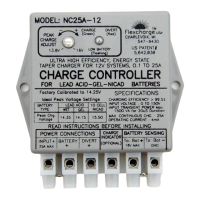
Charge Indicator does not
light.
Using the Charge Indicator is optional
Verify that the Charge Indicator terminal is wired to the NON-BANDED side of a blocking diode on ONLY ONE
OF THE SOLAR PANELS, or on the wind generator. (SEE THE INSTALLATION DRAWINGS). When
charging through a diode type battery isolator the charge indicator terminal may be connected directly to the
Input + terminal on the controller.
Check the connection on the battery sense wires. The charge indicator will not light if the controller’s BAT-
wire is not connected.
Disconnect the wire from the Charge Indicator terminal, and temporarily touch/connect it to +12V. You can
use the Battery's Positive terminal (The Sense wires must be connected). It should light. If it does not see
warranty return instructions.
Charge Indicator is ON all the
time.
Verify that the Charge Indicator terminal is wired to the NON-BANDED side of a blocking diode on ONE OF
THE SOLAR PANELS, or on the wind generator. (SEE THE INSTALLATION INSTRUCTIONS). The diodes
found on the back of many models of Siemens Solar Panels are bypass diodes not blocking diodes. You may
need to add blocking diodes to Siemens panels.
If you are using the NC25 with a Battery Combiner the Charge Indicator wire must be connected to the
charging source side of the blocking diode as shown in the installation drawings, also ; connect the battery
sense wires to the Primary battery bank.
The Divert Indicator does not
Illuminate.
The controller must first reach the peak charge voltage before Divert will engage. This Indicator will
only illuminate while the battery voltage is between the peak charge voltage and reconnect voltage (factory set
at 14.25V / 13.6V, but is user adjustable).
Check ALL the wire connections.
Check the Battery Sense Ground Wire for a good connection. These wires are the only way the controller
can determine battery voltage and control charging. A poor connection here could cause SERIOUS DAMAGE
to your battery bank, and other electronics connected to it.
Return the unit for warranty repair or replacement if it is less than 5 Years old and you have proof of purchase
( See warranty restrictions).
The controller does not switch
to FLOAT/ DIVERT when the
battery voltage is equal to, or
above the Peak Charge Point.
Ensure the Battery Sense Wires re making good connection. These wires are the only way the controller
can determine battery voltage and control charging. A poor connection here could cause SERIOUS DAMAGE
to your battery bank, and other electronics connected to it.
Make Sure ALL wire to wire and crimp connections are soldered.
Check the position of the Peak Charge Adjustment. Unless you have custom set this adjustment, it should be
set to the dot on the case.
The battery is being
overcharged.
Check the position of the Peak Charge Adjustment. It should be set at the small calibration dot on the case,
unless you have custom set your peak charge voltage. DO NOT MOVE THE ADJUSTMENT unless you
have calibrated test equipment and a fully charged battery bank to re-calibrate the controller. MIS-
ADJUSTMENT COULD CAUSE SERIOUS DAMAGE TO YOUR EXPENSIVE BATTERY BANK. If it is not
at the dot and you did not custom set your peak charge voltage, see the installation instructions for
the calibration procedure, or call your dealer.
Check the Battery Sense Wires for very good connections. These wires are the only way the controller can
determine battery voltage and control charging.
Make Sure ALL wire to wire and crimp connections are soldered .
Controller makes a Buzzing
sound.
This will happen when the charging source is charging while the wire from the Controller's Battery + Terminal
and the Sensing+ terminal wire are connected together, but removed from the Battery terminal. If left in this
state for even a few minuets the controller will be damaged.
Disconnect the charging source, or separate the Controller's battery + terminal and the Sense + wires until the
installation is completed. Removing one of the fuses will also stop this from occurring.


 To Next Page
 Loading...