TIMER BUTTON:
Can be set to turn o the unit automatically in 1, 2, 4, or 8 hours.
OSCILLATION BUTTON:
When this button is pressed, the horizontal louvers oscillate side to side. Press
the button again to lock in any position. Press again to resume horizontal oscil-
lation. Do not manually adjust the horizonal louvers - damage to the unit will
result.
COOLER/HUMIDIFIER BUTTON:
If the Cooler/Humidier function is not on, the ECO AIR COOLER acts like any
normal fan, without the evaporative cooling.
To use the Cooler/Humidier function, please ll the Water Tank rst.
When the Cooler/Humidier button is selected, the water pump is engaged.
After a couple of minutes, the evaporative cooling process will begin.
Please ensure that the Eco Air Cooler is not operated with Cooler/Humidi-
er function on when there is less than the minimum amount of water, as
indicated by the water level indicator. If the Cooler/Humidier function is
operated with less than the minimum amount of water required, the water
pump may be damaged.
After the unit has been run for 10 hours continuously with the Cooler/Hu-
midifer function on, the Cooler/Humidier function will automatically shut
o, to protect the water pump.
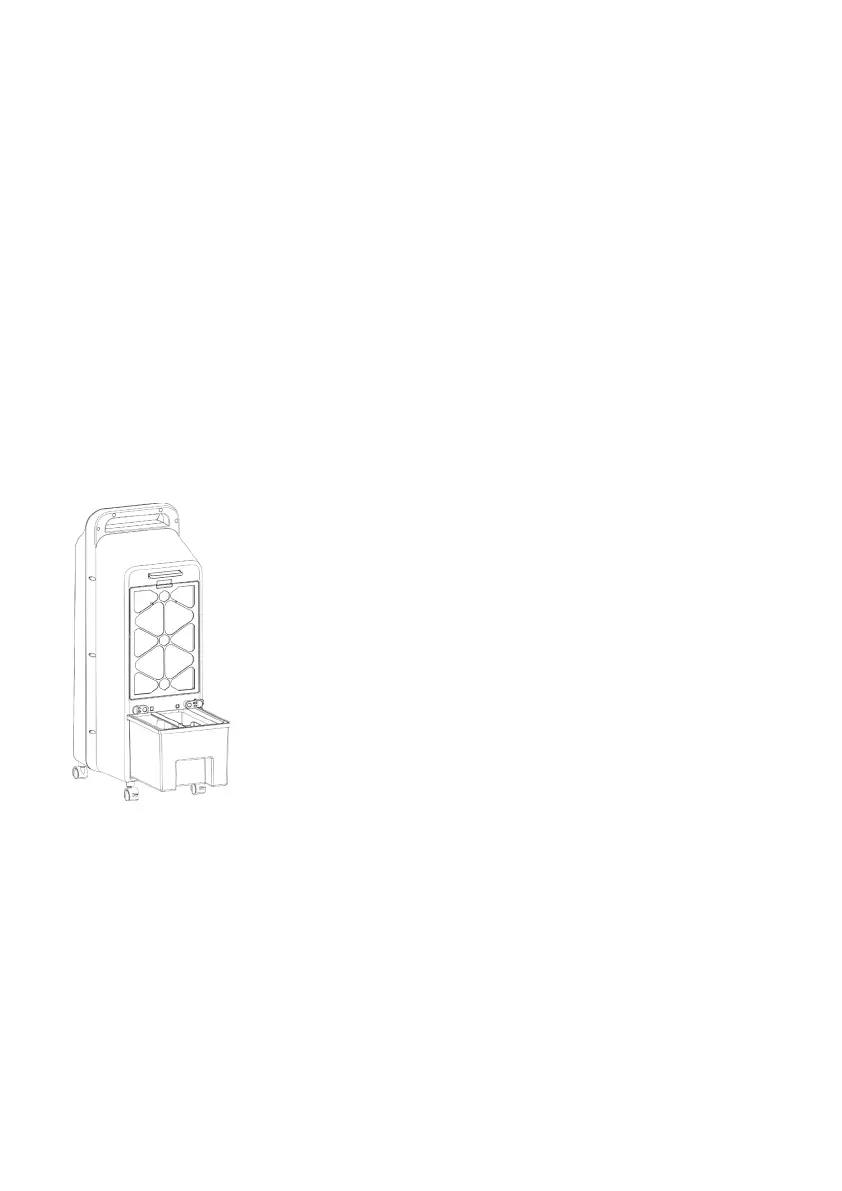
• Turn the knobs above the Water Tank on the
back of the unit to unlock the Water Tank.
• Pull the Water Tank out.
• Add cold and clean water to the Water Tank.
• Be mindful of the water level indicator when
adding water and ice packs.
• DO NOT OVERFILL.
• If water is overlled, remove excess water.
• DO NOT TIP UNIT TO DRAIN.
• After adding water or ice packs, close and lock
the Water Tank.


 To Next Page