4
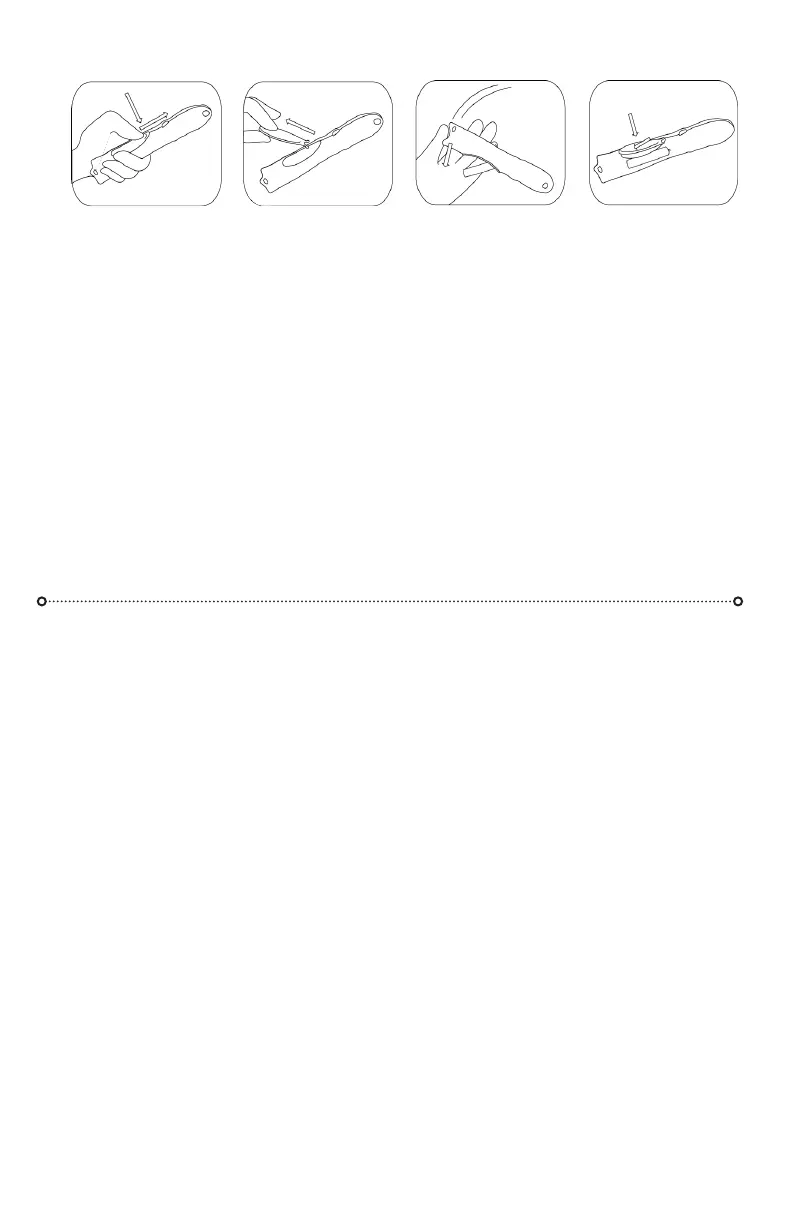
There is a slight lip at the tip of the door—push the lip DOWN towards the belly of the light
and FORWARDS towards the head of the light. There is a tiny “latch” inside near the button that
needs to be released before you can push the door forwards.
Use your thumb or another hard object (the tail end of another owlight works really well) to push
down and forwards on the tip of the door. Don’t push on the main part of the door itself—this will
not release the internal latch. Once you have released the battery door, pull rmly on the door to
separate the door from the light and access the battery compartment.
Inserting and removing the battery
There is a transparent battery pull tab—make sure you insert the battery with the tab across the
bottom of the compartment. Insert the positive end of the battery (pointy end) in the direction of
the head of the owlight (pointy end). Pull the tab to release battery. A rm tap on a table or other
semi-hard object will also pop the battery out of the compartment.
Push the front lip of the door
down and forwards towards the
button rmly. The back of the door
should pop out. It may help to use a
small object like a battery or the end
of another owlight.
Pull the door out to access the
battery compartment. The antenna
are very strong and durable. You can
pull hard to remove the door. This
is normal.
To remove the battery, pull on the
clear battery pull tab, or tap the tail
of the owlight rmly against a rm
surface. Battery may be snug, this
is normal.
Insert battery “+” end rst towards
the pointy head of the light. Ensure
clear tab is placed correctly. Push
battery “-” end down. Insert antennae
of battery door. Push door down and
back to secure it. Power up & enjoy!
Your owlight-FS has many modes and features enabling innite patterns, and eects.
We’ve organized them into 4 pages of modes - easy to navigate with a few types of button presses.
BUTTON PRESSES
Click - 0.3 seconds or less: A quick click, like a computer-mouse click. Multiple clicks, like a double-
click on a computer mouse, will access dierent pages - 2 clicks for page 2, 3 clicks for page 3, and
so on. You may discover this by accident by trying to cycle through the modes too quickly, and nd
a mode you’ve never seen!
Press - 0.3-0.75 seconds: The classic button-press, this is what feels “normal” to most people.
Long-press - 0.75-1.5 seconds: An indicator ash lets you know you can let go. This puts you into
the “adjust” state to adjust the mode you are in.
Hold - 1.5 seconds or more: If the light is on, it will turn o, it will also remember your mode and
any adjustments you might have made to it. When you press the button again, it returns to where
you were. If it is o, it will display its battery’s life estimate, then turn back o.
Save - 3.5 seconds: If you continue holding past “o”, the pattern will be saved to the Favorites
page and the light will turn back on.
ADJUSTING MODES
Every mode has 1 parameter that can be adjusted. In most cases it’s the color/hue, in others it’s the
speed/density of the pattern, or the brightness. To put a mode into its adjust state, do a long-press
(hold for more than 0.75 sec., let go when the indicator ashes). The mode will then cycle slowly
through its adjustment. When you see what you like, a button press will stop the adjust cycle,
selecting that adjustment.
OPENING YOUR BATTERY DOOR
NAVIGATING THE FLOWLIGHT-FS MODES



 To Next Page
 Loading...