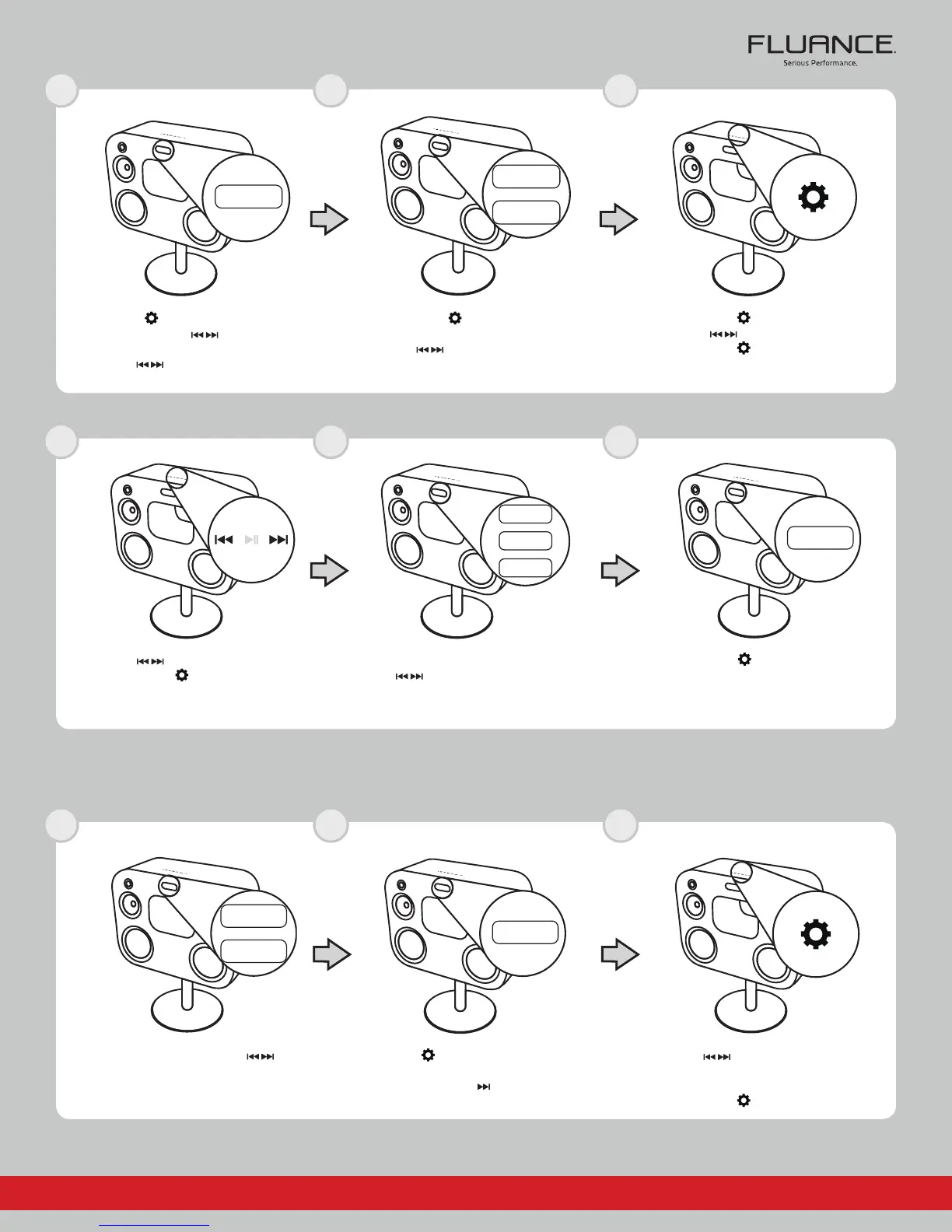
Press the buttons to select the minutes
Press the
button to confirm
Press the
button to confirm
“OK” will now be displayed on the LED screen
You will now see either “AM”, FM” or “BUZZ”
Use the
buttons to select which mode will
sound when the alarm is activated (Buzzer, FM
Radio, AM Radio)
Press the
button until you see “MEM”
displayed on the LED screen
Press the button
On the AM or FM input, press the
buttons
to select the radio station you wish to save to
the selected pre-set channel
Press the
buttons to select the pre-set
Channel that the radio station will be saved to
Wait until the LED begins flashing
Press the
button to confirm
VOL
VOL
BAS
TRE
TRE
TREBLE
BASS
BAS
alm
VOL
VOL
BAS
TRE
TRE
TREBLE
BASS
BAS
am
VOL
VOL
BAS
TRE
TRE
TREBLE
BASS
BAS
VOL
VOL
BAS
TRE
TRE
TREBLE
BASS
BAS
am
VOL
VOL
BAS
TRE
TRE
TREBLE
BASS
BAS
buzz
VOL
VOL
BAS
TRE
TRE
TREBLE
BASS
BAS
mem
VOL
VOL
BAS
TRE
TRE
TREBLE
BASS
BAS
VOL
VOL
BAS
TRE
TRE
TREBLE
BASS
BAS
ok
VOL
VOL
BAS
TRE
TRE
TREBLE
BASS
BAS
If you require further assistance please consult the manual: fluance.com/support
1
4
1
2
5
2
3
6
3
Fi70
Quick Start Guide
SET ALARM
SET RADIO PRESETS
Press the
button to confirm
Press the buttons to select the hour
Press the
button to confirm
Press the
button to confirm
You will now see either AM or PM
Use the buttons to cycle between
both settings
Press the button until you see “ALM”
Press the
button
You will now see either “ON” or “OFF”
Use the buttons to select “ON” to
enable the alarm



 To Next Page
 Loading...