EasyManua.ls Logo

Fluke 6062A - Parameter Programming and Editing

Fluke 6062A
86 pages
Print Icon
To Next Page IconTo Next Page
To Previous Page IconTo Previous Page
Loading...
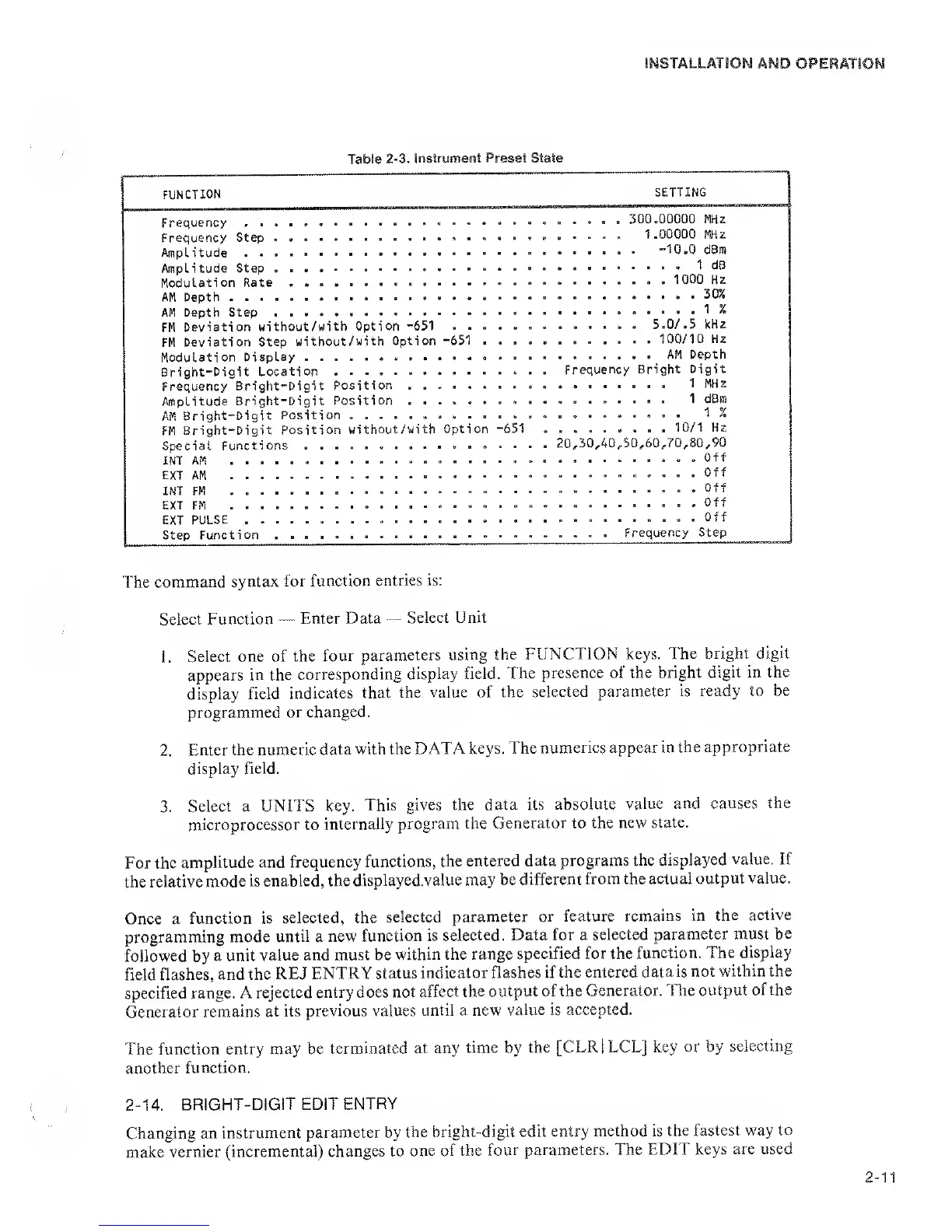
Table
2-3. Instrument Preset
State
FUNCTION
SETTING
Frequency
Frequency Step
Amplitude
Amplitude Step
Modulation Rate
AM Depth
AM Depth Step .....
FM
Deviation
without/with
Option
-651
. . .
FM
Deviation
Step
without/with Option
-651
.
Modulation
Display
Bright-Digit
Location
Frequency
Bright-Digit
Position
Amplitude
Bright-Digit
Position
AM
Bright-Digit
Position
FM
Bright-Digit
Position
without/with Option
Special
Functions
INT AM
EXT
AM
INT FM
EXT FM
EXT PULSE
Step Function
300.00000
MHz
1 ,00000
MHz
. .
-10,0
dBm
1 dB
,
.
. 1000
Hz
30%
....
1
%
II*.!!’.".!!!
*5!o/.
5 kHz
100/10
Hz
AM Depth
. . . .
Frequency
Bright Digit
1 MH
z
,
1 dBm
1
%
-651 10/1 Hz
. . . . 20,30,40^50,60,70,80,90
Off
. .
Off
.
... Off
........
Off
Off
... Frequency
Step
The
command syntax
for function
entries is:
Select Function
—
Enter
Data
—
Select Unit
1.
Select one
of the
four
parameters using
the
FUNCTION keys.
The bright digit
appears in the
corresponding
display field. The
presence of
the bright
digit in the
display
field
indicates
that the value
of the
selected
parameter is ready
to be
programmed or
changed.
2.
Enter
the numeric
data with the
DATA keys.
The
numerics appear in
the
appropriate
display
field.
3.
Select a
UNITS key.
This
gives the data
its absolute
value and
causes the
microprocessor to
internally
program the
Generator
to the new state.
For the
amplitude
and frequency
functions,
the entered
data programs
the displayed
value. If
the relative
mode is
enabled, the
displayedvalue may
be
different from the
actual output
value.
Once a
function is
selected, the
selected
parameter
or feature
remains in
the active
programming
mode
until
a
new
function is
selected. Data for a
selected
parameter must
be
followed
by
a unit
value and
must be
within the range
specified for the
function.
The display
field
flashes, and the
REJ ENTRY
status
indicator flashes if
the entered
data is not
within the
specified range.
A rejected
entry does
not affect the
output of the
Generator. The
output of the
Generator remains
at its
previous values
until a new
value is accepted.
The function
entry may be
terminated
at any time by
the [CLRl
LCL] key or by
selecting
another function.
2-14.
BRIGHT-DIGIT
EDIT
ENTRY
Changing an
instrument
parameter by
the
bright-digit edit entry
method is the
fastest way to
make vernier
(incremental)
changes to
one of the
four parameters. The
EDIT keys
are used

Related product manuals