06 Programming
07 Protections
1
Programming with Program Card.
2
08 Trouble shooting
.
Troubles
3
4
09 Optional Kits
●45A M odel wi th Fan as fa ctory defa ult.
● A,25A,35A wit hout Fan a s factor y de fault. a ccordi ng your re quirem ent inst all or not i nstall .18
*p lease p ay atte ntion t o the "+" and"-"
du ring ins tall th e Fan.
25 1400 -102 5-EN V 1.1
... ...Th e follow ing proc edure is a s above. .....
……
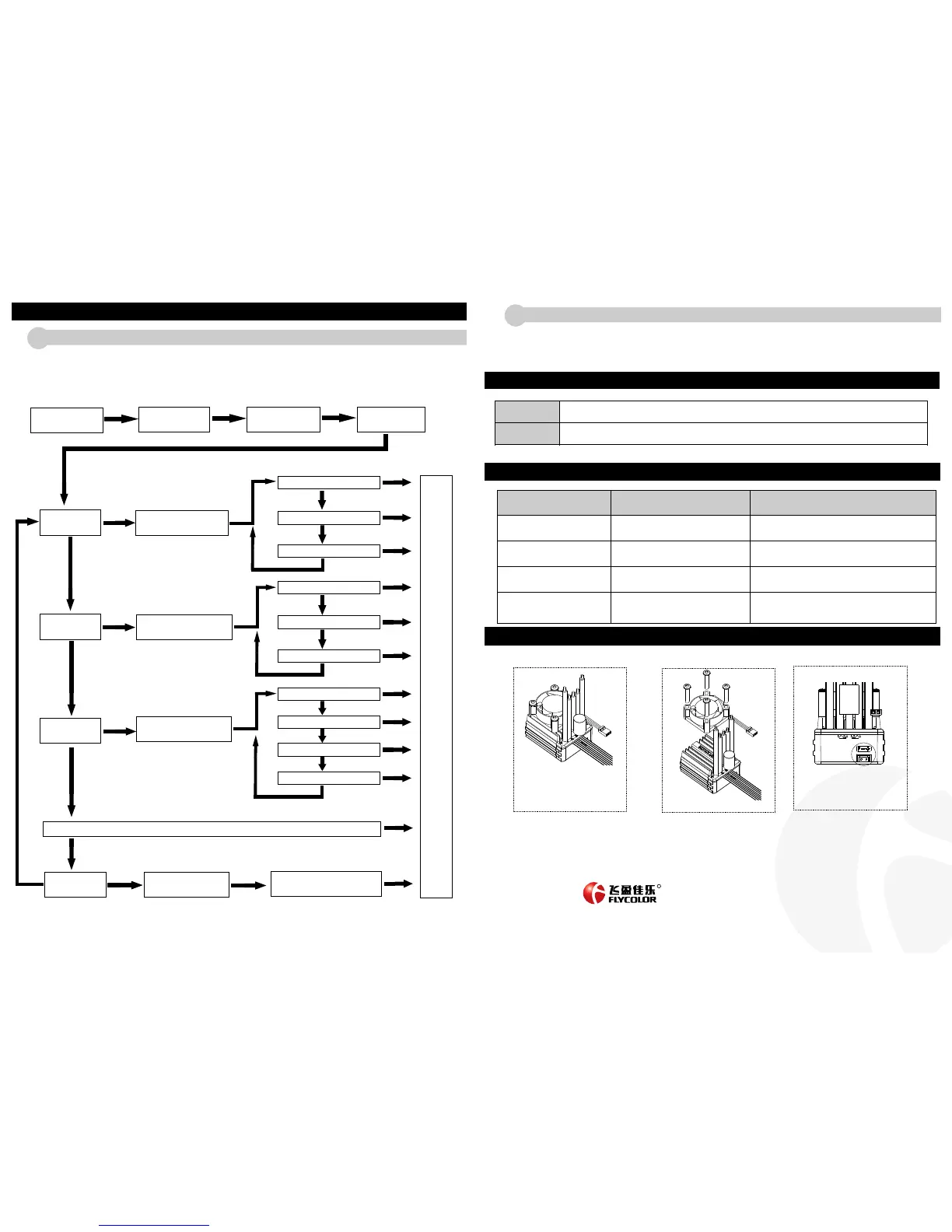
Programming with set button in the switch.
Note: Motor will emit “BEEP” when indicator light flashes.●
● When N>=5, indicator light will flash for a long time ( with long tone ) to represent 5 .For example, ESC red indicator flashes for a long time
once ( motor emits long tone “BEEP---” at the same time) , shows that enter the 5th set option. If ESC green indicator flashes for a long time
once then f or a short time once ( motor emits long “ BEEP---” once and short “BEEP” once at the same time), shows that it enters the 6th set
option. And the like, the 7th set option “BEEP---BEEP,BEEP,BEEP”, the 8th set option “ BEEP---BEEP,BEEP,BEEP”.
It's the easiest way to set with programming card. Operation is as following: insert signal wire to the interface in programming card , select
the options that you want ( see in the above char t), press【OK】,after VALUE screen displaying “S”, this option sets successfully .
If want to reset the option to factor y setting, please press 【RESET】, then press【OK】.
(Please see the instruction of program card for more detail)
When temperature is higher than 90°, ESC will cut off with flashing green light. When temperature is lower than 80°, motor
will restart again.
Note : To make ESC not be burnt during working , please don't cancel over heat protection.
Lipo low-voltage
protection
If running speed gets slowly (reduce power to cut off in 5 seconds), please reduce speed and stop. ESC red light will flash at
this time, it means low-voltage protection starts.
For NiMH battery, set no low-voltage protection.
Over heat protection
Possible causes
Solutions
After connecting battery, indicator led
doesn't flash, motor doesn't start ,fan
doesn't star t.
1.ESC not powered.
2.Power supply switch damaged, or switch
bad connection.
Car goes backwards when forward is
pressed.
1.The motor wires may not be connected in
the correct sequence.
Make sure the motor wires are connected in the correct
sequence
Stop suddenly during motor rotation.
1.Receiver meets interference.
2.ESC was protected by battery low-voltage or
over heat.
See the explanation of low-voltage protection and over heat
protection.
When motor starts, fast acceleration,
motor gets stuck or pauses.
1.The batter y discharge capacity isn’t enough.
2.Motor is too fast or wrong gear ratio is used.
3.ESC startup acceleration is too fast.
1.Change good discharge capacity batter y.
2.Use a slower motor or change the gear ratio .
3.Set ESC star tup acceleration ( star tup mode) slower.
ADD : 5th Flo or,C2 Buil ding, Ji aan Ind ustria l Park,
Zo n e 72,Ba oan Dist rict, Sh enZhen , China
TEL:0 755-8 632185 3 FAX:0 755-8 632185 2
Web: w ww.fly color.net
Ema il: sal es@fly color.net
RR
Turn of f ESC power s witch
and turn on transmitter
power s witch.
Press”Set” button and
turn on power supply
switch
Green LED flashes “N”
times, it shows battery
cells number.
Red LED flashed and
con tinuous ly pre ss
“Set”button.
Green LED
flashed once
Release
button
Press button for 3 seconds
Green LED
flashed twice
Release
button
Press button for 3 seconds
Release
button
Press button for 3 seconds
Green LED
flashed 3 times
Press button for 3 seconds
Press button
for 3 seconds
Green LED
flashed “N” times
Release
button
Enter the 1st set option -
“Running Mode”.
Red LED flashes once, select
“Forward with brake”
Press “Set” button once,
select next option.
Press “Set” button once,
select next option.
Press “Set” button once,
select next option.
Red LED flashes twice,select
“Forward&Reverse with brake”
Red LED flashes 3 times,select
“Forward&Reverse”
Enter the 2nd set option -
“Fixed Area Accelerator”.
Ent er the 3r d set opti on -
“In itial b rake for ce”
Enter the No.”N” set option
Press “Set” button once,
select next option.
Press “Set” button once,
select next option.
Press “Set” button once,
select next option.
Red LED flashes once, select
“6% Fixed Area”
Red LED flashes twice, select
“9% Fixed Area”
Red LED flashes 3 times, select
“12% Fixed Area”
Red LED flashes once, select
“0% ”
Red LED flashes twice, select
“5% ”
Red LED flashes 3 times, select
“10% ”
Red LED flashes 8 times, select
“60% ”
Press “Set” button once,
select next option.
Press “Set” button once,
select next option.
Press “Set” button once,
select next option.
Press “Set” button once,
select next option.
Press SET button to select the value,
Red LED flashes times shows the item
of value.
Tur n
off
ESC
powe r
swit c h
to
confi r m
and
finsh
the
sett i n g,
turn
on
agai n ,
The
ESC
can
work .
Check the soldering of all joints, especially between the battery
and motor wires.
If the switch or switch wire is damaged, return to factory for
service.


 To Previous Page
 Loading...