ATTENTION
Dimensions
You need to use DFU mode to recover firmware for Flight control, and need a software tool called Zadig to replace the driver for you F.C
when you load firmware at the first time.
Zadig 2.3.701
List All Devices
Ignore Hubs or Composite Parents
Crea te a Catalog File
Sign C atalo g&Insta ll Auto generated c ertifica te
Adva nced Mode
Log Verbosit y
CONFIGURATOR 10.7.0
6. Start the Betaflight on the PC; Press and hold the “BOO T” on the FC, connect the FC to the P C, then the F C is connected
in the “D FU” mode, then you can load the firmware;
1.Start the Zadig software tool;
2.Press and hold the “BOO T” on the FC, connect the FC to the P C.
3.Click “Options”,and select “List All Devices”.
4.Then select “S TM32 B OOT LO AD ER”,Then click “Replace Driver”
5. Close the Zadig software tool when replace successfully,
Then disconnect the F C from the PC.
(Notice:If you've run the above steps before, then you don't need to repeat, starting directly from the 6th step)
●Please don't load any other firmware or config. for FC .
●The Bluetooth port is fixed as MSP of UART4;
●SBUS and Spektrum receivers are applicable to all UART ports
(except UART4, which is fixed to Bluetooth). It is required to manually
turn on the “Serial RX” of the required UART port;
●UART6 is recommended for telemetry port, which can be directly
connected with ESC / flight control connecting wire;
●Flight control should be far away from all magnetic materials
●If there is any deviation between the detected voltage/current with actual
situation, you can adjust the scale value in the Betaflight-Power&Battery
●5V ,10Vsupply is for low-current use only(5V 3A MAX, 10V 1.5mA MAX).
05 Load firmware for FC
06 Attentions
Thank you for using our product . Any Improper operation may cause personal injury damage to the product and related equipments. This high
power system for RC model can be dangerous ,we strongly recommend reading the user manual carefully and completely. We will not assume any
responsibility for any losses caused by unauthorized modifications to our product. We have the right to change the design, appearance,
performance and usage requirements of the product without notice.
ES C
● MC U:S TM32F051 .,AR M 32-bit Cortex MC U, frequency up to 48 M HZ
● MO SF ET with high performance and low Rds , not afraid of large current, more suitable for rapid flight.
ESC firmware: .● Flycolor_X_Cross_BL_32
● Two layers tower structure between 4in1 E SC and FC,using cable for quick connection, using silicone vibration
absorber for supporting, reducing the effect of vibration on Flight Control.
● Damped light does regenerative braking, causing very fast motor retardation, and inherently also does active
freewheeling.
● The code supports regular 1-2ms pulse width input, as well as Oneshot125 , Oneshot42 and Multishot .
● All Dshot and Proshot signals are supported.
Flight Control
Config.● FC firmware:ST M32F7X2( :FLYC OL OR F7)
● FC board:F LY CO LO RF7.
● MCU:ST M32F722.
● Gyro MP U-6000 SPI.:
● Bluetooth:F C_Bluetooth.
● USB: Type C.
● Supports S BUS,SP EK TR UM1024/2048 etc. remote control / receiving mode.
● FC integrated 3.3V,5V, 12V for receiver, VT X, camera, buzzer, LED and other peripheral devices.
● 4-way led port, independent 5V B EC power supply, making the power supply more safe and reliable.
● Supports Betaflight Configurator to adjust the L ED color.
● Install holes:30.5x30.5mm,M3.
01 Main features
02 Specifications
Con. Current
(Good heat dissipation)
Burst Current
(10S)
F.C Vout
Size
(For reference)
Weight
(Without accessories)
LiPo cells
Typical Applications
(For reference)
Model
03 Part list / Install Dimensions and Diagram
*All pictures are for reference only
ESC
F.C
●ESCs use BLHeli-32 firmware, please don't load any other firmware except
“Flycolor_X_Cross_BL_32”.
●User needs to calibrate the throttle range when starting to use a new ESC or
another transmitter. When the input signal is Dshot, throttle calibration is disabled.
●Observe polarity at all times. Check and double check before applying power.
●Power off before unplugging ,plugging in or making any connections.
●Please do not exceed the current & voltage range of ESC.
●Please ensure that all wires and connecting parts are well insulated to avoid
product damage due to short circuit.
●Never use this product in harsh environments such as humidity, high temperature,
and so on to avoid product damage.
●Please contact Flycolor sales or technical support for more information.
04 Connect diagram of ESC and FC
User Manual
Multi-Rotor Flight Control System
F11
Zadig 2.3.701
STM32 BOOTLOADER
ST Tub30(v3.0.4.0)
0483
D
X
8 devices found
Replace Driver
Options
ATTENTION
2
X-Tower 2-60A 60A
70A
3-6S
210-550 Multi
3.3V/5V/10V
41.7x44.8x16.7mm
26g
X-Tower 2-45A 45A
55A
3-6S
170-450 Multi
3.3V/5V/10V
41.7x44.8x16.7mm
26g
X-Tower 2-30A 30A
40A
3-6S
170-210 Multi
3.3V/5V/10V
41.7x44.8x16.7mm
26g
*To enhance performance of filtering, users can solder the electrolytic
capacitor which are included in the accessory pack to the positive and
negative terminals.
30.5 mm
30.5 mm
36 mm
44.8 mm
16.7 mm
41.7 mm
39.5 mm
ATTENTION
●Please use the parts supplied with the product
for installation. Please ensure enough safety
space between the ESC& Drone frames, as
short circuit will damage the product.
●Please use the wire supplied with the product for
connecting. If there is any change, before connecting,
make sure your connecting wire is in correct order to
avoid product damage
M3
M4
M1 M2
Battery V -
Battery V+
3# Motor
4# Motor
1# Motor 2# Motor
GND
GND
VBAT
NC
S4
S3
S2
S1
CRT
TX
GND
NC
GND
To Flight control
1# signal
2# signal
3# signal
4# signal
Current meter
Vbat Output
Telemetry
●All soldering tasks require good
soldering technique,short circuit
between components or wires
should be avoided at any time.
●Please ensure that all wires and
connecting parts are well
insulated to avoid product
damage due to short circuit.
●Please double-check the polarity
is correct before power up.
*5V:5V output here after inserting USB,
(it is convenient to debug the receiver without power on); the other 5V / 10V ports need battery power before voltage output.
GND
GND
TX5
RX5
5V
10V
CAM
VTX
Rx1
GN D
RX2
TX2
GN D
10V
LED
5V
GND
LED
5V
GND
LED
5V
GND
LED
5V
GND
TX1
RX1
5V
GN D
RS SI
To E SC
GND
GND
Vbat in
NC
S4
S3
S2
S1
CRT
RX6
GND
NC
GND
1# signal
2# signal
3# signal
4# signal
Current meter
Vbat Input
RX6
5V
3.3V
GN D
RX3
TX3
TX6
RX6
5V
GND
GN D
Vbat in
S4
S3
S2
S1
CRT
FCCM To camera OSD port
Boot
Type C
B+ B-
GND
GND
TX5
RX5
5V
10V
CAM
VTX
TX1
RX1
*5V
GN D
RS SI
Spare pad
To E SC
USB
7.You can load the firmware online or local:
1) Local(recommended, it needs to download in advance or ask for Flycolor):First load the ST M32f7x2.hex file, then connect and input the contents of
FLYCO LO RF7.config file in the CLI ,and enter “save”.
2) Online:Select FC board ,and select the correct firmware version for the board, then load the firmware online.FLY CO LOR F7
251400-1124 V1.1
www.flycolor.net
1
8
3
2
5 6 7
4
9
32Bit 4in1 ESC
F7 Flight Control
ES C /F C connecting wire
(2x10p SH1.0)
Silicone vibration absorber
Electrolytic capacitor *
Item
Description
Qty.
1
1
8
4
1
3
4
5
2
1
O-Ring
1
6
Power wire(XT60)
1
7
48
Nylon nut
49
Screw
Nylon nut
Flight Control
Silicone vibration absorber
O-Ring
4in1 ESC
Silicone vibration absorber
Frame
Screw
T0wer
X
2

 Need help?
 General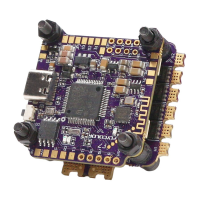

 To Next Page
