Need help?
Do you have a question about the Flywoo CineRace20 ANALOG PRO and is the answer not in the manual?
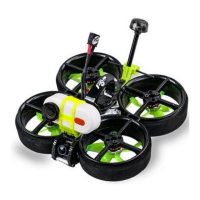
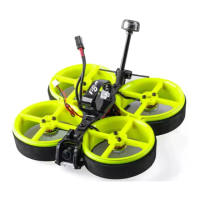
Introduces the CineRace20 as a hybrid CineWhoop and RaceWhoop, highlighting its dual duct design and flight characteristics.
Highlights injection-molded ABS/PC material for sturdiness and ease of disassembly/installation with aluminum columns.
Covers pilot customization of colors, efficient power configuration, and structural design for stable, quiet, long flight times.
Notes no propellers in view for jello-free footage and mentions power cable output for SMO cameras.
Details the addition of the Flywoo Bt-nano Bluetooth Module for parameter setting via mobile devices.
Lists key specifications including item, weight, FC/ESC, frame, motors, props, VTX, and antenna.
Suggests Explorer 4S HV 300mah for flexibility and 900mah for longer flight time and stability.
Details the items included in the package: quadcopter, props, battery straps, and hardware set.
Provides a visual guide for connecting the flight control components.
Details MCU, IMU, barometer, LEDs, UARTs, receiver support, blackbox logging, and firmware for the GOKU GN405S AIO.
Outlines the built-in 20A/40A BLHeli_S ESC features including input voltage, continuous current, and firmware.
Covers Proportional, Integral, and D Max/Min settings, Master Multiplier, PD Balance, and Stick Response Gain.
Details Gyro Filter and D Term Multiplier settings for adjusting filtering levels.
Details serial port assignments for receivers, Bluetooth, VTX, and other peripherals, along with baud rates.
Explains the functions of the onboard button for channel selection, light modes, and power levels.
Instructions for binding the TBS NANO 915 receiver when connected via USB.
Step-by-step guide for binding the ELRS 2.4G receiver to the transmitter using the ExpressLRS Configurator.
Explains the LED indicators for successful binding, bind mode, signal connection, and Wi-Fi hotspot mode.
Instructions for using ACCESS protocol and links for remote control setup.
Details on binding if the remote control uses ACCST protocol, including firmware files.
Instructions for updating the firmware of the R9M TX module.
Steps to write firmware to the R9MM receiver via its S.PORT.
Describes the binding process for R9M TX and R9MM RX using ACCST firmware, including LED indicators.
Details the process of binding the XM+ receiver using the remote control and receiver button.
Guides setting the corresponding serial port and receiver protocol for normal channel output.
Explains how to set the ARM switch and flight mode switches using AUX channels in Betaflight.
Outlines the process for testing motor rotation direction and functionality without propellers.
Mentions the availability and use of the Bluetooth function, likely related to configuration.
Instructions on how to activate DFU mode for firmware flashing.
Guides entering DFU mode via Betaflight Configurator and addresses potential driver issues.
Provides a link and instruction to install the ImpulseRC Driver Fixer if DFU mode is not recognized.
Explains loading the local HEX firmware and waiting for the flashing process to complete.
Instructions for entering CLI commands and applying factory settings.
Details on saving CLI commands and restarting the FC for changes to take effect.
Confirms that FC functions return to normal after applying CLI commands and saving.
Compares specs for Analog, Analog Pro, and Polar Nano models: color, FC/ESC, camera, VTX, antenna, motor, prop, battery, flight time, weight.
The Flywoo CineRace20 Analog Pro is a versatile drone that combines the agility of a racing drone with the stability of a cinewhoop, offering an all-round flying experience for both racing and stable video shooting. Its innovative double-duct design, inspired by the RaceWhoop, allows for flexible flight performance while ensuring stable footage without jelly effects. The drone is designed for extended flight times, achieving up to 12 minutes with Flywoo's 4S HV 900mAh battery.
The CineRace20 Analog Pro is engineered to provide a seamless and enjoyable flying experience. Its primary function is to serve as a hybrid drone, excelling in both high-speed maneuvers typical of racing drones and the smooth, stable video capture characteristic of cinewhoops. This dual capability makes it suitable for a wide range of applications, from competitive FPV racing to cinematic videography. The drone's design prioritizes flight stability and low noise, ensuring that video footage is clean and free from unwanted vibrations.
One of the key features is its ability to output power directly to a SMO camera, simplifying the setup for videography. For users with GoPro 6/7/8 cameras, an adapter cable is required. The integration of a Flywoo Bt-nano Bluetooth Module enhances usability, allowing pilots to adjust flight controller parameters conveniently using mobile devices. This feature streamlines the configuration process, making it easier to fine-tune the drone's performance on the go.
The drone's frame is largely constructed from injection-molded ABS/PC material, contributing to its sturdiness and durability. This robust construction ensures that the CineRace20 Analog Pro can withstand the rigors of both racing and casual flying. The frame's design also facilitates easy disassembly and installation, with parts secured by just two aluminum columns, which simplifies maintenance and repairs.
The CineRace20 Analog Pro offers a highly customizable experience, particularly with its personalization frame kit. Pilots can freely combine different colored frame parts to create a drone that reflects their individual style. While pre-built drones come with determined color schemes, the option to replace ducts allows for extensive personalization. This feature not only adds an aesthetic dimension but also allows for easy replacement of damaged parts.
The drone's efficient power configuration and reasonable structural design are optimized for stable flight and extended endurance. The absence of propellers in view ensures clear, unobstructed footage, eliminating the "jello" effect often seen in drone videos. This makes the CineRace20 Analog Pro an excellent choice for capturing high-quality aerial videos.
Setting up the drone involves configuring various parameters through the Betaflight Configurator. This includes PID and filter settings, which are crucial for optimizing flight performance. The manual provides detailed guidance on adjusting proportional, integral, and D-term values, as well as gyro and D-term filter multipliers. These settings allow pilots to fine-tune the drone's responsiveness and stability according to their flying style and environmental conditions.
The default serial port settings are also outlined, indicating the allocation of UARTs for different components such as receivers, Bluetooth modules, VTX, and GPS. This ensures proper communication between the flight controller and peripheral devices. The frequency table for the VTX is provided, along with instructions on how to change channels and power levels using button functions, giving pilots control over their video transmission.
Receiver binding is a critical step in preparing the drone for flight. The manual provides specific instructions for binding TBS NANO 915, ELRS 2.4G RX, and R9MM FCC ACCESS OTA receivers. These procedures involve specific button presses and power cycles to enter binding mode, ensuring a secure connection between the drone and the remote control. For ELRS 2.4G RX, the process involves powering the RX three times to enter double-flash binding mode, then using the ELRS menu on the radio transmitter to bind. For R9MM FCC ACCESS OTA, the process involves flashing specific firmware files to both the R9M TX module and the R9MM receiver, followed by a binding procedure that involves holding down the RX button during power-on.
Mode setting is another essential aspect of drone usage. Pilots can assign ARM and flight mode switches to their remote control, with AUX channels corresponding to these switches. The Betaflight Configurator allows for visual confirmation of these assignments, ensuring that the drone responds correctly to pilot inputs.
Before the maiden flight, motor testing is recommended. This involves removing the propellers and individually testing the rotation direction of each motor. The Betaflight Configurator provides a motor tab where pilots can safely activate and test each motor, ensuring they spin in the correct direction and at appropriate speeds. This step is crucial for preventing accidents and ensuring proper flight dynamics.
The Bluetooth function, enabled by the Flywoo Bt-nano module, allows for convenient wireless configuration of the flight controller via a mobile app like Speedy Bee. This eliminates the need for a physical USB connection, making it easier to adjust settings in the field. The app provides a user-friendly interface for managing various drone parameters, including OSD display, mix type, and system settings.
The CineRace20 Analog Pro is designed with ease of maintenance in mind. Its injection-molded ABS/PC parts are not only durable but also easy to disassemble and install, requiring only two aluminum columns for fixation. This modular design simplifies the replacement of damaged components, reducing downtime and repair costs. The availability of a personalization frame kit means that individual parts, such as ducts, can be easily sourced and replaced.
Firmware upgrades and CLI commands are integral to maintaining and optimizing the drone's performance. The manual provides a step-by-step guide for activating DFU mode, which is necessary for flashing new firmware. It also addresses common issues such as driver installation, recommending the ImpulseRC Driver Fixer for Windows users. Once in DFU mode, pilots can load local HEX firmware files to update the flight controller.
After flashing the firmware, CLI commands are used to write default settings. The manual directs users to the Flywoo website for factory CLI links, ensuring that the drone is configured correctly after a firmware update. It emphasizes the importance of saving these commands and restarting the flight controller to apply the changes. This process ensures that all functions of the flight controller return to normal, providing a stable and reliable flying platform. Regular firmware updates and CLI command application help keep the drone's software current, addressing bugs and introducing new features for improved performance and reliability.
 General
| Frame Size | 2 inch |
|---|---|
| Camera | RunCam Nano 2 |
| Propellers | Gemfan D51 |
| ESC | GOKU BS13A 4in1 ESC |
| VTX | Flywoo Goku VTX625 |
| Receiver Option | TBS Crossfire |
| Flight Time | 5-7 minutes |
| Frame | CineRace20 Frame |

 To Next Page