Deployment Reference SheetAppliance Deployment Overview
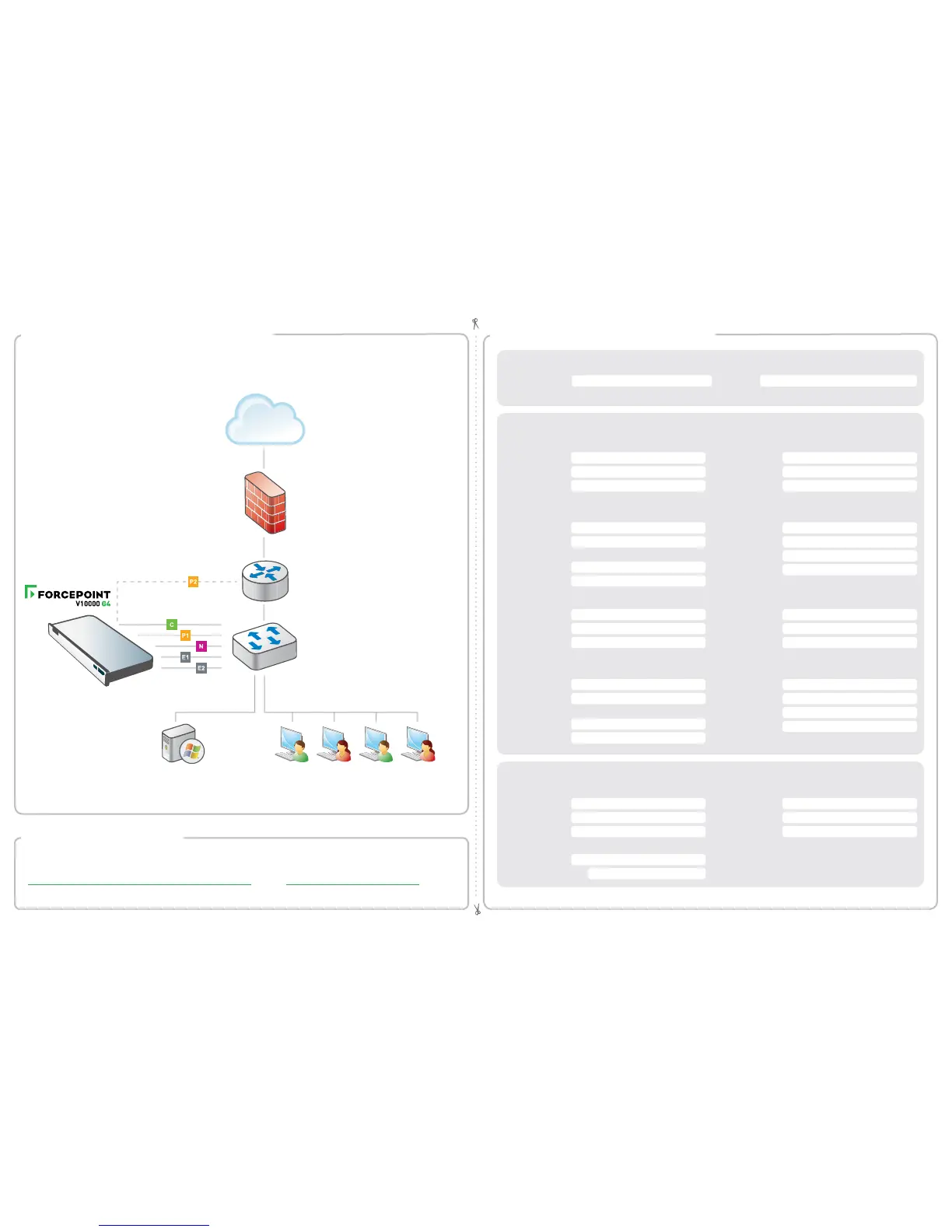
You can deploy one or more appliances on your network. The diagram below illustrates a basic appliance deployment.
A separate computer with Windows Server is required for running Forcepoint Security Manager. See the Forcepoint
Appliances Getting Started guide for details.
* P2 is optional and may be connected to a router or switch.
** Connect to bidirectional span, monitor, or mirror port if sending blocking information through N.
Internet
Firewall
Clients
Windows Server 2008 R2
Windows Server 2012 or 2012 R2
Windows Server 2016
Router
*
**
Switch
Forcepoint Security Manager
Email
Web SQL Server
Policy Server IP: IP Address:
Log Server IP: User Name:
Subscription Key: Password:
Log Server IP:
Authentication Mode:
Network Configuration
Network Agent Interface (N)
Content Gateway Interfaces (P1 & P2)
Forcepoint Email Security Interfaces (E1 & E2)
P1
E1
P2
E2
Appliance Management Communication Interface (C)
IP Address: Primary DNS:
Subnet Mask: Secondary DNS:
Default Gateway: Tertiary DNS:
IP Address: Primary DNS:
Subnet Mask: Secondary DNS:
Default Gateway: Tertiary DNS:
IP Address: Default Gateway:
IP Address:
Default Gateway:
Subnet Mask:
Primary DNS:
Subnet Mask:
Primary DNS:
IP Address:
IP Address:
Secondary DNS:
Secondary DNS:
Subnet Mask:
Subnet Mask:
Tertiary DNS:
Above settings apply to P1 and P2
Tertiary DNS:
Above settings apply to E1 and E2
Getting Started Guide
support.forcepoint.com/documentation
Online Support and Contact Information
support.forcepoint.com
Support & Resources
Appliance Information
C Interface IP: Hostname:
admin is the default user name for the Appliance CLI, Forcepoint Security Manager, and Content Gateway Manager.
See the Forcepoint Appliances Getting Started guide for details.


 To Previous Page
 Loading...