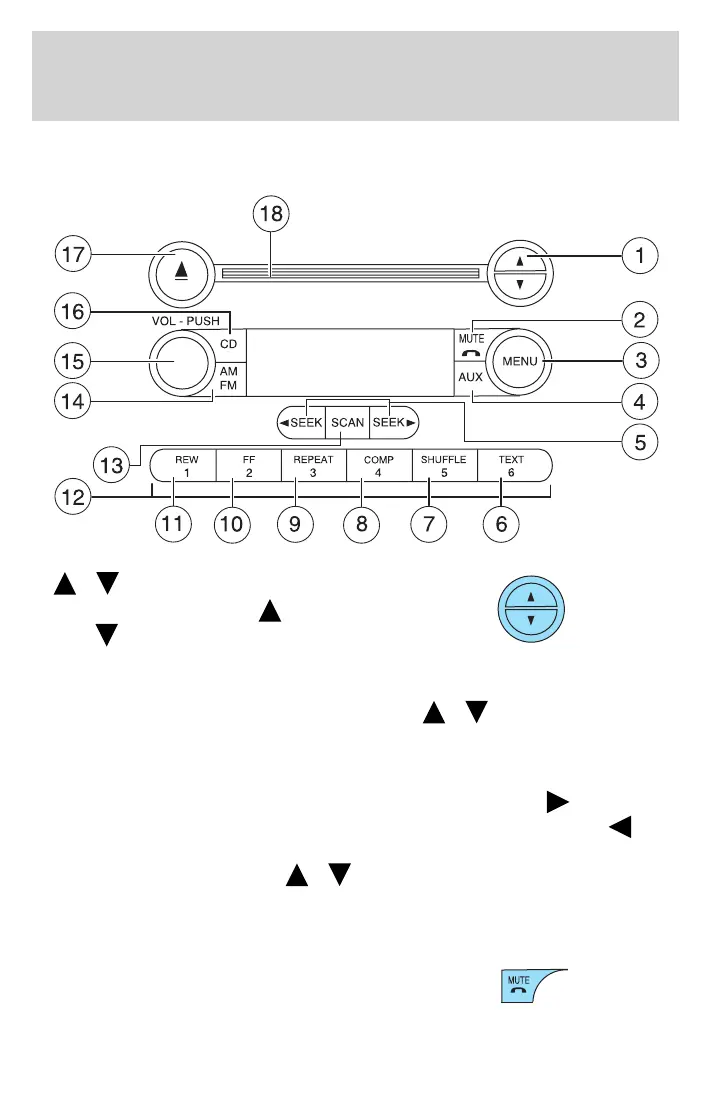
AM/FM Stereo Single CD/Satellite Compatible Sound System
(if equipped)
1.
/ Tune: In radio mode,
press to manually go up ( )or
down (
) the radio frequency.
In menu mode, use to select various
settings.
In Satellite Radio mode (if equipped), press
/ to enter TEXT
MODE and scroll through the current song title, artist, channel category
and Sirius Long Channel Name.
In TEXT MODE, sometimes the display text requires additional text to
be displayed. When the ⬙>⬙ indicator is active press SEEK
to view
the additional display text. When the ⬙<⬙ indicator is active press
SEEK to view to the previous display text.
In CATEGORY MODE, press
/ to scroll through the list of
available Sirius channel Categories (Pop, Rock, News, etc.). Refer to
Catetory Mode under Menu for further information.
Satellite radio is available only in the continental United States.
2. Phone/mute: Press to mute the
playing media. Press again to return
to the playing media.
2006 F-150 (f12)
Owners Guide (post-2002-fmt)
USA (fus)
Entertainment Systems
24



 To Next Page
 Loading...