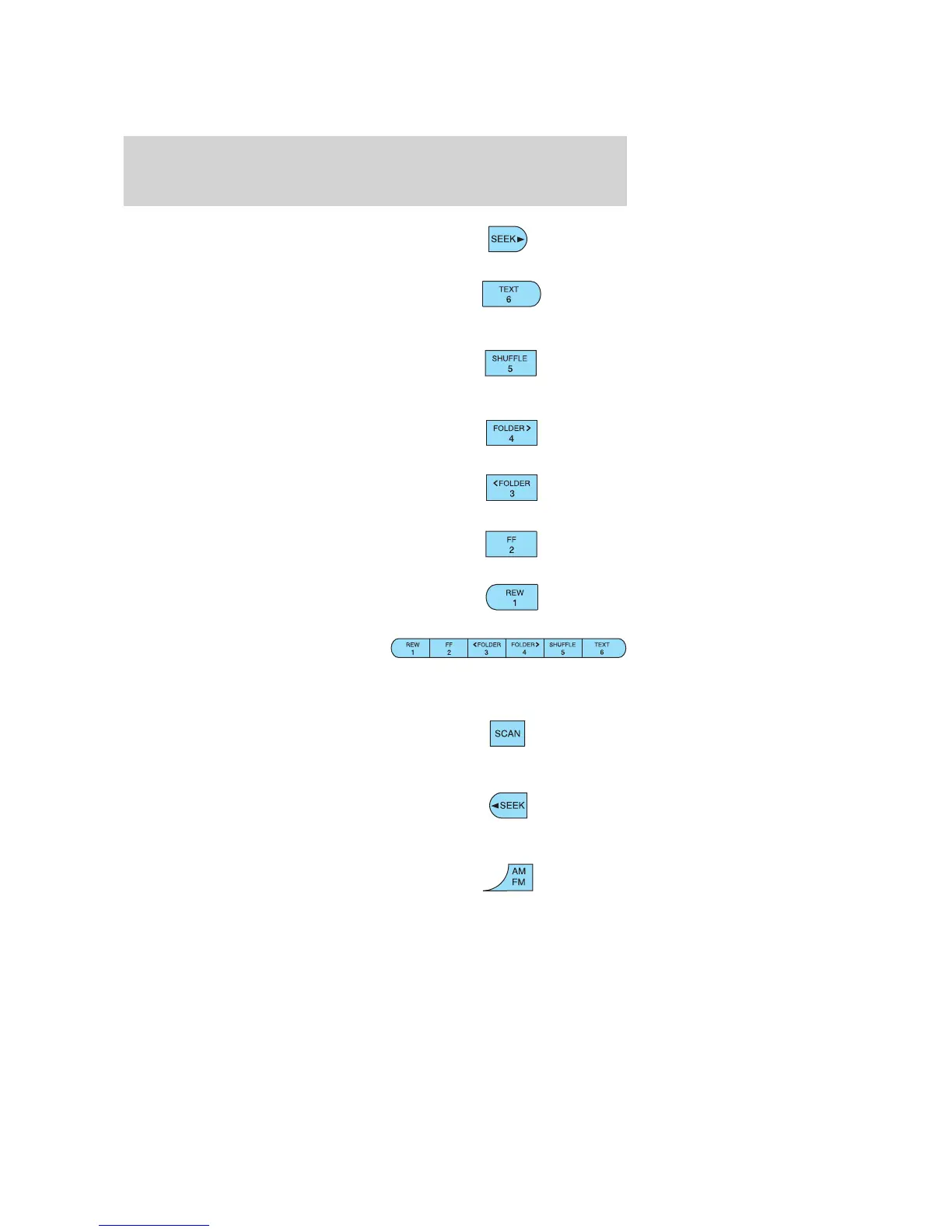
5. Seek up: Press for next strong
station or CD track. Press and hold
for continuous seek functionality.
6. Text: Press in CD mode to
display track title, artist and album
title. This feature will only function
if the CDs are manufactured with the CD text feature.
7. Shuffle: Press to play tracks in
random order on the selected CD.
The first press shows shuffle state.
Repeated presses toggle shuffle on/off.
8. FOLDER: Press to access the
next folder on MP3 discs, if other
folders are available.
9. FOLDER: Press to access the
previous MP3 folder on MP3 discs, if
other folders are available.
10. Fast forward: Press and hold
to manually advance CD.
11. Rewind: Press and hold to
manually reverse CD.
12. Memory presets: To set a
station: Select frequency band
AM/FM1/FM2; tune to a desired
station, press and hold the preset button until the display shows the
preset is set.
13. Scan: Press for a brief sampling
of the next strong radio stations or
CD tracks. Press again to stop scan
function.
14. Seek down: Press for previous
strong station or CD track. Press
and hold for continuous seek
functionality.
15. AM/FM: Press to toggle
between AM/FM1/FM2 frequency
bands.
2007 Focus (foc)
Owners Guide (post-2002-fmt)
USA (fus)
Entertainment Systems
22












 To Next Page