9
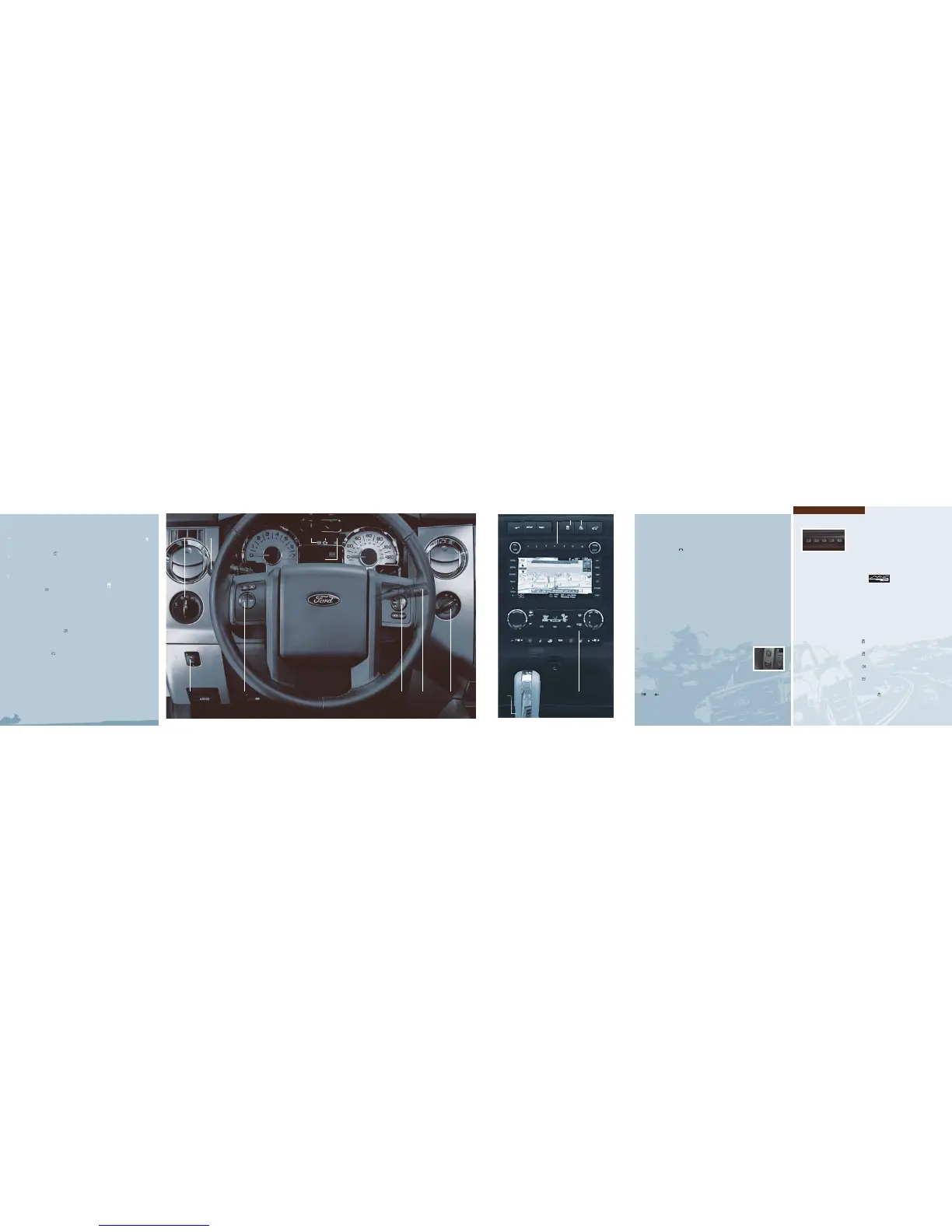
1 HEADLAMP
CONTROLS
Turns the
headlamps off.
Turns on the
parking lamps.
Turns on
the headlamps.
Autolamps:
Automatically turns
the exterior lamps
on/off based on
available daylight.
Turns on fog lamps
(if equipped) by
pulling the control
towards you.
2 MULTI-FUNCTION
LEVER Rotate the
end of the control
up/down to increase/
decrease the speed of
the wipers. Push the
end of the stalk:
• quickly for a single
swipe without fluid.
• and hold briefly
for three swipes with
washer fluid.
• and hold for a
longer wash cycle.
Rain sensing wipers
(if equipped): These
wipers automatically
activate when
moisture is present
on the windshield
and the control is set
to any setting except
off. The wiper speed
will vary based on the
amount of moisture
detected on the
windshield as well as
the current interval
setting. Ensure that
the control is turned
to off prior to entering
a car wash.
To operate your rear
window wiper, turn
the rear wiper control
to 1 (intermittent
speed), 2 (normal
speed) or O (off). For
a rear wash cycle,
rotate and hold the
rear wiper control to
either
position.
Note: For optimal
wiper performance,
clean your blades and
glass regularly. Refer
to your Owner’s Guide
for more information.
3 ABS WARNING
LIGHT The ABS light
illuminates briefly
when the ignition is
turned on. If the ABS
light remains on or
continues to flash, a
malfunction has been
detected. Contact
your authorized dealer
as soon as possible.
Normal braking (less
ABS) is still functional
unless the brake
warning light
is
also illuminated.
4 SERVICE ENGINE
SOON LIGHT The
service engine soon
light
illuminates
briefly when the
ignition is turned on.
If it remains on or
is blinking after the
engine is started, the
on-board diagnostics
system (OBD-II)
has detected a
malfunction. Drive in
a moderate fashion
and contact your
authorized dealer as
soon as possible.
5 MESSAGE CENTER
(if equipped) The
message center
displays important
vehicle information
through a constant
monitoring of vehicle
systems. The system
will notify you of
potential vehicle
problems with a
display of system
warnings followed
by a long indicator
chime. Refer to your
Owner’s Guide for
more information.
6 ADVANCETRAC
®
WITH ROLL STABILITY
CONTROL™ (RSC
®
)
STABILITY
ENHANCEMENT
SYSTEM
(if equipped)
The AdvanceTrac
®
stability system
helps you to
maintain stability
and steerability of
your vehicle during
a variety of road
conditions. If your
vehicle becomes
stuck in the snow,
mud or sand, try
turning off the
AdvanceTrac
®
system
to allow wheel spin
and help increase
momentum to dig
the vehicle out. The
control will illuminate
when turned off.
Refer to your
Owner’s Guide for
more information.
TRAILER
SWAY CONTROL
(if
equipped)
This control uses
the vehicle’s
AdvanceTrac
®
system
to detect and help
reduce trailer sway
by applying brake
force at individual
wheels and, if
necessary, reducing
engine power. I f this
happens, TRAILER
SWAY REDUCE SPEED
will display in the
instrument cluster,
along with the
AdvanceTrac
®
icon .
This control will only
activate at speeds
above 40 mph (64
km/h). For more
information, please
refer to your
Owner’s Guide.
7 AUDIO SYSTEM
Please see reverse
side for more details.
8 HAZARD FLASHER
CONTROL
9 REAR WINDOW
DEFROSTER Press
to clear the rear
window of fog and
thin ice. Press
again to deactivate.
The rear window
defroster will
automatically turn off
after 15 minutes
of operation.
10 OVERDRIVE
CONTROL WITH
TOW HAUL FEATURE
The Tow Haul
feature improves
transmission
operation when
towing a trailer or
a heavy load. To
activate Tow Haul,
press the button on
the gearshift lever.
The TOW HAUL
indicator light will
illuminate in the
instrument cluster.
To deactivate, press
the button again.
Drive with the vehicle
in D (overdrive) with
Tow Haul off for the
best fuel economy.
Refer to your
Owner’s Guide for
more information.
6
7
8
11 CONTROL TRAC
®
4X4 SYSTEM
(if equipped) The
Control Trac
®
system
allows you to choose
between 2H (2WD
High), 4A (4x4 Auto),
4H (4x4), or 4L (4x4
Low) modes.
• Choose 2H (2WD
High) to provide
power to the rear
wheels only – used
mainly for driving on
dry pavement.
• Choose 4A (4x4
Auto) for all on-road
driving conditions,
such as dry road
surfaces, wet
pavement, snow or
gravel. Choose 4H
(4x4) for severe winter
or off-road conditions,
such as deep snow,
ice or shallow sand.
(Not intended for dry
pavement use.)
• Choose 4L (4x4
low) only when you
need extra gearing
to provide maximum
power when climbing
steep grades, going
through deep sand
or pulling a boat out
of the water. For
complete information
on shifting between
modes as well as basic
operating principals,
please refer to your
Owner’s Guide.
12 STEERING
WHEEL CONTROLS
(if equipped)
VOL +/- : Press to
increase/decrease
volume levels.
SEEK : Press to
access the previous/
next radio station, CD
track or preset satellite
radio channel.
MEDIA: Press
repeatedly to
access all possible
media sources.
VOICE: Press to access
voice recognition,
if equipped.
: Press to access
SYNC
®
phone features,
if equipped.
13 SPEED CONTROL
To set the speed:
1. Press ON.
2. Accelerate to the
desired speed.
3. Press SET + and
take your foot off
the accelerator.
• To set a higher
speed, press and
hold SET + or press
SET + repeatedly
until the desired speed
is reached.
• To set a lower
speed, press and hold
SET – or press SET –
repeatedly
until the desired speed
is reached.
• To return to a
previously set speed,
press RES.
• To turn off,
press OFF or t urn
off the e ngine .
14 POWER
ADJUSTABLE
FOOT PEDALS
(if equipped)
Press the top of the
control p to move the
pedals closer to you
or the bottom of the
control q to move
the pedals further
away from you. The
pedals should only
be adjusted when the
vehicle is stopped and
in P (park).
POWERFOLD
MIRRORS
(if equipped)
Automatic dimming
feature (optional
on the driver’s side
mirror only): With this
feature, your mirror
will automatically
adjust from the typical
high reflective state
to a more darkened
state which helps to
minimize glare when
a bright light is
detected from
behind the vehicle.
Rotate the adjustment
switch located on the
driver’s door, to the
center position. Press
the switch down to fold
in the mirrors. Press
again to fold them
back to the original
position. Fold the side
mirrors in carefully
before driving through
a narrow space, like an
automatic car wash.
If you fold in a mirror
manually, the power
fold mirrors will need
to be reset. To reset,
move the adjustment
switch to the center
position. Press the
switch down to fold
the mirrors in, and
wait for approximately
eight seconds. You
should hear a click
indicating the mirrors
have been reset.
If you do not hear a
click, press the switch
to fold the mirrors
back out, and repeat
the reset procedure.
USB PORT
(if equipped)
The USB port is
located inside the
center console and
allows you to plug
in media playing
devices, memory
sticks, and also to
charge devices if they
support this feature.
For more information,
please refer to the
SYNC
®
supplement
or the Navigation
System supplement.
AUXILIARY
INPUT JACK
The auxiliary input jack
is located in the center
console and allows you
to play audio from a
portable music player
through the vehicle
speakers with high
fidelity. Refer to your
Owner’s Guide for
more information.
POWER POINT
Your vehicle is
equipped with
multiple 12V power
points which you can
use to plug in many
accessories. Your
vehicle may also be
equipped with a 110V
AC power point on the
back of the center
console which is used
for powering electrical
devices that require up
to 150W.
AUTOMATIC
DIMMING FEATURE
(optional on the driver’s
side mirror only)
With this feature your
mirror will automatically
adjust from the typical
high reflective state to
a more darkened state
which helps to minimize
glare when a bright light
is detected from behind
the vehicle.
ADDITIONAL FEATURES
SECURICODE™ KEYLESS
ENTRY SYSTEM The keyless
entry keypad allows you to
lock or unlock all doors and
the liftgate glass without using
a key. Simply enter your five
digit program code and the
press 3•4 within five seconds
to unlock all doors and the
liftgate. Press 5•6 to open the
liftgate glass. To lock all doors
and the liftgate, press 7•8 and
9•0 at the same time. Note:
You do not have to enter your
five digit code first.
REVERSE SENSING
(if equipped)
The sensing
system may warn you if there
is an object behind the vehicle.
The system will sound a
warning tone that increases
in frequency as the object
gets closer and will sound
continuously when the object is
less than 10 inches away. The
system is not effective when the
vehicle is traveling above 3 mph
(5 km/h) and may not detect
angular or moving objects.
Note:
Visibility aids do not
replace the need to watch
where the vehicle is moving.
Refer to your Owner’s Guide
for safety information, more
detail and limitations.
REARVIEW CAMERA
(if equipped)
The rearview
camera is located on the liftgate
which provides a visual display
of the area behind the vehicle.
The display will automatically
appear on the navigation
system screen (if equipped) or
in the rearview mirror whenever
the vehicle is in Reverse (R)
and uses colors (green, yellow
and red) to alert you of your
proximity to objects.
Note:
Visibility aids do not
replace the need to watch
where the vehicle is moving.
Refer to your Owner’s Guide for
safety information, more detail
and limitations.
SYNC
®
(if
equipped)
SYNC
®
is
a hands-free communications
and entertainment system
with special phone and media
features. For more information,
please refer to the SYNC
®
Supplement or to the SYNC
®
section in the Navigation
Supplement. Please feel free
to visit www.SyncMyRide.com
.
I
NTEGRATED KEYHEAD
TRANSMITTER (IKT) AND
REMOTE ENTRY SYSTEM
FEATURES
• Press
once to lock all
doors. Press again to confirm
all doors are closed.
• Press once to unlock the
driver’s door. Press again within
three seconds to unlock all doors.
• Press to activate the panic
alarm. Press again or turn on
the ignition to deactivate.
• Press
twice within three
seconds to open the power
liftgate (if equipped), or to
unlatch the liftgate window.
• Car finder: Press
twice
within three seconds to locate
your vehicle. The horn will chirp
and the turn lamps will flash
.
MYKEY™ Allows you to program
certain driving restrictions on
any standard key in order to
promote good driving habits.
When MyKey™ is programmed:
• Belt-Minder
®
cannot be
disabled and the audio system
will be muted until the safety
belt is buckled.
• early low fuel warnings
are displayed.
• audio volume can be limited.
• vehicle speed can be limited.
• audible and visual speed
warnings can be configured at
preselected speeds.
• AdvanceTrac
®
cannot be
programmed off.
For complete information, refer
to MyKey™ in the Locks and
Security chapter in your
Owner’s Guide.
I
MPROVED FUEL ECONOMY
WHILE COASTING OR
DECELERATING Your vehicle
has been designed to improve
fuel economy by reducing
fuel usage while coasting or
decelerating. This may be
perceived as a light to medium
braking sensation when
removing your foot from the
accelerator pedal.
10
1 2 4
5
11
10
12
1314
INSTRUMENT PANEL
3
Use extreme caution when using any device or feature that may take your
attention off the road. Ford recommends against the use of any hand-held
device while driving and that you comply with all applicable laws. Your
primary responsibility is the safe operation of the vehicle.


 To Previous Page
 Loading...