*if equipped
SYNC
®
3
*
(continued)
Comfort
*if equipped
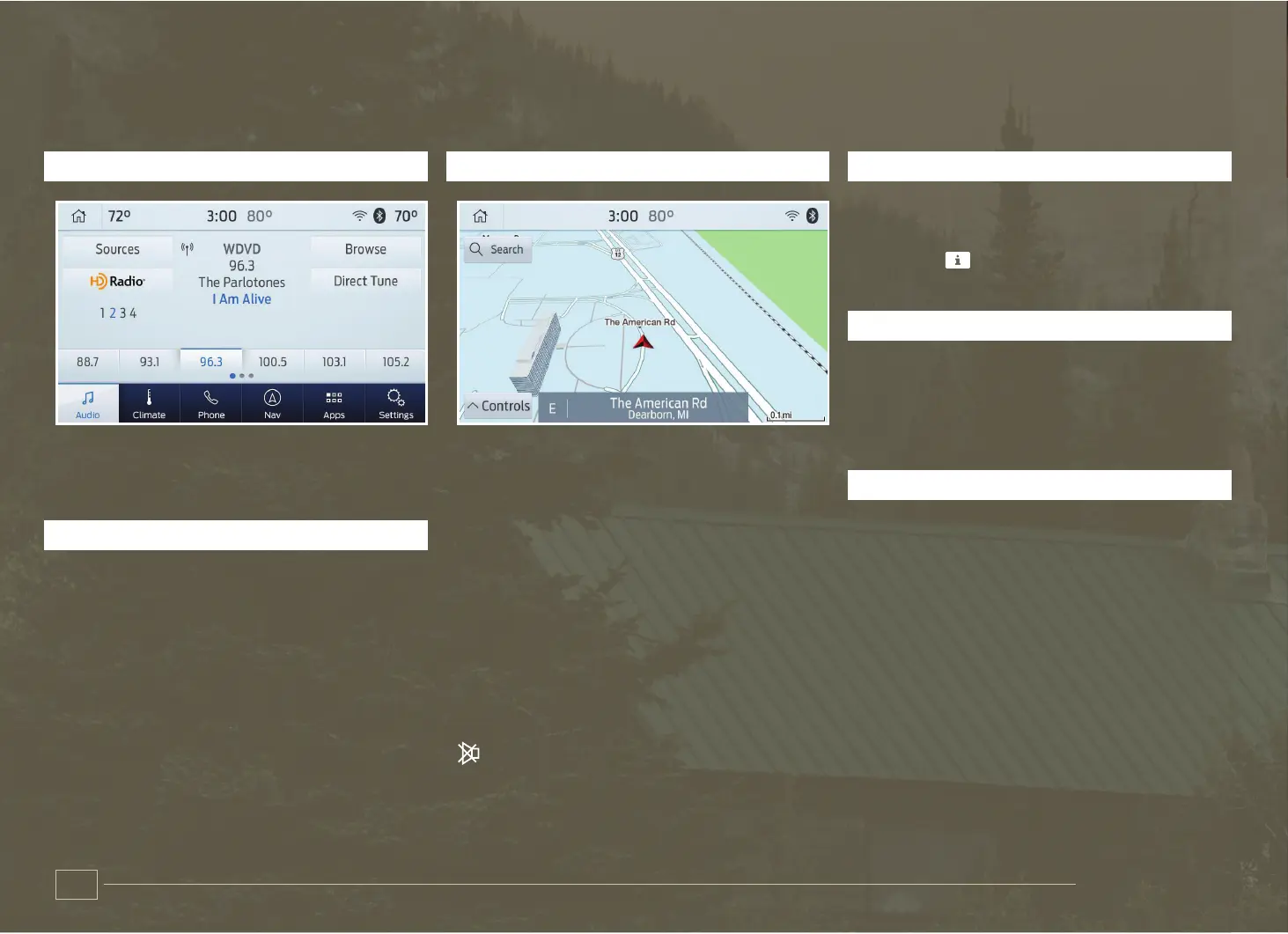
AUDIO
You can select from a variety of
entertainment options, including AM/FM
radio, USB, Bluetooth Stereo and Apps.
PRESETS
To set a new preset, tune to the station
and then press and hold one of the preset
buttons. The audio mutes briefly while the
system saves the station and then returns.
To access additional presets, swipe left.
NAVIGATION
You can set your destination using the
text entry or map screen. Using text entry,
you can search by entering all or part of
the destination, such as the Address,
Intersection or City. Using the map screen,
you can select a location on the map, then
select Start to begin the route guidance.
You can adjust the map to display in
two-dimensional or three-dimensional
mode. You can also zoom in or out on
the map by using a pinching gesture.
During route guidance, you will see a turn
indicator, points of interest on the map,
your current road and an option to mute
the guidance prompts. You can press
the button in the top left-hand corner of
the main map to display estimated time of
arrival, remaining travel time or distance
to destination.
SETTINGS
Under the Settings menu, you can access
and adjust the settings for many of the
system features. Once you select a tile,
press the to view an explanation of the
feature or setting.
CLIMATE
You can adjust climate control features,
including the temperature, airflow
direction, fan speed and other climate
features. You can also use voice
commands to make climate adjustments.
APPS
The system allows you to interact with
select mobile apps while keeping your
eyes on the road. Voice commands, your
steering wheel buttons or a quick tap
on your touchscreen give you advanced
control of compatible mobile apps. You
can also stream your favorite music or
podcasts, share your time of arrival with
friends and keep connected safely. For
more information on connecting apps to
your system, please see the SYNC 3 chapter
of your Owner’s Manual.
FOLDING THE SECOND-ROW SEATS
Folding the second-row outboard seat
Pull up the handle on the side of the seat cushion (A) by the door to fold the
seat backrest.
Folding the second-row center seat
Pull the handle on the upper right of the seat backrest (B) to release the folding
seat latch.
To return the second-row seats to an upright seating position
Lift the seat backrest toward the rear of the vehicle. Rotate the seat backrest
until you hear a click, locking it in the upright position.
ADJUSTING THE SECOND-ROW SEAT FOR EASY ENTRY*
You can move the outboard seats forward to allow access to the third-row seats.
Pull the handle on the upper right of the seat backrest (C) to tilt the seat forward.
You can then slide the complete seat forward.
To return the seat to an upright seating position
Slide the seat rearward while pulling down on the seatback until the latch
fully engages.
To move the seat farther back, pull the lever under the front of the seat and slide
it backward.
RECLINING REAR SEATS*
To recline the second-row outermost seat, pull
the release handle on the outermost side of the
seat cushion and adjust the seat backrest to your
desired position.
The third-row seat may have power recline
buttons on the quarter trim panel on each side of
the vehicle.
15
14
B C
A


 To Next Page
 Loading...