Instrument panel (continued)
12| INTEGRATED TRAILER BRAKE CONTROLLER*
Assists in smooth and effective trailer braking by powering
the trailer’s electric or electric-over-hydraulic brakes with a
proportional output based on the towing vehicle’s
brake pressure.
Use the gain adjustment buttons to increase or decrease the
braking feature’s power output to the trailer.
Adjust the gain by pressing the (+) or (–) button to increase or
decrease the setting to the starting point you desire.
A gain setting of 6.0 is a good starting point for heavier loads.
To test the adjusted gain setting:
• In a traffic-free environment, tow the trailer on a dry, level
surface at a speed of 20-25 mph (30-40 km/h) and squeeze
the manual control lever completely.
• If the trailer wheels lock up (the tires squeal), reduce the
gain setting. If the trailer wheels turn freely, increase the
gain setting.
• The proper gain setting is at the point just below trailer wheel
lockup. If towing a heavier trailer, trailer wheel lockup may not
be attainable even with the maximum gain setting of 10.
For more information, please refer to the Towing chapter in your
Owner’s Manual.
TRAILER SWAY CONTROL
Trailer sway control applies your vehicle brakes at individual
wheels and, if necessary, reduces engine power.
If the trailer begins to sway, the stability control light flashes
and the message “TRAILER SWAY REDUCE SPEED” appears
in the information display. The first thing to do is slow down
your vehicle, then pull safely to the side of the road and check
for proper tongue load and trailer load distribution. For more
information, please refer to the Towing chapter in your
Owner’s Manual.
13| HILL DESCENT CONTROL*
When traveling at low speeds (between 2 mph [3 km/h] and
20 mph [32 km/h]), switch this feature on to help maintain
vehicle speed while descending steep grades on a variety of road
conditions. To use, press the hill descent button. The button
illuminates and a tone sounds.
For more Information, see the Hill Descent Control chapter in
your Owner’s Manual.
14| STABILITY CONTROL WITH RSC™
(ROLL STABILITY CONTROL™)
Stability Control with RSC automatically activates when you
start your engine and helps you keep control of your vehicle
when on a slippery surface. The electronic stability control
portion of the system helps avoid skids and lateral slides, while
the roll stability control helps avoid a vehicle rollover. The
traction control system helps avoid drive wheel spin and loss
of traction.
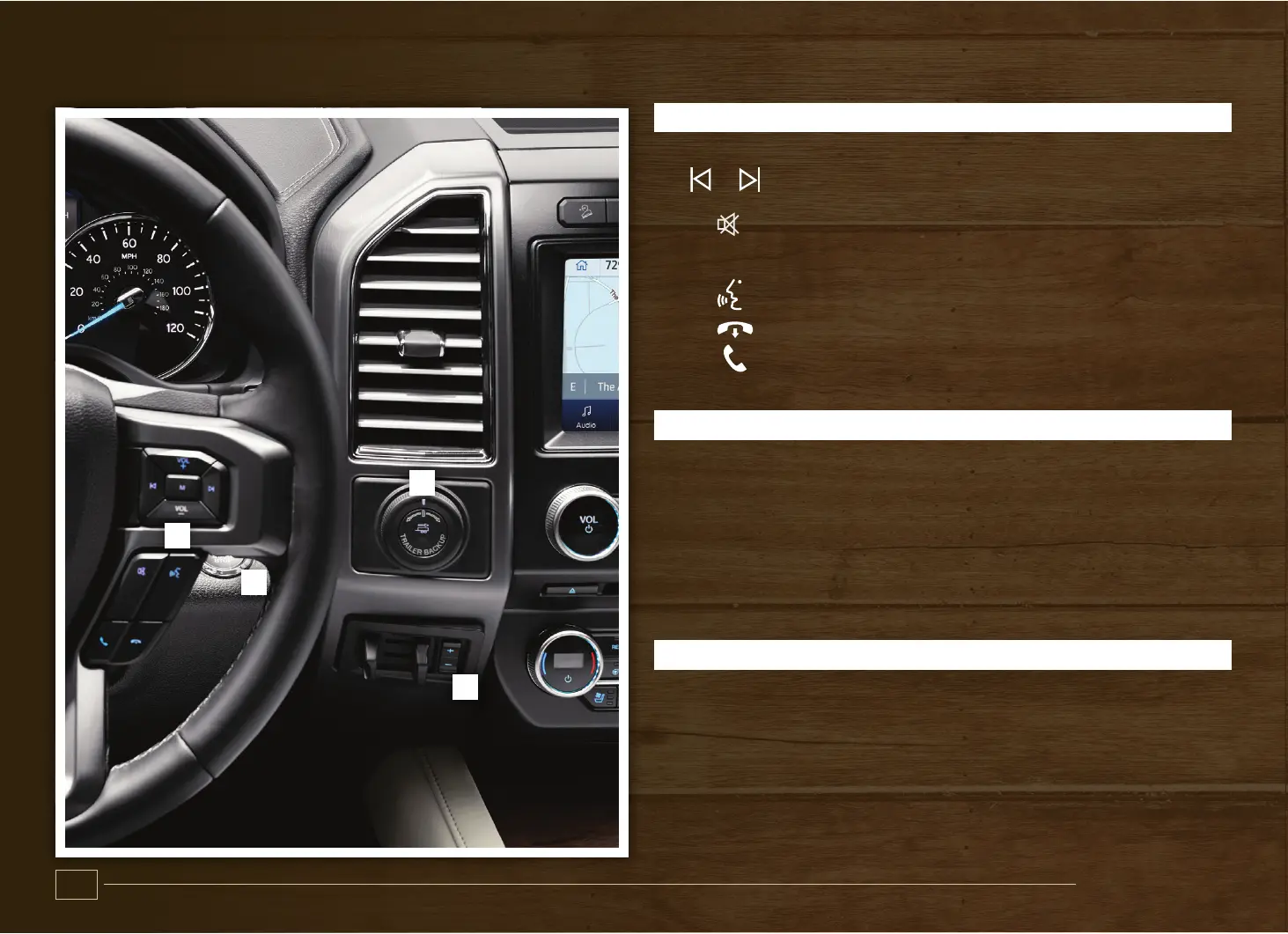
9| STEERING WHEEL MEDIA CONTROLS
VOL+ or VOL– Press to increase or to decrease volume levels.
or Press to access the previous or next
media selection.
Press to silence the current media.
M Press repeatedly to scroll through available
audio modes.
Press to access voice recognition.
Press to end a call.
Press to access phone mode or to answer a
phone call.
10| KEYLESS STARTING*
You can start your vehicle by pressing the START STOP button
while fully pressing down on the brake pedal. Press the button
again, without applying the brake, to switch the engine off. If
you leave your vehicle idling for an extended period of time,
the engine shuts down automatically. Before this happens, a
message appears in the information display, allowing you time
to override the shutdown feature.
Note: A valid key must be inside the vehicle for the ignition to start.
11| PRO TRAILER BACKUP ASSIST*
The Pro Trailer Backup Assist control knob helps assist you in
backing up your trailer. Turn the knob in the direction you want
the trailer to go and the system will take over the steering to get
it there. This system will not work until you set it up. See the Pro
Trailer Backup Assist Quick Start Guide in your Owner’s Manual
portfolio for the complete setup and operation details.
*if equipped*if equipped
7
6
9
10
11
12
13
14


 To Next Page
 Loading...