*if equipped *if equipped
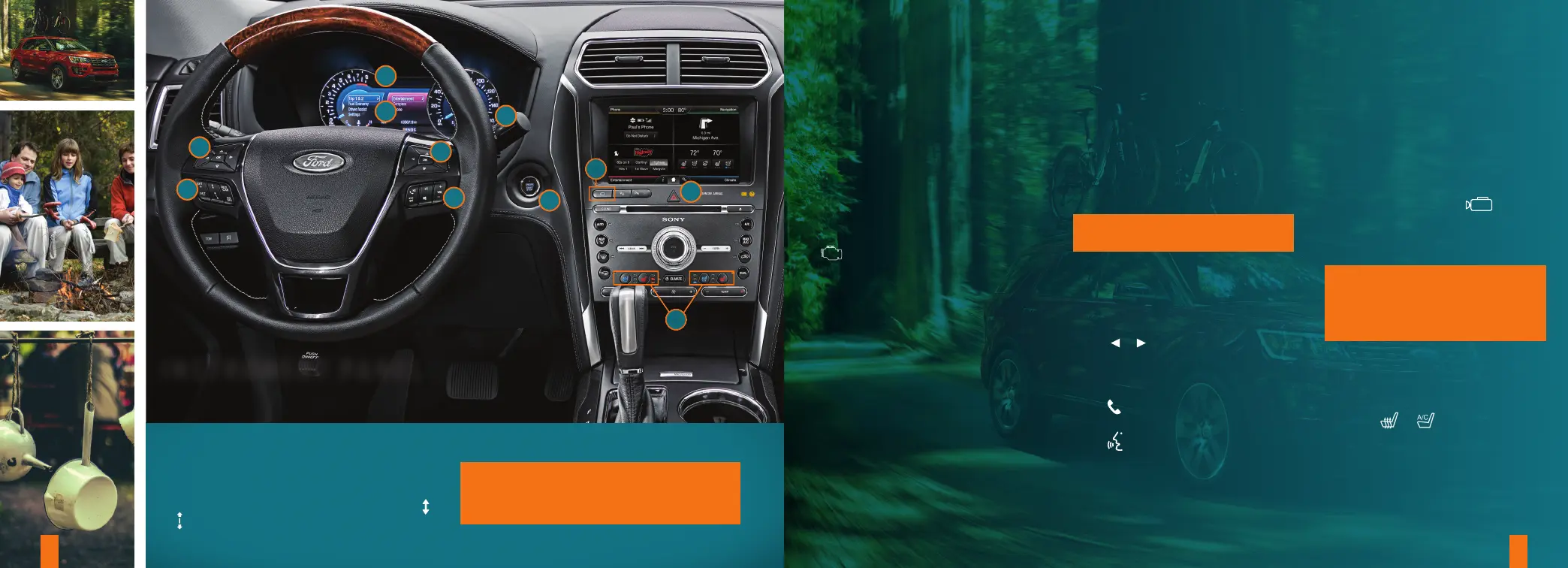
INSTRUMENT PANEL
2
3
2
1
5
6
8
2
4
9
7
4 5
2. INFORMATION DISPLAYS*
Provides information about
various systems on your vehicle.
Use the le-hand, 5-way controls
to choose and confirm settings and
messages. See the Information
Displays chapter in your Owner’s
Manual for more information.
Use the right-hand, 5-way controls to
choose and confirm Entertainment,
Phone and Navigation* settings. See
the MyFord Touch
®
chapter in your
Owner’s Manual for more information.
3. SERVICE ENGINE SOON LIGHT
Lights briefly when you switch on
the ignition. If the light remains on or
is blinking aer starting the engine,
the On-Board Diagnostics (OBD-II)
system has detected a problem. Drive
in a moderate fashion and contact an
authorized dealer as soon as possible.
4. AUTOWIPERS*
To switch the feature on, move the
wiper controls to intermittent wipe. The
autowiper system turns the wipers on
only when moisture is present on the
windshield. The wiper speed depends
on how much moisture the system
detects and the sensitivity setting.
• Low sensitivity means the wipers
turn on when the system detects a
large amount of moisture on
the windshield.
• High sensitivity means the wipers
turn on when the system detects
a small amount of moisture on
the windshield.
• To switch this feature o, use your
wiper controls. To change this
feature to intermittent wipe every
time you use your wipers, use
the information display.
• To switch intermittent wipe
back to autowipers, use the
information display.
NOTE: Make sure you switch this
feature o before entering a car wash.
5. STEERING WHEEL CONTROLS
AUDIO CONTROL
Press VOL + or – to increase or
decrease volume levels.
Press | or | to access the
next or previous radio station preset,
CD or MP3 track.
VOICE CONTROL*
Press
to access phone mode or
answer a call.
Press to access voice recognition.
6. PUSH BUTTON START*
Allows you to start your vehicle by fully
pressing the brake pedal and the
START STOP button. Press the button
again to switch the engine o.
7. 180-DEGREE CAMERA*
The system consists of front and
rear cameras.
The system:
• Allows you to see what is directly
in front or behind your vehicle.
• Provides cross trac view in front
and behind your vehicle.
• Provides visibility during
parking maneuvers.
Press the camera button to
toggle between dierent views.
See the Parking Aids chapter of your
Owner’s Manual for details.
NOTE: The front view camera switches
o if your vehicle speed exceeds
6 mph (10 km/h). You need to switch
the system back on by pressing the
camera system button once.
8. HAZARD CONTROL
9. CLIMATE CONTROLLED
FRONT SEATS*
Press the or repeatedly to
cycle through the various modes and
o. More lights indicate warmer or
cooler settings. See the Seats chapter
in your Owner’s Manual for details.
1. ADAPTIVE CRUISE CONTROL*
With cruise control active, this feature allows you
to set and maintain a ‘gap distance’ between you
and the vehicle in front of you in the same lane.
To select a gap distance, press the gap control
or . See the Cruise Control chapter in your
Owner’s Manual for more details.
NOTE: Driving aids do not replace the need to
watch where the vehicle is moving and brake where
necessary. Refer to your Owner’s Manual for
more details.
*if equipped *if equipped















 To Next Page