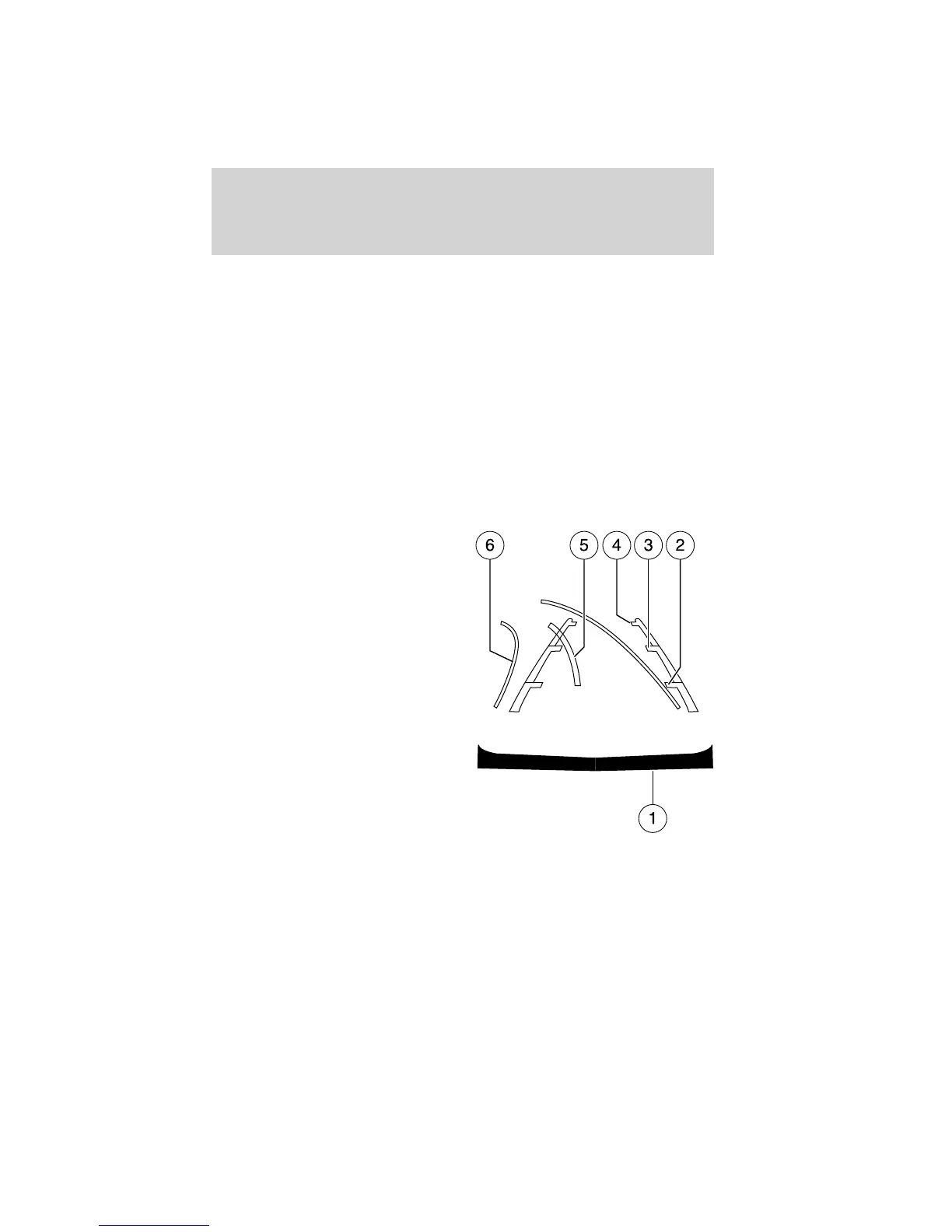
Active guidelines, fixed guidelines and centerline
The active guidelines show the path of intended motion of the vehicle
while reversing. The fixed guidelines assist a driver with backing into a
parking space or aligning with an object behind the vehicle. The
centerline assists a driver with aligning the center of the vehicle with an
object (i.e. trailer).
To turn this feature on or off when the vehicle is not in R (Reverse), do
the following on the touchscreen:
1. Select Menu
2. Select Vehicle
3. Select Rear View Camera
The guideline options are ACTIVE + FIXED, FIXED and OFF.
Note: The centerline is available if Active or Fixed guidelines are ON.
• (1) Rear bumper
• (2) Red zone
• (3) Yellow zone
• (4) Green zone
• (5) Centerline
• (6) Active guidelines (if
equipped)
Active guidelines (6) will only be shown with fixed guidelines (2), (3)
and (4).
To use active guidelines, turn the steering wheel and point the active
guidelines towards an intended path. If the steering wheel position is
changed while reversing, the vehicle might deviate from the original
intended path.
Driving
287
2012 Focus (foc)
Owners Guide, 5th Printing
USA (fus)



 To Next Page