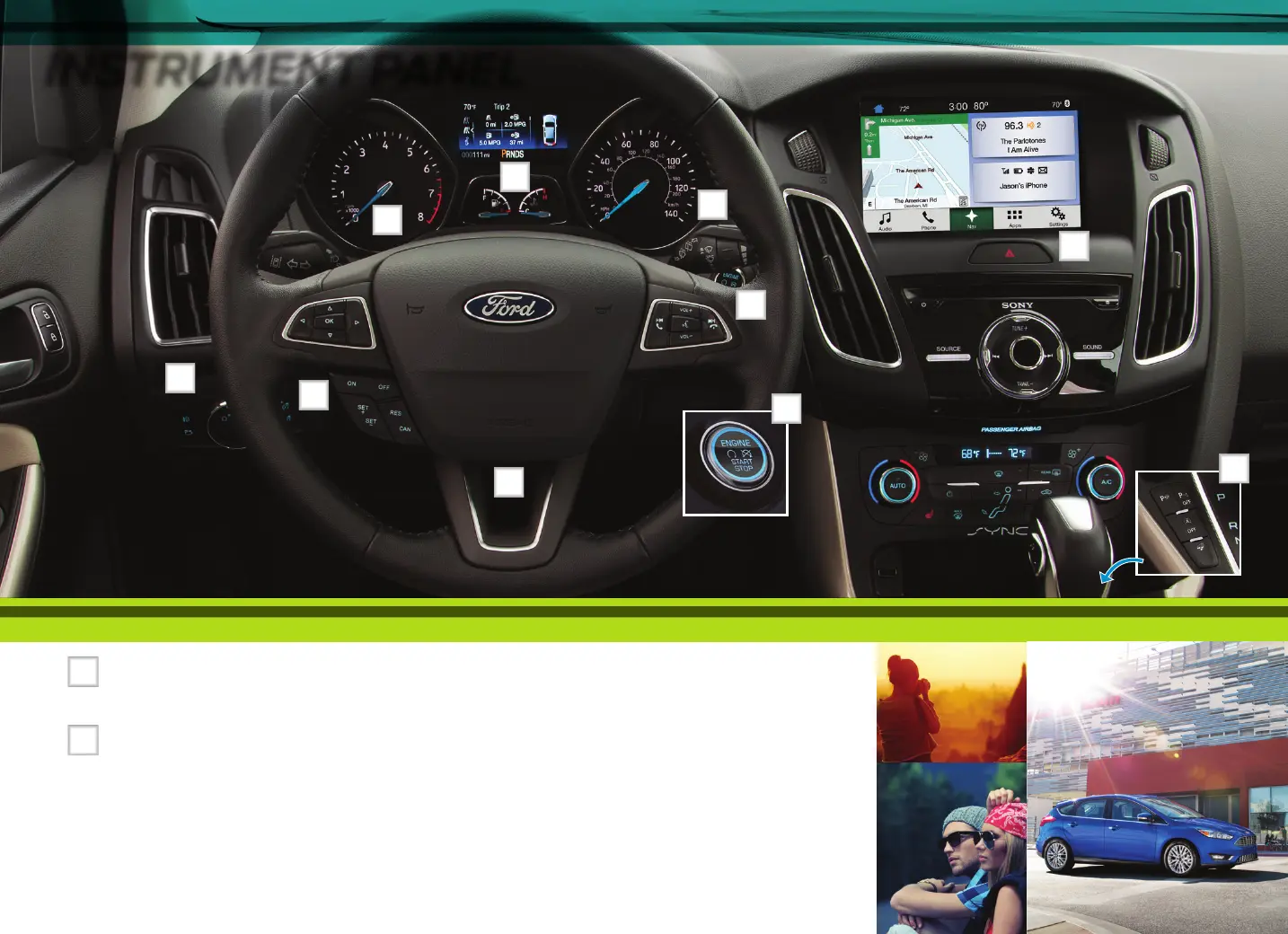
INSTRUMENT PANEL
1
2
4
3
6
9
5
8
4 • 5
*if equipped*if equipped
7
10
1
Luggage Compartment
*
/
Liftgate
*
Release
2
Cruise Control
*
To Set Your Cruise Control Speed
A. Press and release the ON control.
B. Drive to the desired speed.
C. Press and release the SET + control,
then take your foot o the accelerator.
Aer you set your speed, you can press
SET + or SET – to adjust your cruise
speed. To cancel the set speed, tap the
brake or press the CAN control.
3
Service Engine Soon Light
Lights briefly when you switch the ignition on. If it
remains on or blinks aer you start the engine, the On-Board
Diagnostics (OBD-II) system detects a problem. Drive in a
moderate fashion and have your vehicle serviced at the first
available opportunity.
4
Information Displays
Provides information about various systems on your vehicle.
Use the le, 5-way controls, located on the steering wheel,
to choose and confirm settings and messages. Refer to the
Information Displays chapter of your Owner’s Manual for
more information.
5
Wiper Controls
6
Steering Wheel Controls
*
Use the right-hand, 5-way controls to adjust the
following features:
Press VOL + or – to increase or decrease volume levels.
Press to access the previous or next radio station,
CD or MP3 track or preset satellite radio channel.*
Press to access voice recognition.
Press to answer a call.
Press to exit phone mode or end a call.
7
Keyless Starting
*
Allows you to start your vehicle by pressing the START STOP
button while fully pressing down on the brake (automatic
transmission) or clutch (manual transmission) pedal.
Press the button again to switch the engine o.
Note: Your intelligent access transmitter must be inside the
vehicle for keyless starting to work.
8
Tilt/Telescope Steering Column
Unlock the steering wheel by pulling the lever down. Adjust
the wheel to the desired position. Push the lever back up to
lock the steering wheel in place.
9
Hazard Warning Flashers
10
Auto-Start-Stop
*
The system reduces fuel consumption and CO2 emissions
by shutting down the engine when you idle your vehicle, for
example at trac lights. When you switch the ignition on,
the system automatically turns on.
To switch the system o, press the switch and the
word OFF illuminates. Press the switch again to switch
the system back on. The system only switches o for the
current ignition cycle. See the Unique Driving Characteristics
chapter in your Owner’s Manual for complete details.



 To Next Page