10
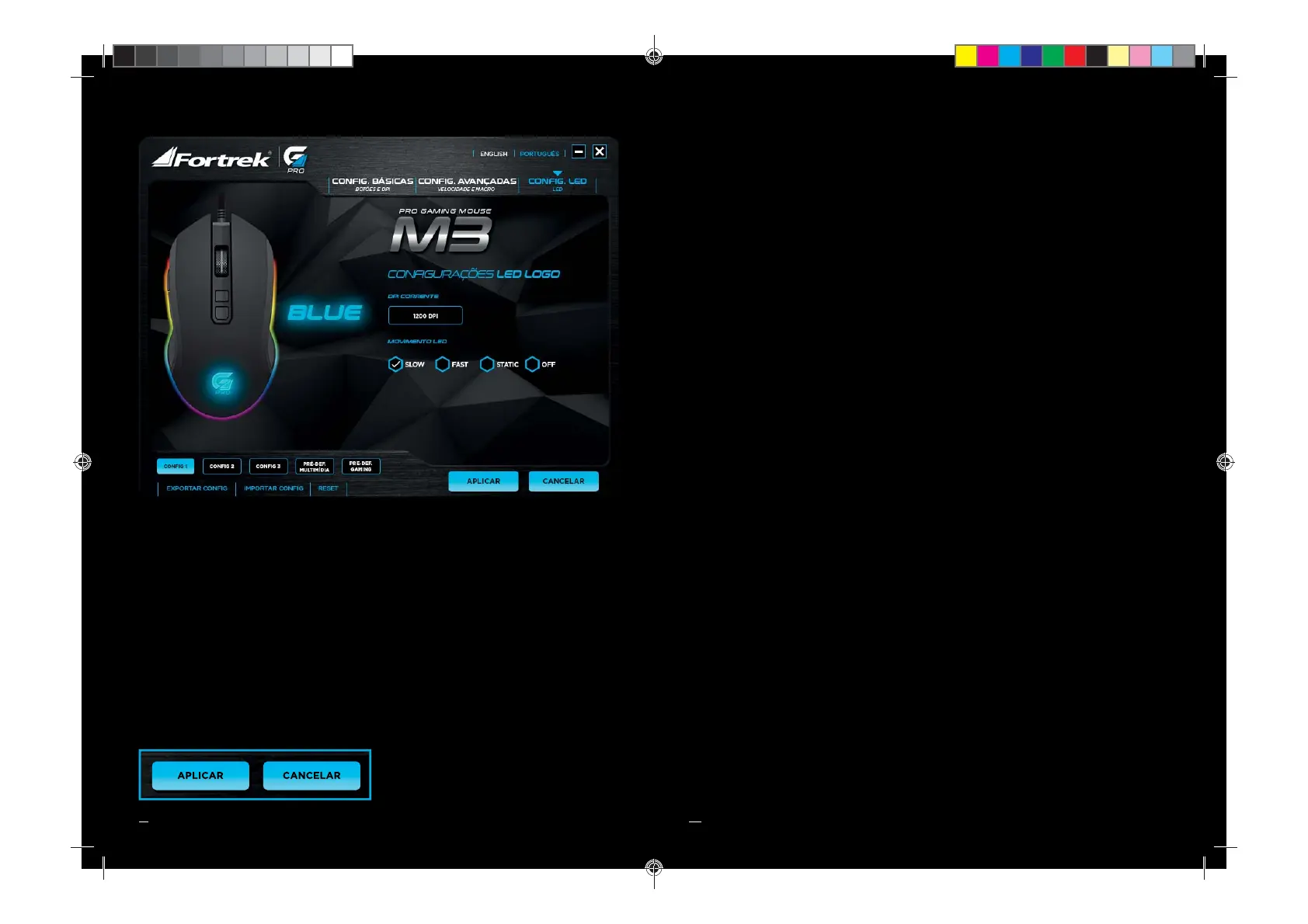
3 CONFIGURAÇÕES DE LED
REFERÊNCIA LED: A partir das cores selecionadas na confi gurações básicas, junto com as
confi gurações de LED, nesta aba é capaz de ter uma pré-visualização de como irá funcionar os
efeitos de iluminação do mouse.
DPI CORRENTE: Irá demonstrar qual os efeitos da sensibilidade selecionada
MOVIMENTO: Nesta confi guração, o usuário pode alterar a velocidade e o modo de operação do
efeito da luz de led conforme a sua preferencia.
Clique em APLICAR para salvar as
confi gurações feitas.
03
ENGLISH
USER GUIDE
1. INTRODUCTION
DEAR CUSTOMER, THANKS FOR CHOOSING FORTREK’S M3
PRO-GAMING MOUSE!
We have pleasure to o er one of the best gaming computer acessory!
Please, read carefully this user guide to use the mouse for the fi rst time.
In them are contained the main guidelines for correct use and installation.
INCLUDED ITEM
01 Fortrek M3 Gaming-Pro Mouse
01 User Guide
2. INSTALATION GUIDE
Insert your mouse into an available USB connection. If the device does not work, reboot your
computer and check the devices confi guration of your PC operational system.
To resort of the macros and mouse confi gurations, its needed to install the mouse software
available in www.fortrek.com.br website or acess by QR code on fi nal page of user guide that
must be installed for your respective model.
COLOR: Black
LED: 16.8 milion colors running RGB*
MAXIUM RESOLUTION: 200-4800 DPI*
SENSOR: Optical sensor
SWITCH: HUANO
CONECTOR: USB 2.0 golden plated with
magnetic fi lter
BUTTON: 7 + aluminium scroll
CABLE LENGTH: 1,8m Textile cable
MATERIAL: ABS Plastic
FINISHING: Matte coating with smooth
mouse feet
POLLING RATE: 125Hz~1000Hz*
DIMENSIONS: 126x68x40cm
OPERATION: Driveless and controlated
by software (requires driver installation to
confi gurate)
COMPATIBILITY: Windows XP/Vista/Win7/Win8/
Win10 and **Mac Os X 10.2 or later
*Adjustable by software)
**The software and it confi guration function
doesn’t work on MAC, Linux and Ubuntu
operational systems.
3. TECHNICAL SPECIFICATION
M3-USERGUIDE.indd Spread 3 of 6 - Pages(10, 03)M3-USERGUIDE.indd Spread 3 of 6 - Pages(10, 03) 06/03/18 16:2206/03/18 16:22


 To Next Page
 Loading...