EasyManua.ls Logo

Fortress Technologies P1EF - User Manual

Fortress Technologies P1EF
8 pages
Print Icon
To Next Page IconTo Next Page
Loading...
P1EF
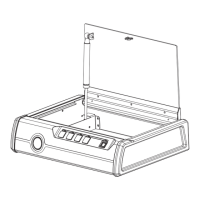
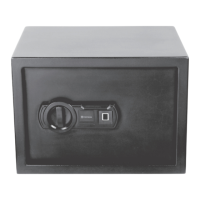
Deluxe Quick-Access Firearm Safety Device with Biometric Fingerprint Lock
Instruction Manual
Question and Answer IconNeed help?

Do you have a question about the Fortress Technologies P1EF and is the answer not in the manual?

Summary

Welcome Guide and Features

Product Features Overview

Details the main components of the safety device, including emergency keyhole, buttons, pneumatic rod, biometric scanner, and battery compartment.

Important Safeguards and Battery Setup

Battery Warnings and Installation

Provides crucial warnings for battery usage, correct insertion, mixing types, and step-by-step installation instructions.

Initial Use and Safety Precautions

Outlines checks for transport damage, cleaning, and critical suffocation risks from packaging materials.

Fingerprint and Security Code Configuration

Registering Fingerprints

Step-by-step guide for registering up to 50 fingerprints using the biometric scanner and reset button.

Programming the Security Code

Instructions for setting a 4 to 6 digit personal security code for device access.

Deleting Registered Fingerprints

Procedure to erase all previously registered fingerprints from the device.

Device Operation and Alerts

Accessing the Device

Explains how to open the safety device using a valid security code or registered fingerprint.

Error Handling and System Alerts

Details behavior for incorrect entry, lock-down modes, audible sound control, and low battery indicators.

Securing the Safety Device

Installation on Concrete Surfaces

Detailed steps for drilling, inserting fasteners, and securing the device to a concrete surface.

Installation on Wooden Surfaces

Instructions for securely mounting the safety device onto a wooden surface using tapping screws.

Summary

Welcome Guide and Features

Product Features Overview

Details the main components of the safety device, including emergency keyhole, buttons, pneumatic rod, biometric scanner, and battery compartment.

Important Safeguards and Battery Setup

Battery Warnings and Installation

Provides crucial warnings for battery usage, correct insertion, mixing types, and step-by-step installation instructions.

Initial Use and Safety Precautions

Outlines checks for transport damage, cleaning, and critical suffocation risks from packaging materials.

Fingerprint and Security Code Configuration

Registering Fingerprints

Step-by-step guide for registering up to 50 fingerprints using the biometric scanner and reset button.

Programming the Security Code

Instructions for setting a 4 to 6 digit personal security code for device access.

Deleting Registered Fingerprints

Procedure to erase all previously registered fingerprints from the device.

Device Operation and Alerts

Accessing the Device

Explains how to open the safety device using a valid security code or registered fingerprint.

Error Handling and System Alerts

Details behavior for incorrect entry, lock-down modes, audible sound control, and low battery indicators.

Securing the Safety Device

Installation on Concrete Surfaces

Detailed steps for drilling, inserting fasteners, and securing the device to a concrete surface.

Installation on Wooden Surfaces

Instructions for securely mounting the safety device onto a wooden surface using tapping screws.

Fortress Technologies P1EF Specifications

General IconGeneral
CategorySafes
BrandFortress Technologies
ModelP1EF
Lock TypeElectronic
MountingFloor