EasyManua.ls Logo

Fostex G16 - Page 24

Fostex G16
124 pages
Print Icon
To Next Page IconTo Next Page
To Previous Page IconTo Previous Page
Loading...
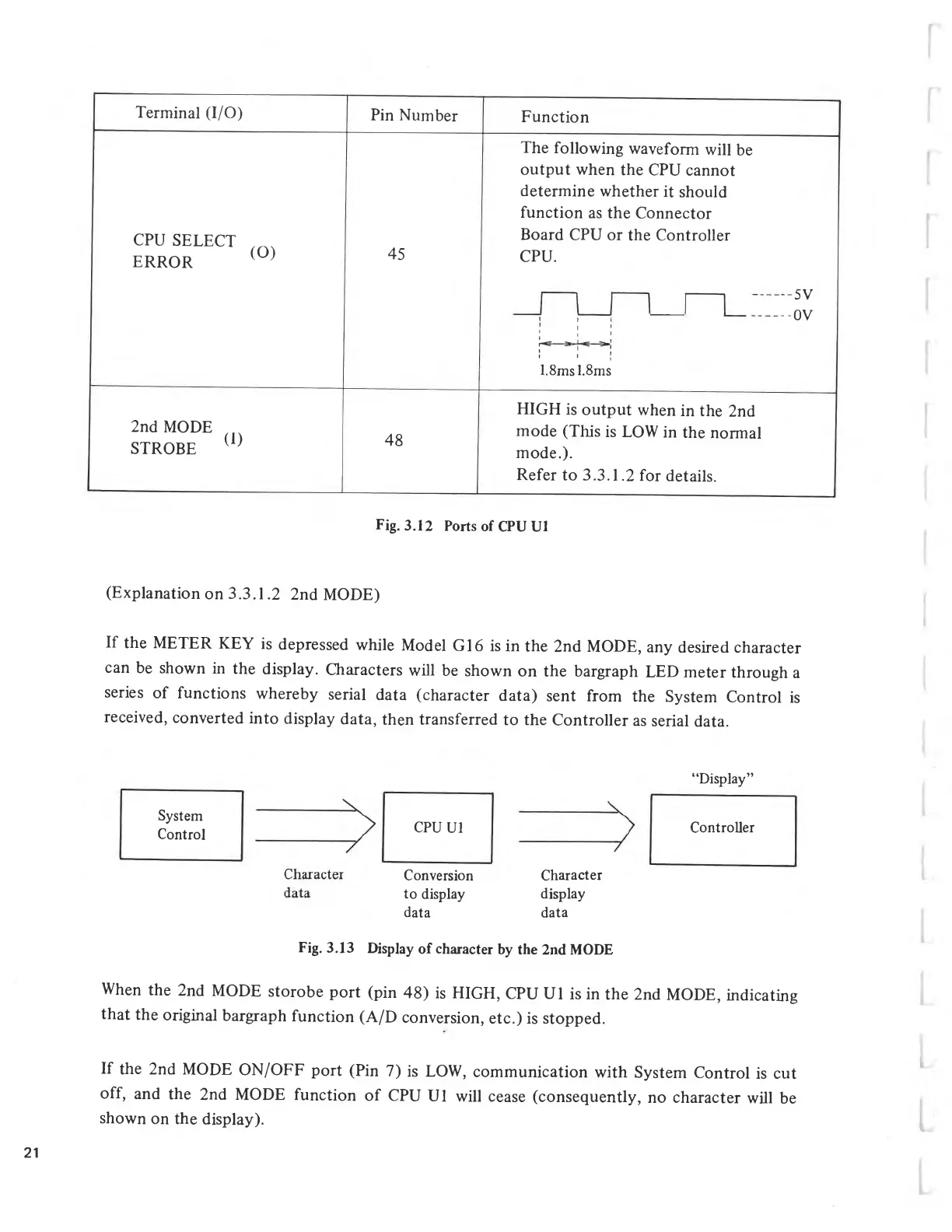
Fig.
3.12
Ports
of
CPU
Ul
Terminal
(I/O)
Pin
Number
Function
The
following
waveform
will
be
output
when
the
CPU
cannot
determine
whether
it
should
function
as
the
Connector
CPU
SELECT
ERROR
(O)
45
Board
CPU
or
the
Controller
CPU.
-5V
I
1
:
i
:
--0V
A
3
1
c
;
1
1
1
1.8ms
1.8ms
2nd
MODE
STROBE
(1)
48
HIGH
is
output
when
in
the
2nd
mode
(This
is
LOW
in
the
normal
mode.).
Refer
to
3.3.1.2
for
details.
(Explanation
on
3.3.1.2
2nd
MODE)
If
the
METER
KEY
is
depressed
while
Model
G16
is
in
the
2nd
MODE,
any
desired
character
can
be
shown
in
the
display.
Characters
will
be
shown
on
the
bargraph
LED
meter
through
a
series
of
functions
whereby
serial
data
(character
data)
sent
from
the
System
Control
is
received,
converted
into
display
data,
then
transferred
to
the
Controller
as
serial
data.
Display
System
Control
CPU
UI
Character
display
data
Controller
Conversion
to
display
data
Fig.
3.13
Display
of
character
by
the
2nd
MODE
When
the
2nd
MODE
storobe
port
(pin
48)
is
HIGH,
CPU
UI
is
in
the
2nd
MODE,
indicating
that
the
original
bargraph
function
(A/D
conversion,
etc.)
is
stopped.
If
the
2nd
MODE
ON/OFF
port
(Pin
7)
is
LOW,
communication
with
System
Control
is
cut
off,
and
the
2nd
MODE
function
of
CPU
UI
will
cease
(consequently,
no
character
will
be
shown
on
the
display).
21

Related product manuals