EasyManua.ls Logo

Fostex G16 - Page 40

Fostex G16
124 pages
Print Icon
To Next Page IconTo Next Page
To Previous Page IconTo Previous Page
Loading...
13)
Adjust
R30
1
(L)
so
that
test
point
1
wave
length
is
16
msec
at
the
middle
of
the
tape.
And
confirm
that
the
difference
of
the
winding
speed
in
F.
FWD
and
in
RWD
should
be
within
1
msec.
4.2.6.11
Adjusting
the
Reel
Pulse
Duty
1)
Put
transport
in
the
F.
FWD
or
RWD
mode.
2)
Adjust
R304
on
the
SYSTEM
CONTROL
PCB
for
a
50%
duty
of
the
test
point
3
wave
form.
3)
Adjust
R3O5
on
the
SYSTEM
CONTROL
PCB
for
a
50%
duty
of
the
test
point
4
wave
form.
4.2.7
DD
Capstan
Servo
Adjusting
Procedure
4.2.7.1
Lock
duty
adjusting
1)
Connect
the
oscilloscope
probe
to
TP-2
on
the
DD
CAPSTAN
PCB.
2)
Set
transport
in
the
PLAY
mode
and
adjust
R85
and
R86
so
that
a
square
wave
appears
at
TP-2.
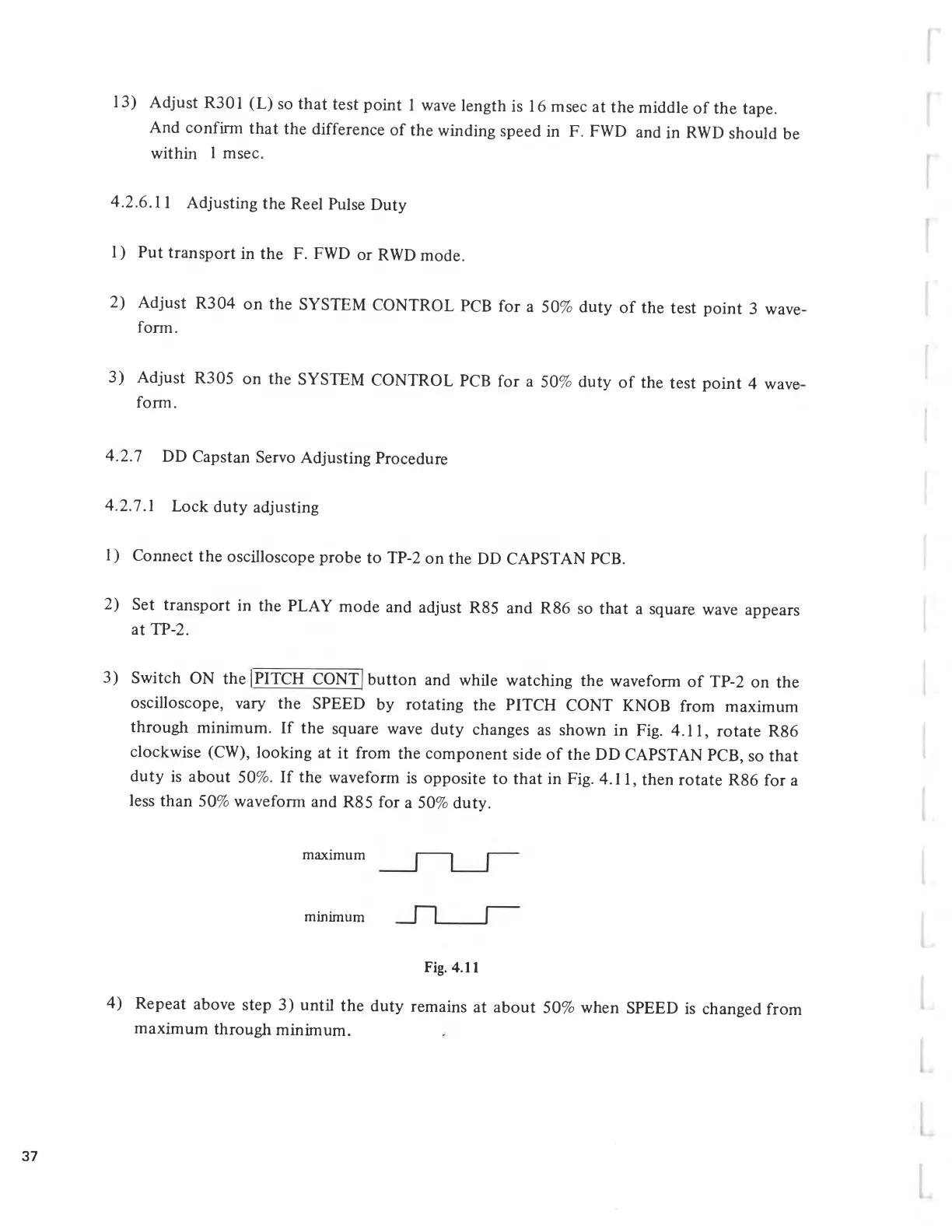
3)
Switch
ON
the
¡
PITCH
CONT
button
and
while
watching
the
waveform
of
TP-2
on
the
oscilloscope,
vary
the
SPEED
by
rotating
the
PITCH
CONT
KNOB
from
maximum
through
minimum.
If
the
square
wave
duty
changes
as
shown
in
Fig.
4.11,
rotate
R86
clockwise
(CW),
looking
at
it
from
the
component
side
of
the
DD
CAPSTAN
PCB,
so
that
duty
is
about
50%.
If
the
waveform
is
opposite
to
that
in
Fig.
4.11,
then
rotate
R86
for
a
less
than
50%
waveform
and
R85
for
a
50%
duty.
maximum
minimum
Fig.
4.11
4)
Repeat
above
step
3)
until
the
duty
remains
at
about
50%
when
SPEED
is
changed
from
maximum
through
minimum.
37

Related product manuals