
 Need help?
Do you have a question about the Foxxray BK-20 TOUGHNES and is the answer not in the manual?
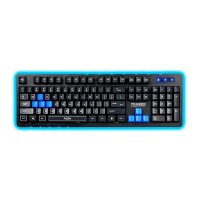
The FOXXRAY BK-20 TOUGHNESS Gaming Keyboard is a wired peripheral designed for PC gaming, offering a robust set of features for an enhanced user experience. This user's guide provides comprehensive information on its system requirements, usage instructions, and key functionalities.
The BK-20 TOUGHNESS is a gaming keyboard that connects to a personal computer via a USB port. It is designed to provide a responsive and customizable input experience for gamers. A key feature is its "19 keys conflict free" capability, which ensures that specific combinations of keys commonly used in gaming can be pressed simultaneously without ghosting or missed inputs. These conflict-free keys include Q, A, Z, W, S, X, E, D, C, B, Space, Up Arrow, Down Arrow, Left Arrow, Right Arrow, Tab, Left Ctrl, Left Shift, and Left Alt. This anti-ghosting functionality is crucial for fast-paced games where multiple commands need to be executed in quick succession.
Beyond standard alphanumeric input, the keyboard integrates multimedia control keys, allowing users to manage audio and video playback directly from the keyboard. It also includes dedicated function keys that, when combined with the FN key, unlock additional features such as launching applications, controlling volume, and managing media playback. A notable gaming-specific feature is the ability to swap the WASD keys with the arrow keys, offering flexibility for different gaming styles or preferences. The keyboard also features a WIN key lock function to prevent accidental presses of the Windows key during gameplay, which could interrupt the game.
The keyboard is designed for ease of use with a plug-and-play setup.
Fn+F1: Media PlayerFn+F2: Volume DownFn+F3: Volume UpFn+F4: MuteFn+F5: Stop (media playback)Fn+F6: Previous TrackFn+F7: Start / Pause (media playback)Fn+F8: Next TrackFn+F9: Mail (launches default email client)Fn+F10: Network Home (launches default web browser to homepage)Fn+F11: All Key Lock (locks all keyboard input)Fn+F12: Calculator (launches calculator application)FN + W: WASD & Arrow Switch (swaps the functionality of WASD keys with the arrow keys). This is particularly useful for games that might traditionally use arrow keys for movement but where WASD is preferred, or vice-versa, offering greater ergonomic flexibility.Fn+WIN-L: Lock WIN Key (disables the Windows key to prevent accidental presses during gameplay, which can minimize game interruptions).The manual does not explicitly detail specific maintenance features for the keyboard beyond its initial setup and usage. However, as a wired peripheral, general maintenance practices for electronic devices would apply:
The FOXXRAY BK-20 TOUGHNESS Gaming Keyboard is presented as a straightforward, functional gaming peripheral with essential features like anti-ghosting and dedicated multimedia controls, aimed at providing a reliable and enjoyable gaming experience. The inclusion of the WIN key lock and WASD/arrow key swap functions highlights its focus on catering to gamer needs.

 To Next Page
 General