EasyManua.ls Logo

Foyum TY200 - User Manual

Foyum TY200
13 pages
Print Icon
To Next Page IconTo Next Page
Loading...
More information could visit Youtube.com and search with TY200”.
www.foyum.com
Question and Answer IconNeed help?

Do you have a question about the Foyum TY200 and is the answer not in the manual?

Overview

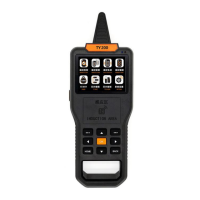
The TY200 is a multi-functional locksmith tool designed for remote control and smart card operations, offering a comprehensive suite of features for professionals.

Function Description:

The TY200 serves as a versatile device for various remote control and smart card tasks. Its primary functions include:

  • Remote Frequency Test: This feature allows users to accurately test the frequency of remote controls, ranging from 312MHz to 868MHz. It can distinguish between ASK (Amplitude Shift Keying) and FSK (Frequency Shift Keying) modulation modes, and is capable of testing frequencies for Citroen and Peugeot vehicles. When testing, the device displays a "yellow wave" at the bottom of the screen, indicating a valid frequency value and modulation result.

  • Remote Data Detection: This function provides crucial information about a remote control, including its chip model, baud rate, note (Fixed, Hopping, or Undefined), bits, frequency, and modulation type. This data helps determine if a remote can be cloned. For "Fixed" code remotes, the device displays the chip model (e.g., AX5326) and frequency, making it easy to decide on cloning. The "Data" display shows the raw data, which can sometimes be edited to create a new remote, even if some buttons on a four-button remote are broken. For "Hopping" code remotes (rolling code), it identifies chip models like HCS101 and HCS201/302. The TY200 can directly copy HCS101 codes. For HCS201/302 codes, users may need to select the brand in "Garage RC" or use the "Car RC" generation function. The device warns that for some HCS201/302 codes, direct copying may not work properly, recommending RC generation instead to avoid affecting the original remote. For "UNDEFINED" codes, which are more complex and secure, the TY200 can attempt a copy, but users are warned against trying on vehicle keys where renewal after loss of function cannot be ensured, as most smart car keys have anti-theft features.

  • Remote Data Comparison: After cloning a fixed code remote, this function allows users to compare the newly cloned remote with the original to ensure the correct code has been copied.

  • Remote Clone: The TY200 supports cloning of common fixed code remotes (e.g., PT22XX, LX918, HT6P20) and hundreds of vehicle and garage HCS rolling code remotes. It supports all TY series Universal remotes. Specific cloning options include:

    • Car RC Clone
    • Garage & Other RC Clone
    • Special Clone
    • HYUNDAI & KIA CLONE
    • SMART CAR CLONE
    • STEEL-MATE1 CLONE
    • Important Notice: For special cloning functions (2.3-2.6), there are inherent risks. It is strictly forbidden to copy VW car keys, original smart keys, or keys with chips. These functions are only recommended for skilled technicians/locksmiths. The device supports fixed code remote cloning, partial special vehicle model cloning (e.g., 2015 K2, K3) without repeated codes, and partial vehicle non-repeated code HCS type direct cloning.
  • Remote Generation: The TY200 is a hand-held remote control generation tool.

    • Garage Remote Generation: It has built-in data for dozens of garage models (continuously updated), including famous brands like BFT, FAAC, NICE, and DOORHAN. Generated remotes must be reprogrammed to the receiver box.
    • Car Remote Generation: The device has built-in data for over 1200 vehicle models (continuously updated), including remote pictures and matching information. Users can select the relevant data file based on the actual vehicle model, use the TY200 with a universal remote, and match it to the vehicle control unit by programming.
  • Remote Edit: This function allows for generating new remote controls without an original remote, accomplished in two ways:

    • Select Chip Type: Data is created from the machine itself. It supports editing for chip types like PT2262, PT2240, AX5326, LX918, HT6P20*, HT12*, DOOYA, etc. It uses common fixed code format data and the TY200 Universal remote for emulation, supporting all TY series remote series.
    • Enter Remote Edit: Data is edited based on a reference remote.
    • Frequency Edit: Users can freely set any frequency between 300MHz and 500MHz for each button. For example, the first key can be set to 315MHz, the second to 433.92MHz, the third to 330MHz, and the fourth to 430.5MHz. The frequency settings are stable and can be repeated multiple times.
    • Make a Fixed Code Remote: This option is also available under Remote Edit.
  • IC & ID Smart Card Operations: The TY200 supports hundreds of smart cards (125KHZ-13.56MHZ) from Asia, Europe, America, Southeast Asia, Africa, and Australia. This support is continuously updated. It also supports almost all blank copy cards, with future updates to include more smart cards.

    • Characteristic Features:
      1. Full Decode Function: Breaks IC card encryption, offering comprehensive defense.
      2. Automatic Step-less Full Frequency Sweep: Prevents offset frequency cards from being hidden.
      3. Built-in WIFI Full Decode and WIFI Upgrade Procedures: Provides unlimited potential for future enhancements.
      4. Broad Support: Supports mainland China, Taiwan, Europe, Southeast Asia, ID/IC Smart Cards.
      5. User Experience: Features a built-in lithium battery and a full-color large screen for optimal user experience.
  • TP TEST (Transponder Test): This function is available.

  • TP Edit & Copy (Transponder Edit & Copy): This function is available.

  • WIFI UPDATE: This function is available.

  • Chip Edit (TP EDIT): This function is not yet open.

  • Chip Copy (TP CLONE): Supports copying 11.12.13 transponder chips and can detect many kinds of chips, including 46, 4D, 11.12.13.

  • System Settings:

    • WLAN: No PC support needed; connect to WIFI easily. Users need to register a simple account for the first connection, and subsequent connections will automatically link to the last entered WIFI.
    • WIFI Update: One-button smart online update via WIFI.
    • Battery: To save lithium battery power, users can set "screen time" and "shutdown time" by specifying the desired number of seconds.
    • Screen: Settings related to the screen.
    • Instructions: Many instructional videos are available on www.youtube.com.
    • About Device: View the version state of the device.

Important Technical Specifications:

  • Frequency Range: 312MHz-868MHz for remote frequency testing.
  • Smart Card Support: 125KHZ-13.56MHZ.
  • Battery: Built-in lithium battery.
  • Display: Full-color large screen.
  • Connectivity: WIFI for updates and certain functions.

Usage Features:

  • Customized Design: Independent version for customized operations.
  • Independent Series Remote: Supports independent series remotes.
  • Free Updates: Free updates for local remote and other functions.
  • User-Friendly Interface: Intuitive menu navigation with clear icons for different functions (Remote Test, Remote Clone, Remote Generation, Remote Edit, IC&ID, Chip Edit, Chip Clone, System Settings).
  • Induction Area: A designated "INDUCTION AREA" for placing remote controls during detection and cloning.
  • Data Detection Tip: To ensure complete information, place the remote control against the Induction Area, press and hold the key until the interface fully displays the Data and Frequency. Clicking the key for only one second may result in incomplete information.
  • Multi-language Support: Implied by the English interface.

Maintenance Features:

  • WIFI Update: Allows for easy, one-button online updates of the device's software and procedures, ensuring it stays current with new car models and smart card technologies. This includes built-in WIFI full decode and upgrade procedures, offering unlimited potential for future enhancements.
  • Battery Management: Users can customize screen and shutdown times to optimize battery life.
  • Online Resources: Access to instructional videos on YouTube for guidance and troubleshooting.

Foyum TY200 Specifications

General IconGeneral
BrandFoyum
ModelTY200
CategoryTest Equipment
LanguageEnglish