24
Freecom MediaPlayer-3
GB
6
7.3.2 Creating a partition on the MediaPlayer-3 under Windows
98 SE / ME
The following steps will guide you the process of creating partitions on your
MediaPlayer-3 under Windows 98SE/ME. After this procedure your Freecom
MediaPlayer-3 will be ready for use and it will be allocated a drive letter.
1. Click on the "Start" button.
2. Select "Run".
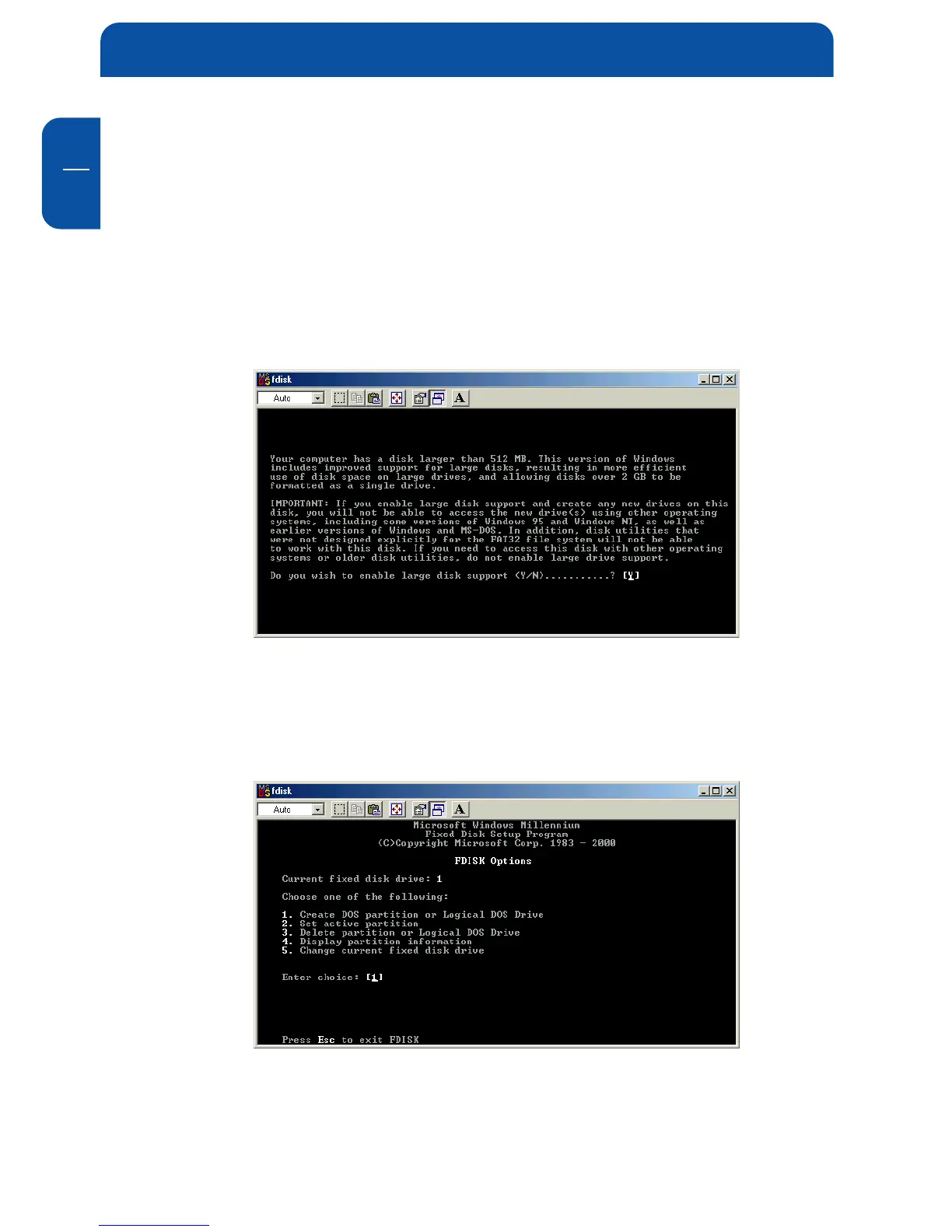
3. Enter "fdisk" and confirm with "OK".
4. Answer the question "Do you wish to enable large disk support?" by pressing
the 'Return' key. FAT32 is now activated.
5. Choose Option "5 (Change current fixed disk drive)" by pressing '5' and
'Return'.
6. Select the hard disk by its number where the "Usage" contains no value but
only a percent symbol. Select the number of the corresponding hard disk and
confirm by pressing the "Return" key.
Now your hard disk is activated and ready to be partitioned.


 To Next Page