【How to Use the Bluetooth Intercom System】
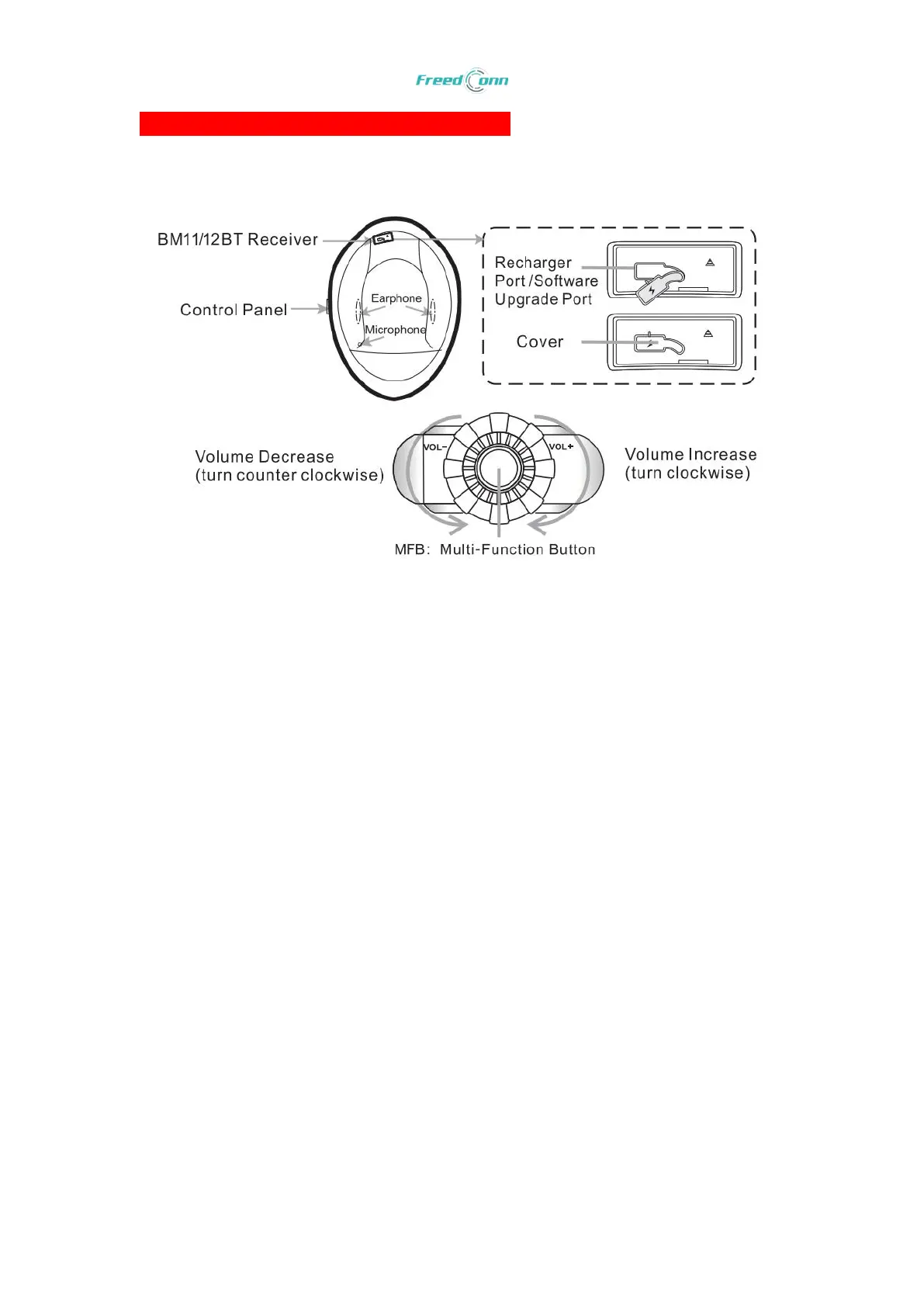
1. Panel Control
2. Pair with Intercom Headset/ Cellphone/ GPS or other Bluetooth-enabled Device
(1) Turn on your cellphone, GPS or other Bluetooth-enabled device and turn into BT search
mode.
(2) Press and hold the MFB button about 6s until the blue and red indicator light flashes
alternatively.
(3) Choose “ add new device” or “ BM2-S” on your phone, GPS and other device.
(4) If required, the original code is “0000”
(5) After paired with other device successfully, they will pair automatically next time when
you turn on. ( If not, just try to clear the pairing memory or CONTACT US directly).
3. Pair with 3
rd
Bluetooth Intercom Headset
(1) Make sure there is not other active Bluetooth device when pairing the target device.
(2) Make sure the 2 Bluetooth intercom headset are under “ OFF” status.
(3) Press and hold MFB button about 6s until the blue and red indicator light flashes
alternatively.
(4) Press one of MFB button to go into search mode. When pair successfully, you will hear a
short tone “ Di” and the indicator light will remains blue only.


 To Next Page