EasyManua.ls Logo

Freestyle Shark Classic Tide 600 - User Manual

Freestyle Shark Classic Tide 600
12 pages
Print Icon
To Next Page IconTo Next Page
Loading...
1
SHARK CLASSIC TIDE 600
Instruction Manual
Question and Answer IconNeed help?

Do you have a question about the Freestyle Shark Classic Tide 600 and is the answer not in the manual?

Summary

Button Configuration

Special Features

Display Modes

Normal Time Display Formats

Details DATE/TIME, TIDE/TIME, and BIG TIME formats in Normal Time mode.

Tide;Time Display

Shows current time, next tide time, and tide height indicators.

Big Time Display

Setting Normal Time and Calendar

Setting the Tide Mode

Using Tide, Sunrise, and Sunset Data

Tide Status Graph

Displays tide levels over time in 30-minute intervals.

Next Tide Data

Shows time and height of upcoming or previous tides.

Sunrise and Sunset Times

Using the Chronograph

Setting the Timer

Using the Timer

Setting the Heat Timer

Using the Heat Timer

Setting the Alarm

Alarm On;Off and Operation

Setting Time 2 and Calendar

Using the Backlight

Overview

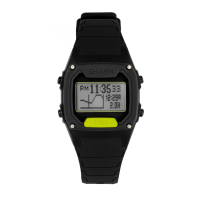
The Freestyle Shark Classic Tide 600 is a digital watch specifically designed for surfers, offering a range of features to enhance their experience.

Function Description:

The watch provides seven distinct display modes:

  • Normal Time: Displays the current time and date.
  • Tide: Shows programmed tide information, including upcoming, current, and previous tide levels, as well as sunrise and sunset times for selected locations.
  • Chrono (Chronograph): Measures elapsed time.
  • Timer: A countdown timer with various end-of-countdown actions.
  • Heat Timer: A specialized countdown timer for surf heats.
  • Alarm: Allows setting two independent alarms with different frequencies.
  • Time-2 (Foreign Time): Displays a second time zone.

Important Technical Specifications:

  • Water Resistance: Features unique Hydro Pushers® that can be pressed underwater to a dynamic water pressure of 3ATM.
  • Chronograph Capacity: Can count up to 99 hours, 59 minutes, 59 seconds, and 99 hundredths (99:59.59.99).
  • Timer Capacity: Can be set for a maximum of 23 hours, 59 minutes, and 59 seconds.
  • Heat Timer Capacity: Can be set for a maximum of 35 minutes.
  • Tide Data: Pre-programmed with tide information for numerous surf locations worldwide.
  • Display Formats: Offers multiple display formats within modes, such as DATE/TIME, TIDE/TIME, and BIG TIME in Normal Time mode.
  • Backlight: Features an S5 LIGHT button to activate the backlight for approximately 3 seconds.

Usage Features:

Button Configuration:

  • S4 SET: Used for setting various parameters.
  • S5 LIGHT: Activates the backlight.
  • S3 MODE: Cycles through the different display modes.
  • S2 RESET: Decreases digits during setting, stops chronograph, stops/resets timers, turns off alarms.
  • S1 TIDE: Increases digits during setting, starts chronograph, starts/resumes timers, toggles between alarms, cycles through tide data.

Normal Time Mode:

  • Display Formats: Users can switch between DATE/TIME, TIDE/TIME, and BIG TIME formats by pressing the S1 TIDE button.
  • BIG TIME Format: Displays time without AM/PM indication and features a "Shark fin" animation that moves across the screen once per minute (left to right for even minutes, right to left for odd minutes).
  • Setting Time and Calendar:
    1. Enter Normal Time mode (S3 MODE).
    2. Press and hold S4 SET for ~4 seconds to enter "SET TIME-1" mode.
    3. Use S1 TIDE (increase) and S2 RESET (decrease) to adjust blinking digits for year, month, date, hour, minutes, and seconds (S3 MODE to advance).
    4. Set time format (12-Hour or 24-Hour), calendar format (MM-DD-YY, DD-MM-YY, or YY-MM-DD), day of the week language (English, French, Portuguese, Spanish), hourly chime (ON/OFF), beep (ON/OFF), and tide height unit (Meters or Feet).
    5. Confirm with S4 SET.

Tide Mode:

  • Selecting Tide Mode: Press S3 MODE to enter TIDE mode. The favorite beach name and number will display.
  • Changing Favorite Tide Location: Press and hold S4 SET for ~4 seconds to enter "SET TIDE LOCATION" mode. Use S1 TIDE or S2 RESET to cycle through locations. Confirm with S4 SET.
  • Data Display Modes: After ~2 seconds, one of four modes will display: TIDE STATUS GRAPH, DATA OF NEXT TIDE, SUNRISE TIME, SUNSET TIME. Switch between these with S4 SET.
  • Setting Tide Location:
    1. In TIDE mode, press and hold S4 SET for ~4 seconds.
    2. The favorite tide location number will blink. Use S1 TIDE or S2 RESET to cycle through locations.
    3. Press S3 MODE to advance to continent, country, region, and beach entries, using S1 TIDE or S2 RESET to select.
    4. Set DST (Daylight Savings Time) ON/OFF for the selected beach location.
    5. Adjust tide offset minutes in increments of 10 using S1 TIDE or S2 RESET. This creates a custom location based on a programmed beach.
    6. Choose YES/NO for a custom beach. If YES, use S1 TIDE/S2 RESET to select letters and S3 MODE to advance for an 18-character name.
    7. Confirm with S4 SET.
  • TIDE STATUS GRAPH: Use S1 TIDE or S2 RESET to browse upcoming or previous tide levels in 30-minute intervals. Updates every 30 minutes.
  • DATA OF NEXT TIDE: Use S1 TIDE or S2 RESET to display previous or next tide data. Time shows A.M. or P.M. in 12-hour format.
  • SUNRISE/SUNSET TIME: Use S1 TIDE or S2 RESET to display previous or next sunrise/sunset times. If no tide data, "NO TIDE DATA FOR THE DATE" will display.

Chronograph Mode:

  • Selecting Chrono Mode: Press S3 MODE.
  • Starting/Stopping: Press S1 TIDE to start. Press S2 RESET to stop.
  • Resuming/Resetting: Press S1 TIDE to resume. Press and hold S2 RESET to stop and reset to 00:00.00.
  • Running in Background: The chronograph can run while in other modes, indicated by a graphic on NORMAL TIME or TIME 2 screens.

Timer Mode:

  • Selecting Timer Mode: Press S3 MODE.
  • Setting Timer:
    1. Press and hold S4 SET for ~4 seconds to enter "SET TIMER" mode.
    2. Adjust hours, minutes, and seconds using S1 TIDE (increase) and S2 RESET (decrease), with S3 MODE to advance.
    3. Select action-at-end: STOP AT END (stops at zero, alert tune, backlight flash), REPEAT AT END (reloads and repeats, beep for <30s, alert tune/backlight flash for >=30s), UP AT END (counts up to 23h 59m 59s, alert tune, backlight flash).
    4. Confirm with S4 SET.
  • Using Timer:
    1. Press S1 TIDE to start countdown.
    2. Press S2 RESET to stop. Press S1 TIDE to resume.
    3. To reload, stop with S2 RESET, then press and hold S2 RESET.
  • Running in Background: The timer can run while in other modes, indicated by a graphic (STOP AT END / REPEAT AT END / UP AT END) on NORMAL TIME or TIME 2 screens.

Heat Timer Mode:

  • Selecting Heat Timer Mode: Press S3 MODE.
  • Setting Heat Timer:
    1. Press and hold S4 SET for ~4 seconds to enter "SET HEAT TIMER" mode.
    2. Adjust minutes in 5-minute increments using S1 TIDE (increase) and S2 RESET (decrease).
    3. Confirm with S4 SET.
  • Using Heat Timer:
    1. Press S1 TIDE to start countdown.
    2. Press S2 RESET to stop. Press S1 TIDE to resume.
    3. To reload, stop with S2 RESET, then press S2 RESET to reset.
    4. When complete, an alert tune will emit and the backlight will flash.
  • Running in Background: The heat timer can run while in other modes, indicated by a graphic on NORMAL TIME or TIME 2 screens. It functions independently of the main Timer.

Alarm Mode:

  • Selecting Alarm Mode: Press S3 MODE.
  • Setting Alarm:
    1. Press and hold S4 SET for ~4 seconds to enter "SET ALARM" mode.
    2. Toggle between ALARM 1 and ALARM 2 using S1 TIDE or S2 RESET.
    3. Adjust hour (including AM/PM) and minutes using S1 TIDE (increase) and S2 RESET (decrease), with S3 MODE to advance.
    4. Set alarm frequency (DAILY, WEEKDAYS, WEEKENDS, SUNDAY-SATURDAY WEEKLY) using S1 TIDE or S2 RESET.
    5. Confirm with S4 SET. The alarm activates automatically.
  • Turning ON/OFF Alarm:
    1. In ALARM mode, toggle between ALARM 1 and ALARM 2 with S1 TIDE.
    2. Press S2 RESET to turn ON (frequency setting appears).
    3. Press S2 RESET again to turn OFF ("OFF" message displays).
  • Alarm Activation: A 20-second alarm tune and flashing backlight. Press any button to stop. If uninterrupted, the watch enters snooze mode, and the alarm will sound again after 5 minutes. Both alarms function with NORMAL TIME only.

Time-2 Mode:

  • Selecting Time-2 Mode: Press S3 MODE.
  • Setting Time-2:
    1. Press and hold S4 SET for ~4 seconds to enter "SET TIME-2" mode.
    2. Adjust year, month, date, hour, and minutes using S1 TIDE (increase) and S2 RESET (decrease), with S3 MODE to advance.
    3. Confirm with S4 SET.
  • Synchronization: Only year, month, date, hour, and minute can be set in Time-2 mode; all other settings are synchronized with NORMAL TIME.
  • Display Formats: Only DATE/TIME and TIDE/TIME formats are available in Time-2 mode.

Maintenance Features:

  • Hydro Pushers®: The unique design of the pushers allows for underwater operation up to 3ATM, reducing the need for specific maintenance related to water ingress through buttons.
  • Battery: While not explicitly detailed, as a digital watch, battery replacement would be a standard maintenance procedure.

Freestyle Shark Classic Tide 600 Specifications

General IconGeneral
BrandFreestyle
ModelShark Classic Tide 600
CategoryWatch
LanguageEnglish

Related product manuals