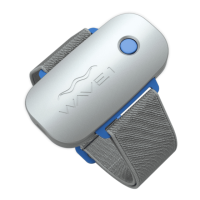
Your WAVE 1 Package Includes:
1. WAVE 1 frequency-emitting wearable device
2. Three (3) straps - small, medium and large sizes to wear on
your arm or leg
3. 1 x Micro USB Data/Charging Cable - Use only when
connecting to your computer and store mindfully. Other USB
charge-only cables will not work with the WAVE 1.
4. 1 x USB Wall Charger
Also Enclosed: Safety and One Year Warranty
1.
3.
2.
4.
Instruction Guide
+
WAVE 1 Assistant App
Minimum Requirements:
Mac OS 10.7 or Windows 7
Return Policy
If you are unsatisfied with your Wave 1 within 30 days from
purchase, contact us by email to initiate a return and refund.
Email returns@FREmedica.com
Note: this return policy is void if your Wave 1 is transferred
or loaned to anyone other than the origional purchaser,
excluding family members who reside at the same address.
WARNING: DO NOT expose your WAVE 1 to water, sweat, rain, etc. Your device
is durable, but it is not waterproof. Any moisture could potentially create
internal corrosion. Any repairs under this condition due to misuse are not
covered under your Limited Time Warranty.
One Year Limited Warranty
For more information, please reference your Limited Warranty
inside WAVE 1 packaging.
Contact help@FREmedica.com for assistance and support.
DISCLAIMER: www.FREmedica/disclaimer.com
Your Quick Start to WAVE 1:
1. Download WAVE Assistant App and Charge your Device.
2. Connect WAVE 1 with Computer and Register.
3. Review your App’s main screen. Intensitly Settings are low to start.
4. Start Slow, Test your Body to Find Comfortability.
5. Select a Strap. Wear on Arm or Leg. Press Blue Start Button. Begin.
6. When Ready, Increase your App’s Intensity Settings for Maximum Effect.
7. Listen to Your Body. Customize your Intensity Settings based on How You Feel.
8. Use your App regularly to Customize Intensities and Review Progress.
9. Access new Firmware every 30 days OR Select Defer to extend time.
10. Still stuck? Review this Instruction Guide carefully or visit:
www.FREmedica/userguides.com


 To Next Page
 Need help?
 General