Operating Instructions
(continued)
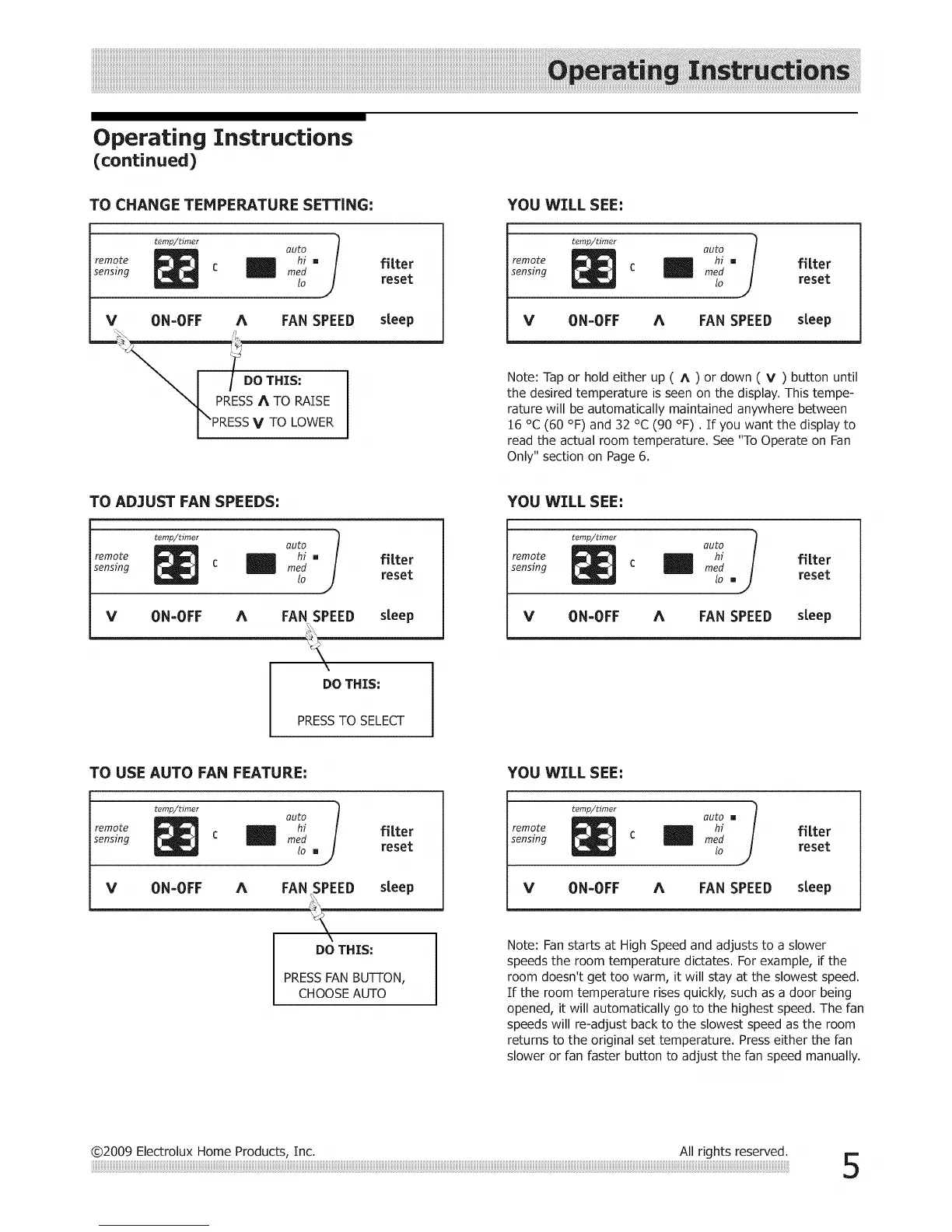
TO CHANGE TEMPERATURE SETTING;
remote
sensing
temp/timer
auto i
hi, fitter
mm
med
lo reset
V 0N=0FF A FAN SPEED
"_ PRESS A TO RAISE
I "PRESS V TO LOWER
steep
YOU WILL SEE;
remote
sensing
temp/timer
c m
auto J
hi , fitter
med
lo reset
V ON=OFF A FAN SPEED steep
Note: Tap or hold either up ( A ) or down ( V ) button until
the desired temperature is seen on the display. This tempe-
rature will be automatically maintained anywhere between
16 °C (60 °F) and 32 °C (90 °F). If you want the display to
read the actual room temperature. See "To Operate on Fan
Only" section on Page 6.
TO AD3UST FAN SPEEDS:
remote
sensing
temp/timer
v ON-OFF A
auto l
hi, fitter
reed
lo reset
FAN SPEED steep
DO THIS:
YOU WILL SEE=
remote
sensing
temp/timer
auto J
hi f] [ter
reed
Io . reset
V ON-OFF A FAN SPEED steep
PRESSTO SELECT
TO USE AUTO FAN FEATURE:
remote
sensing
temp/timer
auto
wedhi fitter
lo , reset
V ON=OFF A FAN SPEED steep
DO THIS:
PRESSFAN BUTTON,
CHOOSE AUTO
YOU WILL SEE:
remote
sensing
temp/timer
auto [] 1
hi j fitter
reed
Zo reset
V ON=OFF A FAN SPEED steep
Note: Fan starts at High Speed and adjusts to a slower
speeds the room temperature dictates. For example, if the
room doesn't get too warm, it will stay at the slowest speed.
If the room temperature rises quickly, such as a door being
opened, it will automatically go to the highest speed. The fan
speeds will re-adjust back to the slowest speed as the room
returns to the original set temperature. Press either the fan
slower or fan faster button to adjust the fan speed manually.
@2009 Electrolux Home Products, Inc. All rights reserved.




 To Next Page