17
CONTROLS AND SETTINGS
1
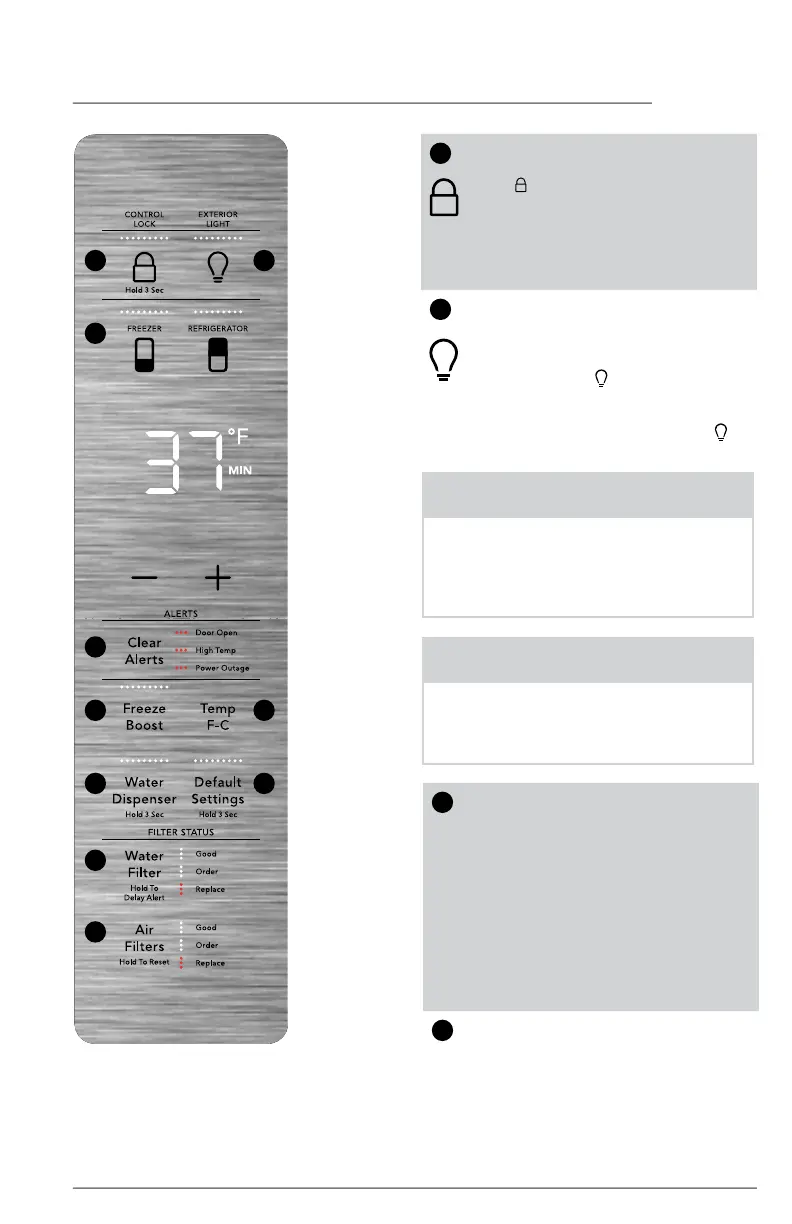
Control Lock
Use to lock the display. Press and
hold
for 3 seconds to enable/
disable. The indicator flashes and
an alert sounds when CONTROL
LOCK is enabled. You cannot
make changes on the display
while the lock is engaged.
2
Exterior light
Your appliance has exterior lights
under the refrigerator doors and
the Custom-Flex Temp drawer.
Press and hold for 5 seconds
to enable the lights. The lights
will remain on until you disable
them by pressing and holding
for 2 seconds.
2
10
9
87
65
4
3
1
3
Temp Settings
Select compartment for tem-
perature change (FREEZER or RE-
FRIGERATOR). Press either the +
or - to adjust to desired tempera-
ture setting.
Freezer temp - Control tempera-
tures range from -6°F / -21°C to
+6°F / -15°C.
Refrigerator temp - Control tem-
peratures range from +34°F / +1°C
to +44°F / +7°C.
4
Clear Alerts
Resets any alarms that are active
and illuminated on the display
(Door Open, High Temp,
Power Outage).
NOTE
The recommended settings for a prod-
uct installed in a kitchen is 37°F for the
fresh food compartment and 0°F for
the freezer.
NOTE
This unit is equipped with a cooling
system where one section (Refrigerator/
Freezer) may cool slower than the other
initially. Allow 24 hours for unit to stabi-
lize and reach the desired temperatures.



 To Next Page