OPERATION
19
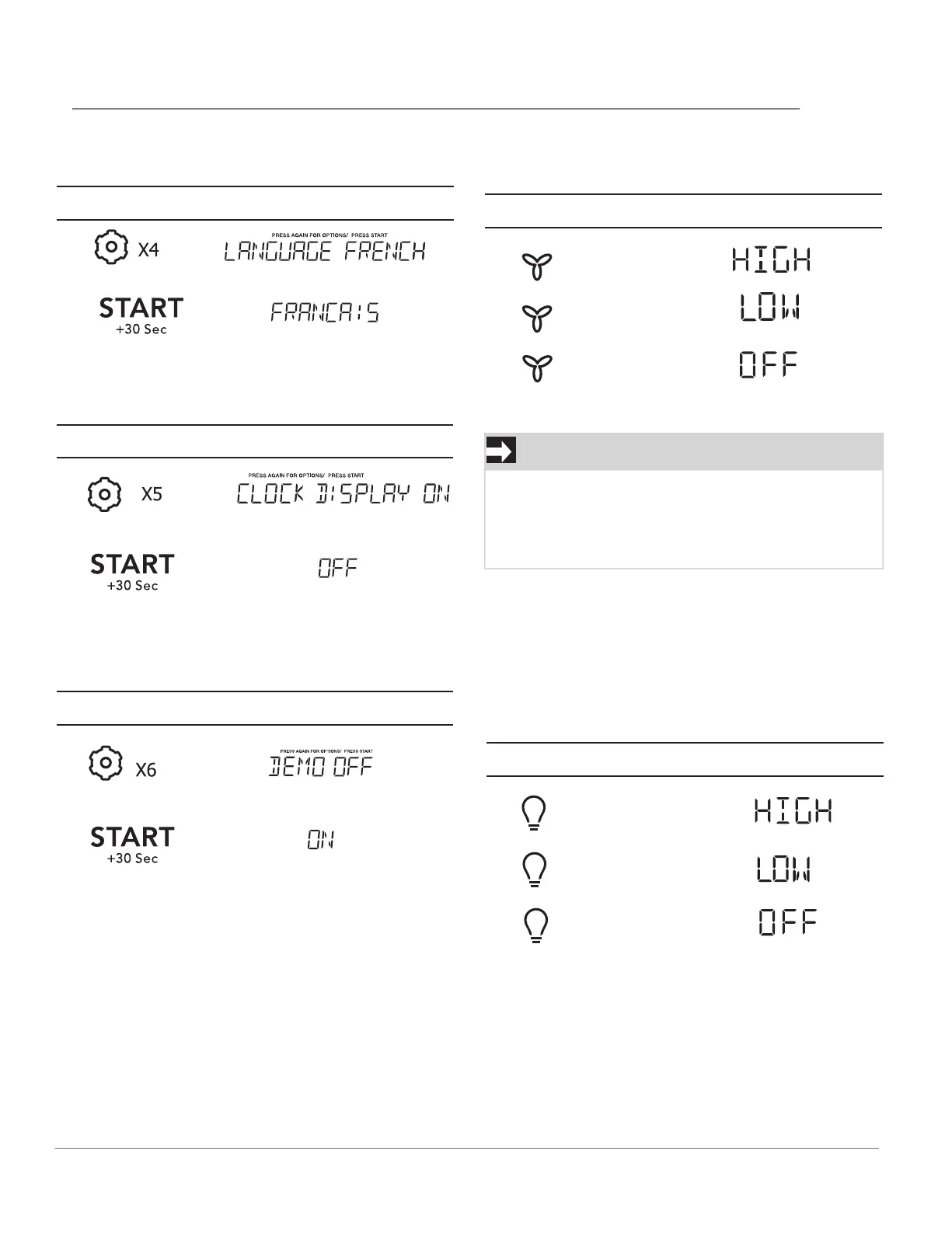
SETTING LANGUAGE
USING VENT FAN
Touch:
Display Shows:
Touch:
Display Shows:
1.
1.
2.
3.
Turn o fan when desired
2.
SETTING CLOCK DISPLAY OFF/ON
Touch:
Display Shows:
NOTE
If the temperature from the range or cooktop
below the oven gets too hot, the vent fan will
automatically turn on to protect the oven. It may
stay on up to an hour to cool the oven. When this
occurs, the Vent pad will not turn the fan o.
1.
2.
USING COOKTOP LIGHT
The pad controls the cooktop light. If the light is
OFF the first touch of the light pad will turn the
light HIGH, second touch LOW and third touch
OFF.
SETTING DEMO
Touch:
Display Shows:
1.
Touch:
Display Shows:
1.
2.
2.
3.
• If the language is Engli
sh:
• If the clock display is on:
• If the language is English:
• Suppose you want to set the vent fan speed
to HIGH from the OFF position.
• Suppose you want to set the light for HIGH
from the OFF position.



 To Next Page