9
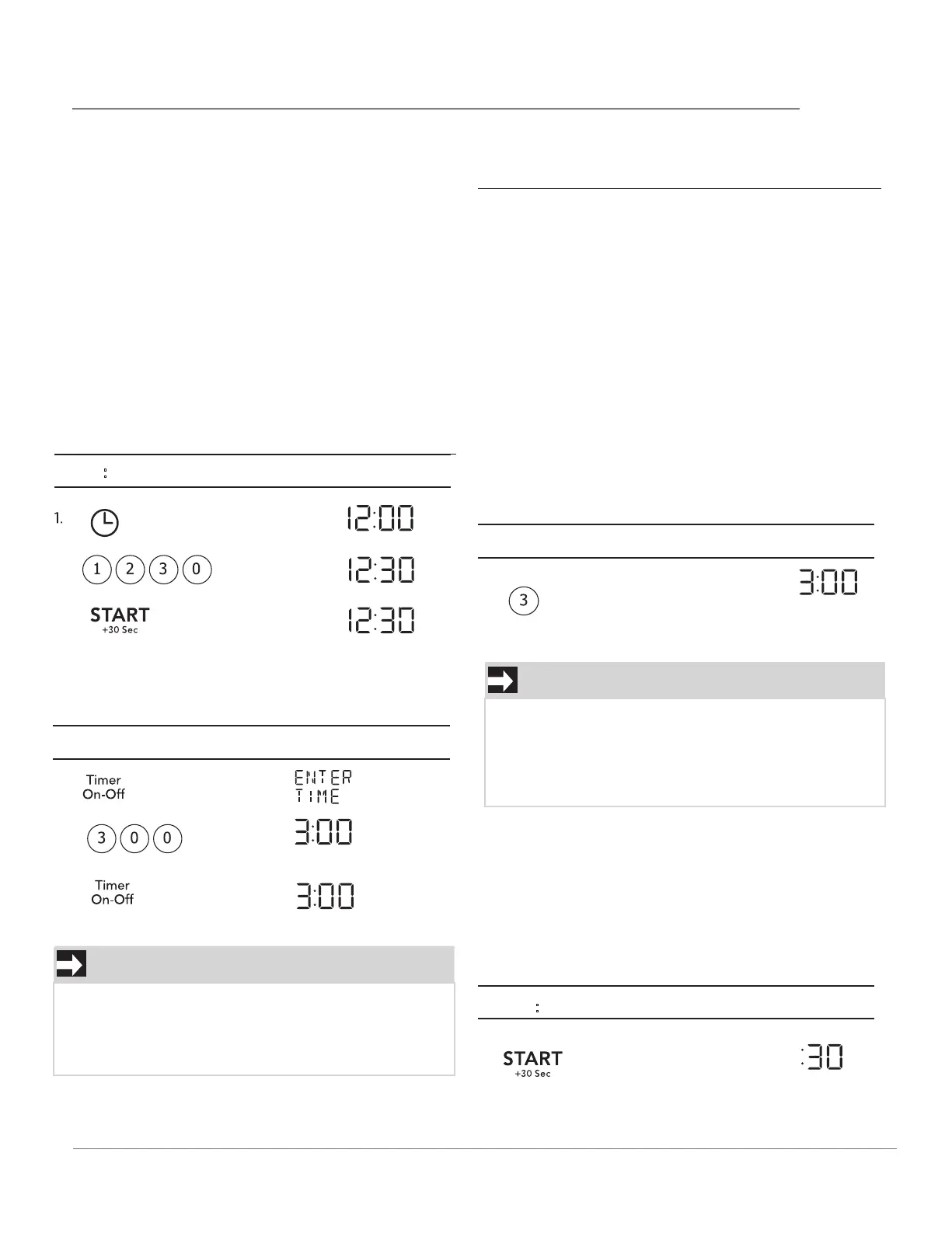
TO SET THE CLOCK
3.
TO SET THE TIMER
1.
OPERATION
• Plug in the oven. Close the door. The oven display
will show 12:00.
• If no operation after 1 minute, the oven will show
12:01.
Suppose you want to enter the correct time of
day 12:30 (A.M or P.M.).
Set the timer for 3 minutes.
2.
1.
1. Before operating your new oven make sure you
read and understand this Use and Care Guide
completely.
2. Before the Over the Range Microwave Oven can
be used, follow these procedures:
3. Set clock. See below.
2.
3.
STOP/CANCEL
Press the STOP/CANCEL to:
1. Erase if you make a mistake during programming.
2. Cancel timer and the signal after cooking.
3. Stop the oven temporarily during cooking.
4. Return the time of day to the display.
5. Cancel a program during cooking, press twice.
6. Press stop/cancel hold 3 seconds to activate or
deactivate child-lock function.
Suppose you want to cook 3 minutes at 100%power.
USING ONE TOUCH START
This is a time saving pad that will automatically start
cooking 2 seconds after selected. Numeric key 1 to 9
can be touched for a 1 minute to 9 minutes automat-
ic start cooking feature.
NOTE
1. Opening the door during timer countdown will
not pause the running timer.
2. To cancel the active timer, press the Timer
On/Off key once.
Then time will count down
Touch:
Display Shows:
NOTE
“Food” will be displayed if a quick start cooking
cycle or +30 sec key is not selected within 5
minutes of placing food in the microwave. You
must open then close the door again to clear
''Food" from the display.
1.
Suppose you want to set and start microwave
cooking at 100% for 30 SEC.
USING ADD 30 SEC.
This is a time-saving pad. It is a simplified feature
that lets you quickly set and start microwave cook-
ing at 100% power.
Then time will count down
Touch: Display Shows:
Touch: Display Shows:
Display Shows:
•
•
•
•
Time counting down
automatically after 2
seconds
T
ouch:



 To Next Page