8
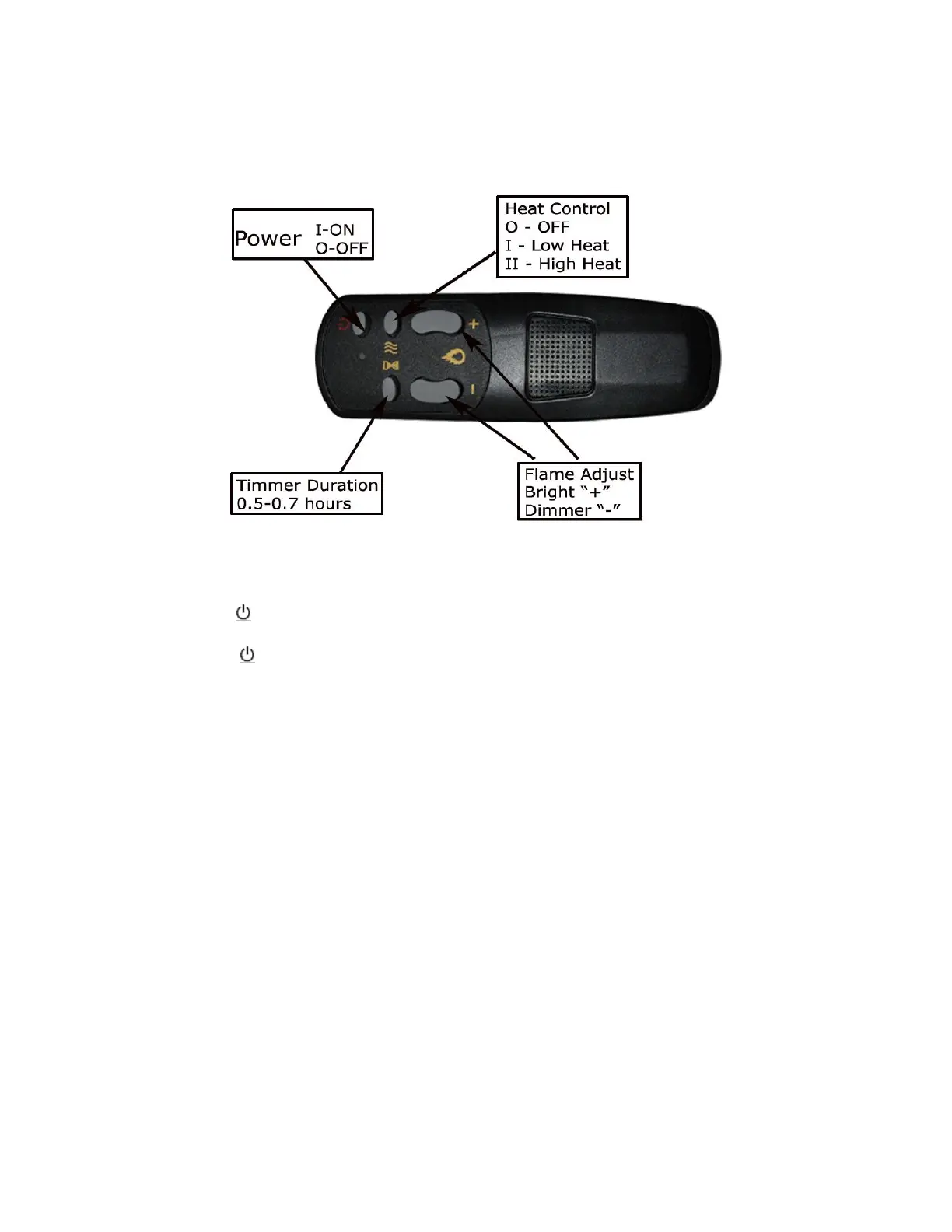
Description of Remote Control
Power Switch
Plug the fireplace into a power outlet. The fireplace is now in Standby mode.
Press the button once to turn on the fireplace and flame effect. An indicator light will light up
to indicate that the function is on. This will also turn on the flame effect.
Press the button once to turn off the flame effect. This will put the fireplace back into
Standby mode.
Heat Control
Press the “Heat Control” button once for the low heat setting. Ten seconds later, the fireplace
will begin to dispense warm air (750W).
Press the “Heat Control” button again to have the fireplace dispense hot air (1500W).
Press the “Heat Control” button again, and after ten seconds the heat will turn off.
Simulate Flames
Press either the 〝+〞or 〝-〞button to brighten or dim the flames.
Timer
Press the “Timer” button to set the fireplace to turn off after certain duration of time. Timer
duration ranges from 0.5hrs to 7.5hrs. The LED indicator lights up when the fireplace is in Timer
mode.
Note: All of the above functions can be operated by either the Control Panel or the Remote Control.


 To Next Page
 Loading...