LCD Display
The AlphaTrack Remote has a 16-character by 2-line backlit LCD display. In addition to the
standard ASCII character set, the display has 8 custom characters to support typical DAW
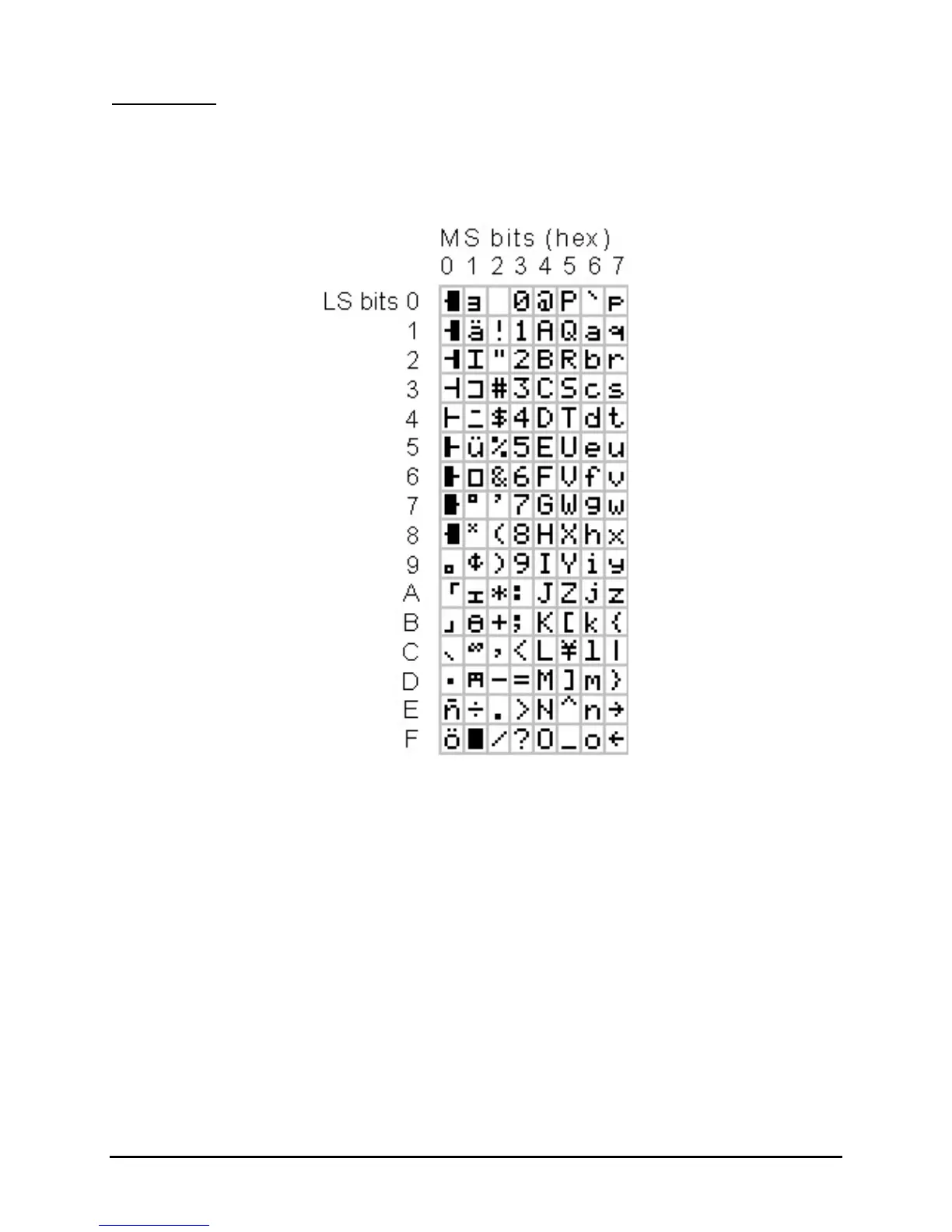
functions. The ASCII character implementation is shown in Table 1 below.
Table 1: AlphaTrack LCD Character Set
The display may be written to by using the following MIDI SysEx message format:
f0 00 01 40 20 00 pp c1 c2 c3 c4 … cn f7
Where: pp is the starting character position, 0 – 0x1f
c1, c2, c3 are the ASCII codes to display.
n can range from 1 to (0x20 – pp)
Example: f0 00 01 40 20 00 10 48 65 6c 6c 6f f7
Writes “Hello” to the beginning of the lower line of the LCD display.
The LCD should be cleared (filled with character 0x20) when the DAW application is closed.
AlphaTrack Native Mode Version 1.0 Page 8 of 9


 To Next Page