23
10/2021
External Monitor User Interface - Setup IPS710A
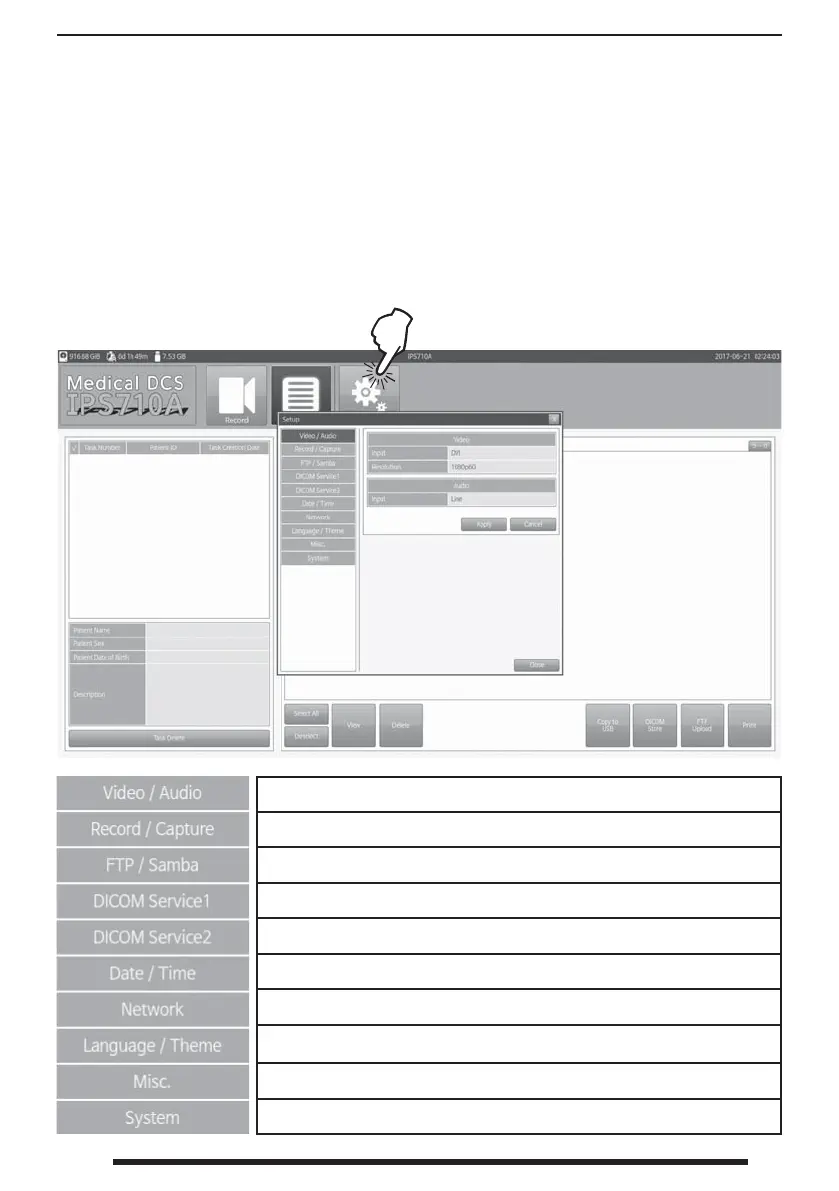
Press the Setup button to access
system and interface options.
Use the Setup dashboard to con gure the system and any connected devices. Setup also de nes
what type of les will be captured or recorded.
Each IPS710A installation has unique requirements for communicating with other information
systems. Specialized modi cations are required by, and should be set-up by, each facility’s IT
department in order to integrate protocols such as FTP/Samba, DICOM, network addresses, etc.
Setup video signal type and resolution, audio input type.
Setup recording quality, clip size, simultaneous copy to USB, USB speed check, still capture le format.
Setup FTP server and Samba client.
Setup worklist and MPPS.
Setup store server details, source modality, station title, and character set.
Setup date and time + or - GMT.
Setup network DHCP, IP, Netmask, Gateway, DNS.
Setup interface language (Spanish, Italian, French, German, Polish, Portuguese, Chinese,
Korean, Japanese, English) and color theme.
Setup various IPS710A features, connected device features, password.
Setup system versions, updating, hard disk formatting, system reset.



 To Next Page