5Before You Begin
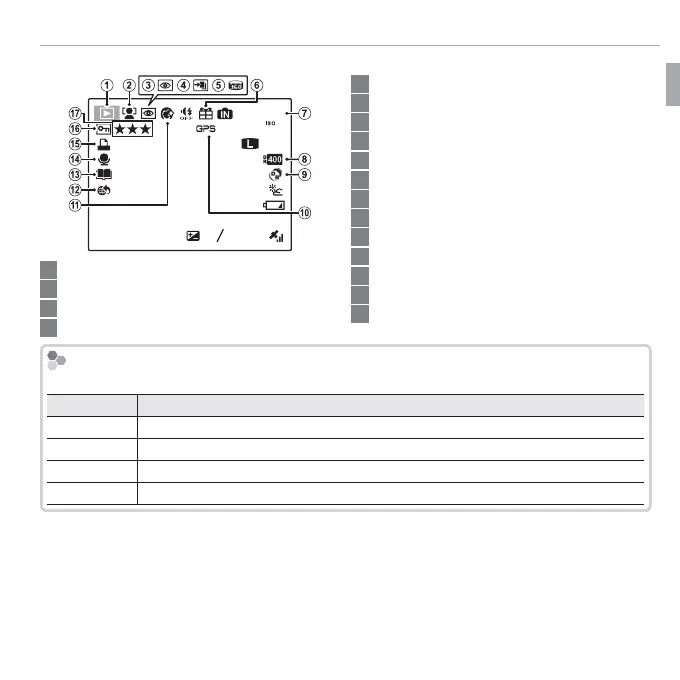
Parts of the Camera
■ Playback
100-0001
400
12 / 31 / 2050
10: 00
AM
2
-
1
1/250
F
3.5
3
4:3
F
YouTube
5 Motion panorama z ................................................. 57
6 Gift image ..................................................................... 50
7 Frame number ............................................................ 104
8 Dynamic range ............................................................. 87
9 E mode .............................................................. 23
10 GPS data ....................................................................... 62
11 Portrait enhancer .......................................................... 30
12 Mark for upload to ........................................................ 95
13 Photobook assist........................................................... 55
14 Voice memo indicator ................................................... 99
15 DPOF print indicator ..................................................... 73
16 Protected image ........................................................... 96
17 Favorites ....................................................................... 50
1 Playback mode indicator..........................................21, 50
2 Intelligent Face Detection indicator .........................41, 96
3 Red-eye removal indicator ............................................ 96
4 Pro focus mode, pro low-light mode ........................28, 29
Battery Level
Battery level is shown as follows:
Indicator
Description
D (white)
Battery partially discharged.
C (white)
Battery more than half discharged.
B (red)
Low battery. Charge as soon as possible.
A (blinks red)
Battery exhausted. Turn camera o and charge battery.



 To Next Page
 Loading...








