48
Focus Frame Selection
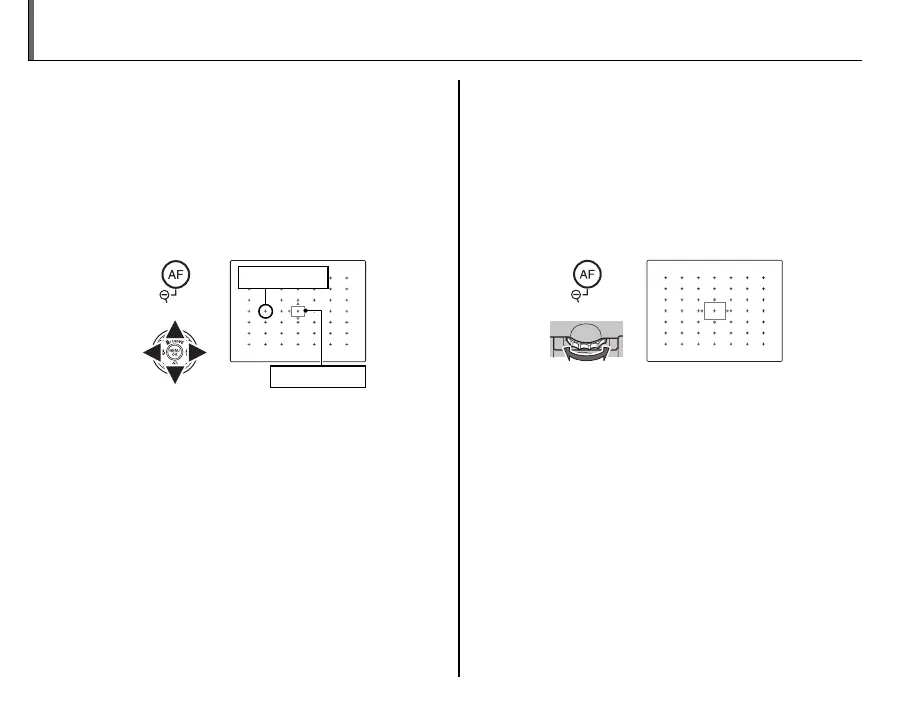
When t AREA is selected for F AF MODE in
the shooting menu and AF-S is selected for focus
mode, focus position can be changed. Press AF
button and then press the selector up, down, left
or right (the focus frame can be returned to the
center by pressing MENU/OK). The setting takes ef-
fect when you press the AF button again.
Focus frame
Focus point
When framing a picture in the LCD monitor, you
can choose the size of the focus frame for AF-S.
Press the AF button and then rotate the main-
command dial. The frame size can be reduced up
to 50% or enlarged up to 150% (returned to 100%
by pressing the main-command dial). The setting
takes effect when you press the AF button again.



 To Next Page
 Loading...