The DZB100 Series is a range of high-performance, low-noise, general-purpose AC Motor Drives manufactured by FULING INVERTER. These drives utilize high-quality components, materials, and the latest microprocessor technology to provide efficient and reliable motor control.
Function Description:
The DZB100 Series AC Motor Drives are designed to control the speed and operation of AC motors. They offer high performance and low noise operation, making them suitable for a wide range of industrial applications. The drives support various voltage and power ranges, catering to different motor capacities.
Important Technical Specifications:
Voltage and Power Ranges:
- 220V Series: 0.5 kW to 3.7 kW
- 400V Series: 0.5 kW to 400 kW
- 660V Series: 15 kW to 630 kW
- 1140V Series: 55 kW to 630 kW
Frequency Range:
- L: 0-400.0 Hz
- H: 0-2000 Hz
- 3-phase, 200-240V or 380-480V, 50/60Hz (for most models)
- Some models support 660V and 1140V input voltages.
- For single-phase applications, the AC input line can be connected to any two of the three input terminals R, S, T. A single-phase DZB100B drive can be powered from three-phase as well as single-phase. Note: This drive is not intended for use with single-phase motors.
Output Power:
- 3-phase, 0-380V, 0-400Hz (typical for 400V series)
Control Circuit Power Source:
- Auxiliary control power source: DC 20V~24V (50mA Max.)
- Power supply for speed setting: +10V (20mA max. output current)
- Analog voltage input (VI-ACM): 0~10V (Max. output frequency) input
- Analog current input (CI-ACM): 4~20mA (Max. output frequency) input
Analog Outputs:
- Analog frequency/current meter (FM-ACM): 0~10V (Max. output frequency) output
- Digital frequency output (DFM-DCM): 0, +10V
- Multi-function inputs (MI1-DCM, MI2-DCM, MI3-DCM, MI4(EF)-DCM) for various control commands.
- REV/STOP (REV/STOP) and FWD/STOP (RUN/STOP) for motor direction and stop commands.
- RST-DCM for Reset.
- TRG-DCM for Counter trigger input.
Digital Outputs:
- Multi-function indication output contacts (A-B, B-C) for status indication (AC 250V 2A below, DC 30V 2A below).
- Multi-function PHC outputs (MO1-MCM, MO2-MCM) for open collector output (48V 50mA below).
Communication Interface:
- Serial communication interface (SG+-SG-): RS-485 serial port.
Environmental Conditions:
- Operating Temperature: -10°C to +40°C
- Storage Temperature: -20°C to +65°C
- Transportation Temperature: -25°C to +70°C
- Relative Humidity (R.H.): 0% to 95%, non-condensing (for storage and operation)
- Air Pressure: 70kPa to 106kPa
- Installation Environment: Protected from rain/moisture, direct sunlight, corrosive gases/liquids, airborne dust/metallic particles, vibration, and magnetic noise.
Usage Features:
Digital Keypad Operation:
The digital keypad consists of a display panel and a keypad, allowing users to program the AC drive and view operating parameters.
- LED Indicators: Red lamps indicate RUN, STOP, JOG, FWD, or REV operation.
- Display: Shows frequency, motor current, alarm contents, output frequency, input voltage, custom unit (n), internal counter value (r), and parameter numbers/values.
- PRGM/RESET Key: Selects normal/program mode, displays motor status, selects parameters, and resets the drive after a fault.
- FUNC/DATA Key: Displays drive status (reference frequency, output frequency, output current) in normal mode; displays current parameters and stores new parameter settings in program mode.
- FWD/REV Key: Toggles between forward and reverse operation. Causes motor to ramp down to 0 Hz and then ramp up to the preset speed in the opposite direction. Can be controlled via control terminal block by setting F1-01 to "0001" or "0002".
- JOG Key: Starts the AC drive at the jog frequency set by F1-23.
- RUN Key: Starts inverter drive operation. No effect if the drive is set to terminal run.
- STOP Key: Stops AC motor drive operation.
- Up/Down Keys: Change parameter settings, scroll through operating values or parameters. Pressing momentarily changes settings in increments; holding down rapidly scrolls through settings.
Operating Modes:
- The operating frequency can be changed in either "STOP" or "RUN" mode.
- Pressing the RUN key after power-on will cause the AC drive to operate at 60 Hz (factory default). The STOP key halts operation.
Motor Rotation Direction:
- When AC drive output terminals U, V, and W are connected to motor terminals U, V, and W, respectively, the motor will rotate counter-clockwise (viewed from the shaft) if a forward operation command is entered (FWD lamp is ON).
- To reverse the direction of rotation, interchange any two connections of the three motor leads.
Wiring Guidelines:
- Control lines and power lines (R,S,T;U,V,W;P,N,BR+,BR-) should be separated to avoid noise and mis-operation.
- Do not attach or remove wiring or connectors while power is applied.
- Do not monitor signals on the circuit board while the AC drive is in operation.
- Do not connect AC input to U, V, W terminals to prevent damage.
- Use twisted-shielded or twisted-pair shielded-lead wires for control signals, preferably in a separate steel conduit. The shield wire should only be connected at the drive.
Maintenance Features:
Safety Precautions:
- Always read the manual thoroughly before use.
- AC input power must be disconnected before any maintenance.
- Do not connect or disconnect wires/connectors while power is applied.
- Maintenance must be performed by qualified technicians.
- To avoid personal injury, do not remove the cover until all "DISPLAY LED" lamps are off, as the DC-link capacitor retains hazardous voltage.
- Grounding is done by connecting Earth Ground to the drive ground terminal.
- Highly sensitive components on PCBs are susceptible to ESD; avoid touching components or circuit boards without static control precautions.
- Never connect main circuit output terminals U, V, W directly to AC main circuit power supply.
Installation Requirements:
- Install vertically for proper ventilation, ensuring adequate space (150mm top/bottom, 50mm sides) between the drive and walls/equipment.
- Enclosures must provide adequate ventilation, keeping internal ambient temperature at 40°C or below.
- Store in a clean, dry location, within specified temperature and humidity ranges, away from corrosive gases and unstable surfaces.
Grounding:
- Provide a circuit breaker or disconnect switch and fuses according to electrical codes.
- Ensure correct wiring and proper grounding. Ground leads should be at least the same size as input leads R, S, T and as short as possible.
- If multiple AC drive units are installed side-by-side, all units should be grounded directly to ground poles, avoiding ground loops.
Cleaning:
- Do not apply antirust to screws for fastening drives. Clean drives and screws with a dry cloth or alcohol, not synthetic cleaner.
- Fasten screws with washers and rated torque to prevent enclosure distortion.

 Need help?
 General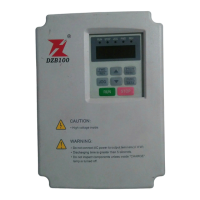

 To Next Page