EasyManua.ls Logo

Furrion FBM08A10C - User Manual

Furrion FBM08A10C
10 pages
Print Icon
To Next Page IconTo Next Page
Loading...
HIGH PRECISION BATTERY MONITOR
MODEL: FBM08A10C / FBM08A35C
LIPPERT ITEM NO.: 2021124459/ 2021124534
USER MANUAL
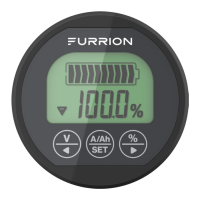
* Product picture for reference only
Furrion battery monitor measures voltage, current, and battery
capacity in real time. It can help user accurately understand the
status of battery pack, and includes a power-down memory
function.
This product works with 8V~30V battery pack, such as the most
common RV deep cycle; Wet cell, AGM and Lithium batteries.
Model FBM08A10C should be used for battery current that is
less than 100A.
Model FBM08A35C should be used for battery current that is
larger than 100A and less than 350A.
PRODUCT OVERVIEW
Battery Symbol
Symbol V: Present Voltage
Symbol A: Present Current
Symbol Ah: Present Capacity
Capacity Percentage
Charging Indication
Discharging Indication
Displayed Value
Percentage/Plus KeyCurrent/Capacity/Setting KeyVoltage/Reducing Key
Product Dimension
59 mm
20 mm
54 mm
Mounting the Shunt
Secure the shunt by using #4 or 3mm
screws with pan heads (not included),
to prevent accidental contact. There are
3 holes provided for mounting on the
shunt as shown.
NOTE: Mounting at least 2 holes is recommended. Do not place in
or cover with insulating material to allow adequate ventilation for
cooling.
Mounting the Power Monitor
Cut a 2⅛" (54.5mm) round hole on the equipment panel, tighten the
installation supporter with butterfly
Equipment Panel
Installation Support
Butterfly Nut
nut to clamp to the panel as shown.
NOTE: The “equipment panel” is
not included.
Connection
1. Connect the shunt in series with the negative circuit of the
battery pack as illustrated. Ensure the ends of the shunt
marked B- and P- are connected correctly as illustrated.
2. Connect a fused (5A max) AWG#18 to AWG#22 wire between
the shunt and a 12V+ supply as illustrated. Using a 2-2.5mm
slotted screwdriver is recommended to connect the shunt.
3. Connect the provided shielded wire between the shunt and
battery monitor as illustrated.
NOTE: The length of the shielded wire is 32.8 feet (10m).
Ensure the shunt and monitor are within reach. The shielded
wire can not be spliced to add length.
WHATS IN THE BOX
Battery Monitor
Shunt Resistor
Shielded Cable Wire
Mounting Clamp Bracket
User Manual
Warranty Manual
INSTALLATION
CAUTION
Do not put the battery monitor in direct sunlight, or in the
environment below 14°F (-10°C) or above 140°F (60°C) for a
prolonged period, which will shorten the lifetime of the LCD
screen.
The shunt is recommended to be put as close as possible
to the battery, but not be exposed directly to the elements,
e.g. rain.
The shunt must be mechanically secured, as its metal
exposed parts are GND and if not secured could cause
unwanted shorts, fire, or even an explosion of the battery.
Ensure wires connected to the battery are properly mounted
– nuts must be tightened securely, so that the wires dont
move, get loose during vibrations.
NOTE: Most power consuming equipment utilizes the RV chassis
frame as a current return path to the battery. Therefore the battery
negative is bonded typically very close in proximity to the chassis.
The shunt must be added in-line between the battery and chassis
frame for accurate use of the meter. No other power consuming
component can be attached to B-, all loads must connect to P-.
P+ (Output Positive)
C- (Charging Negative)
P- (Output Negative)
Shunt Resistor
5A inline fuse
Battery
Pack
Shielded Wire - 32.8 feet (10m)
Connection Diagram
1
2
3
Question and Answer IconNeed help?

Do you have a question about the Furrion FBM08A10C and is the answer not in the manual?

Summary

Product Overview

Product Dimensions

Details the physical dimensions and mounting hole size of the battery monitor.

Whats in the Box

Installation

Mounting the Shunt

Guidance on securely mounting the shunt resistor using screws and ensuring ventilation.

Mounting the Power Monitor

Instructions for cutting a hole and attaching the power monitor to an equipment panel.

Connection

Steps for connecting the shunt and monitor to the battery pack and power supply.

Set Up and Operation

Battery Capacity Calibration

Steps to calibrate the battery monitor for accurate capacity readings.

Navigating the Meter Display

How to check current, voltage, and battery capacity on the monitor.

Display Function

Explains display illumination based on battery charging status.

Turning Back-light on;off

Instructions to turn the display backlight on or off using button combinations.

Specifications

Summary

Product Overview

Product Dimensions

Details the physical dimensions and mounting hole size of the battery monitor.

Whats in the Box

Installation

Mounting the Shunt

Guidance on securely mounting the shunt resistor using screws and ensuring ventilation.

Mounting the Power Monitor

Instructions for cutting a hole and attaching the power monitor to an equipment panel.

Connection

Steps for connecting the shunt and monitor to the battery pack and power supply.

Set Up and Operation

Battery Capacity Calibration

Steps to calibrate the battery monitor for accurate capacity readings.

Navigating the Meter Display

How to check current, voltage, and battery capacity on the monitor.

Display Function

Explains display illumination based on battery charging status.

Turning Back-light on;off

Instructions to turn the display backlight on or off using button combinations.

Specifications

Overview

The Furrion High Precision Battery Monitor is a device designed to provide real-time information about a battery pack's voltage, current, and capacity. It incorporates a power-down memory function, ensuring that settings and data are retained even after the device is powered off. This monitor is compatible with 8V to 30V battery packs, including common RV deep cycle, wet cell, AGM, and lithium batteries. Two models are available: the FBM08A10C, suitable for battery currents less than 100A, and the FBM08A35C, designed for battery currents between 100A and 350A.

Product Overview and Display:

The monitor features a clear display with several indicators:

  • Battery Symbol: A graphical representation of the battery.
  • Charging Indication: An upward-pointing arrow (▲) indicates that the battery is charging.
  • Discharging Indication: A downward-pointing arrow (▼) indicates that the battery is discharging.
  • Displayed Value: Shows the current reading, such as voltage, current, or capacity.
  • Symbol V: Represents the present voltage.
  • Symbol A: Represents the present current.
  • Symbol Ah: Represents the present capacity in Amp-hours.
  • Capacity Percentage: Displays the remaining battery capacity as a percentage.

The device has three control keys:

  • Voltage/Reducing Key (V): Used to display voltage and decrease values during setting.
  • Current/Capacity/Setting Key (A/Ah SET): Used to display current or capacity and enter setting mode.
  • Percentage/Plus Key (%): Used to display capacity percentage and increase values during setting.

Installation:

Installation involves mounting the shunt and the power monitor, followed by wiring connections.

  • Mounting the Shunt: The shunt resistor should be secured using #4 or 3mm pan head screws (not included) to prevent accidental contact. Three mounting holes are provided. It is recommended to use at least two holes for mounting. The shunt should not be placed in or covered with insulating material to ensure adequate ventilation for cooling. The shunt should be placed as close to the battery as possible but protected from direct exposure to elements like rain. It must be mechanically secured, as its exposed metal parts are ground (GND), and unsecured parts could lead to shorts, fire, or battery explosion.
  • Mounting the Power Monitor: A 2⅛" (54.5mm) round hole needs to be cut in the equipment panel. The monitor is then secured using an installation supporter and a butterfly nut.
  • Connection:
    1. Connect the shunt in series with the negative circuit of the battery pack. Ensure the B- and P- ends of the shunt are connected correctly.
    2. Connect a fused (5A max) AWG#18 to AWG#22 wire between the shunt and a 12V+ supply. A 2-2.5mm slotted screwdriver is recommended for this connection.
    3. Connect the provided shielded wire (32.8 feet / 10m long) between the shunt and the battery monitor. The shielded wire cannot be spliced to add length, so ensure the shunt and monitor are within reach.
    • Important Note on Wiring: Most power-consuming equipment uses the RV chassis frame as a current return path to the battery. The battery negative is typically bonded very close to the chassis. For accurate readings, the shunt must be installed in-line between the battery and the chassis frame. No other power-consuming components should be attached to B-; all loads must connect to P-. Ensure all wires connected to the battery are properly mounted and nuts are securely tightened to prevent movement or loosening due to vibrations.

Set Up and Operation:

  • Battery Capacity Calibration and Setting: This is crucial for accurate readings.
    1. Discharge the battery bank by turning on RV loads and disconnecting charging equipment. Do NOT discharge below 10.5 volts.
    2. Press the '%' key to display battery capacity percentage.
    3. Press and hold the 'V' key for 3 seconds to calibrate the meter to 0% capacity (empty).
    4. Press the 'A/Ah SET' key to display Ah battery capacity, then press 'A/Ah SET' for 3 seconds to enter setting mode.
    5. Press the '%' key to increase the Ah value to the maximum or a value slightly greater than the battery bank's capacity. Press 'A/Ah SET' to set the value.
    6. Charge the battery bank completely until the Ah or % capacity stops increasing (charging may take over 24 hours to stabilize).
    7. Repeat steps 3 and 4, but this time set the capacity to the Ah value indicated by the meter after the battery is fully charged. This value represents the true capacity of the battery bank.
    8. Press the '%' key to display battery capacity percentage, then press '%' for 3 seconds to set the meter to 100%.
    • Note: Battery capacity diminishes with age and charge cycles. The meter does not self-calibrate for these changes, so the calibration steps should be repeated occasionally to maintain accuracy. The monitor will power on automatically and initially display an arbitrary setting for battery capacity. After calibration, it will remember these settings until manually changed.
  • Navigating the Meter Display:
    1. Checking Current: Press 'A/Ah SET' to display amperage (A) or current. An upward arrow (▲) indicates current flowing into the battery (charging), while a downward arrow (▼) indicates current flowing out (discharging).
    2. Checking Voltage: Press 'V' to display the real-time voltage of the battery bank.
    3. Checking Battery Capacity: This can be viewed in two ways:
      • Amp-hr (Ah) Battery Capacity: Press 'A/Ah SET' to display the remaining Amp-hours.
      • Battery Capacity "Fuel" Gauge: Press '%' to display the remaining capacity as a percentage, offering an easy-to-understand "fuel" level.
  • Display Function:
    1. The display backlight will show a slow-cyclical pulsing illumination when the battery is charging.
    2. The display backlight will be a constant illumination when the battery is discharging.
    3. The display backlight will not illuminate if the battery is neither charging nor discharging.
    • Note: The display may flicker on/off with significant motor loads, which is normal and does not affect accuracy. If significant interruptions occur due to nearby electric current fluctuations, relocating the meter may be necessary.
  • Turning Backlight On/Off: Press 'V' and '%' together for 3 seconds to toggle the backlight.

Important Safety and Maintenance Considerations:

  • Avoid placing the battery monitor in direct sunlight or in environments below 14°F (-10°C) or above 140°F (60°C) for extended periods, as this can shorten the LCD screen's lifespan.
  • The shunt's metal exposed parts are GND; ensure it is mechanically secured to prevent shorts, fire, or battery explosion.
  • Ensure all wire connections to the battery are secure to prevent movement or loosening during vibrations.

Technical Specifications:

  • Working Voltage: 8~30V
  • Working Consumption: 10.0~12.0mA
  • Stand-by Consumption: 0.5~0.6mA
  • Sleep Consumption: 50.0~60uA
  • Accuracy of Voltage Collecting: ±1.0%
  • Accuracy of Current Collecting: ±1.0%
  • Accuracy of Capacity Collecting: ±1.0%
  • Back-light on Current (>50A specification): 100mA
  • Setting Value of Capacity: 0.1~999.0Ah
  • Temperature Range in Application Environment: -10~60°C (14~140°F)
  • Weight of 100A Shunt: 16.5oz (469g)
  • Weight of 350A Shunt: 21.9oz (620g)
  • Shield Wire Length (100A and 350A Shunt): 32.8 feet (10m)
  • Appearance Size: Ø2⅜" x ¾" (Ø59 × 20mm)
  • Hole Size: Ø2⅛" (Ø54.5mm)

What's in the Box:

  • Battery Monitor
  • Shunt Resistor
  • Shielded Cable Wire
  • Mounting Clamp Bracket
  • User Manual
  • Warranty Manual

Furrion FBM08A10C Specifications

General IconGeneral
BrandFurrion
ModelFBM08A10C
CategoryMeasuring Instruments
LanguageEnglish