Need help?
Do you have a question about the Fursys sidiz T80 Series and is the answer not in the manual?
Adjust chair height using the lever under the seat. Pull up to elevate, sit and pull to lower.
Limit tilting range by turning the left lever backward; turn forward for more tilt (4 levels).
Adjust tilting resistance by turning the right lever forward for stronger tension, backward for weaker.
Adjust headrest height and angle by gripping and moving it to your preferred position.
Modify lumbar pad height by moving the handles on its ends to fit your posture.
Adjust armrest height by pressing the button. Width/depth adjusted by moving the pad.
Lean the seat forward by turning the lever located between the seat and multi-limited tilt.
Extend/retract the seat front using the lever on the lower left for 7-step depth adjustment.
Avoid standing on the chair, sitting on edges, or using for unintended purposes. Max weight 250 lbs.
Do not sit astraddle, press backrest of seated person, or push chair with occupant. Avoid sudden movements.
Ensure safe operation, especially for casters and during tilting. Keep fingers clear of gaps and moving parts.
The T80 Series User Guide provides comprehensive instructions for the assembly, function, and safe use of the T80 office chair, a product of FURSYS GROUP under the SIDIZ brand. This manual outlines various adjustable features designed to enhance user comfort and ergonomic support, along with critical safety warnings to prevent injury and damage.
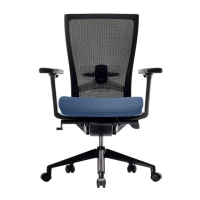
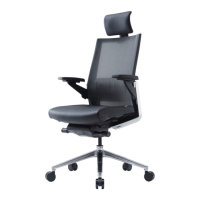
The T80 office chair is designed to provide a customizable seating experience, offering a range of adjustments to accommodate different body types and preferences. Its primary functions revolve around supporting proper posture and reducing discomfort during prolonged sitting. The chair incorporates several key adjustable components:
Seat Height (01): This fundamental adjustment allows users to set the seat to their desired height, ensuring their feet are flat on the floor or a footrest, and their thighs are parallel to the ground. The mechanism involves pulling a lever located under the right side of the seat. Pulling the lever while unweighted raises the seat, and pulling it while weighted lowers the seat. Releasing the lever locks the seat at the desired height.
Multi-limited Tilting (02): The T80 offers a multi-limited tilting mechanism, enabling users to recline the backrest and lock it into one of four different tilting levels. This feature is controlled by a lever on the left side of the seat. Pushing the lever forward allows for a greater range of tilt, while pulling it backward limits the tilting range, providing support at various recline angles.
Tilting Tension (03): To complement the multi-limited tilting, the chair includes a tilting tension adjustment. This feature allows users to control the resistance of the recline, making it easier or harder to tilt back. Turning the right lever forward increases the tilting tension, requiring more force to recline, while turning it backward decreases the tension, allowing for easier reclining.
Headrest (04): For models including a headrest (indicated by 'H' in the model code), both height and angle adjustments are available. Users can grab the headrest with both hands to move it up or down to their desired height. Similarly, the headrest can be rotated up and down to achieve a comfortable angle, providing optimal neck and head support.
Lumbar Support (05): Models equipped with lumbar support (indicated by 'L' in the model code) feature an adjustable lumbar pad. The height of this pad can be adjusted by moving the lumbar handles located on each end of the lumbar support up and down. This allows users to position the lumbar support to fit the natural curve of their lower back, promoting good posture and reducing strain.
Armrest (06): The armrests on the T80 chair (indicated by 'A' in the model code) offer multiple adjustments for personalized comfort.
Seat Slope (07): For models with this feature (indicated by 'D' in the model code), the seat slope can be adjusted to lean the seat forward. This is achieved by turning down a lever located between the seat and the multi-limited tilt lever. This function is particularly useful for users who prefer a forward-tilting seat position, which can encourage an upright posture. It is recommended to operate this function while standing up.
Seat Slide (08): The seat slide function (also indicated by 'D' in the model code) allows users to adjust the depth of the seat. By pulling out a lever on the lower left side of the seat, users can then pull out the front side of the seat to utilize a 7-step depth adjusting function. This ensures that the seat depth accommodates the user's thigh length, preventing pressure behind the knees and promoting proper circulation. This function should also be operated while standing up.
While specific dimensions and material details are not explicitly provided in the excerpt, the manual does highlight a crucial technical specification:
The T80 chair is designed with user-friendly features that make adjustments intuitive and accessible. The lever-based mechanisms for height, tilt, and tension, along with direct manipulation for headrest, lumbar, and armrest adjustments, allow for quick and easy customization. The multi-limited tilting and 7-step seat slide offer precise control over seating positions, catering to a wide range of ergonomic needs.
The manual does not explicitly detail maintenance features such as cleaning instructions or component replacement. However, adherence to the safety warnings can be considered a form of preventative maintenance, as it helps preserve the chair's condition and functionality over time. For instance, avoiding excessive impact (05) and not exceeding the weight capacity (04) are crucial for the longevity of the chair.
The manual includes an extensive list of 28 safety warnings, emphasizing the importance of proper usage to prevent injuries and damage. These warnings cover a broad spectrum of potential hazards, including:
The manual strongly advises users to "get full knowledge for usage of the chair beforehand for more proper use" (27) and states that "no warranty applies for any possible injuries, dangers and damages caused by neglect of the above warnings" (28). This underscores the user's responsibility in ensuring safe operation.
The T80 Series User Guide is a vital resource for owners of the SIDIZ T80 chair, providing clear instructions for maximizing its ergonomic benefits and ensuring its safe and durable use.
 General
| Brand | Fursys |
|---|---|
| Model | sidiz T80 Series |
| Category | Indoor Furnishing |
| Language | English |

 To Next Page