92 •
••
• Vector Chart material
An UPDATE CD-ROM from a RENC
An UPDATE CD-ROM from a RENC contains all the Updates included to Charts stored in the RENC when the
latest BASE CD-ROM was issued. When you load Charts by CD-Catalogue also following information is loaded
into the ECDIS hard disk:
• The Content Summary of the BASE CD-ROM.
• Publisher Notes.
• The Product List.
When you receive a new BASE CD-ROM from the RENC, load Charts into the ECDIS as follows:
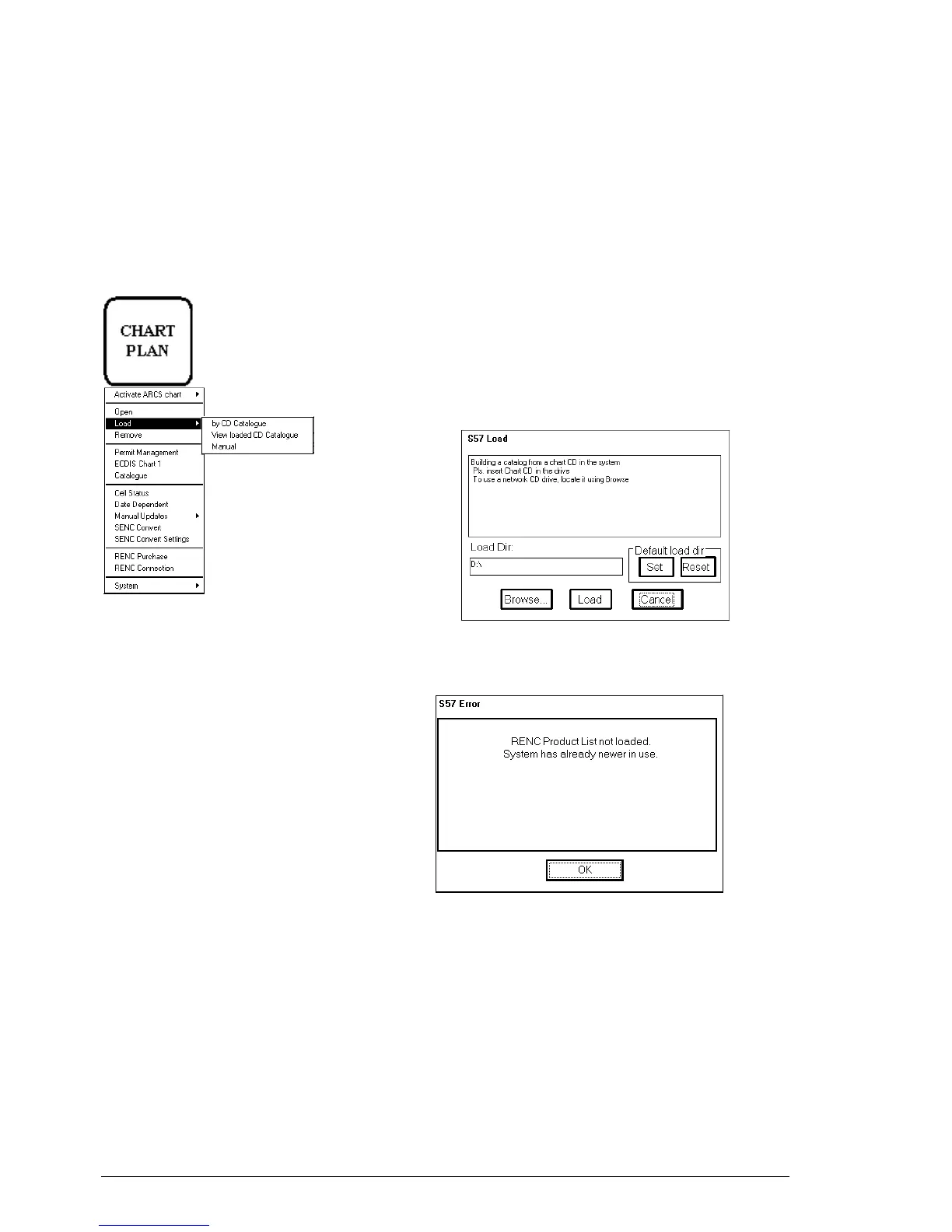
CHART PLAN push button
1. Press CHART PLAN push button.
2. Select Load from the menu and by CD Catalogue
from the sub menu. A S57 Load dialog box appears.
The default load source is CD-ROM. Press Load and
continue from step 5, if you use CD-ROM. If you want
to load from a floppy disk or from another ECDIS
using LAN, you have to change Load Dir. Press
Browse to select a new Load Dir
3. When you press Load button in S57 Load window, the
ECDIS loads Content Summary, Publisher Notes and
Product List from CD-ROM and opens Load or View
CD Catalogue window
If you had a newer Product List already in use, you get
following notice.



 To Next Page
 Loading...








