AP-4
APPENDIX 3 RCB-002 IP ADDRESS
SETTING
When multiple Radar Connection Box RCB-002s are connected to the same network, change the
IP address as follows. Assign a different IP address to each RCB-002. IP address setting is not
required for configurations with a single RCB-002.
Preparation
• PC: Used for LAN connection with the RCB-002
• LAN cable: Used for connection between PC and RCB-002
• IP address setting tool (IPSetting.exe): Download from “Tech-Net” and save it on the PC.
Procedure
1. Set the IP address and subnet mask for the PC as follows.
• IP address: 192.168.31.110
• Subnet mask: 255.255.255.0
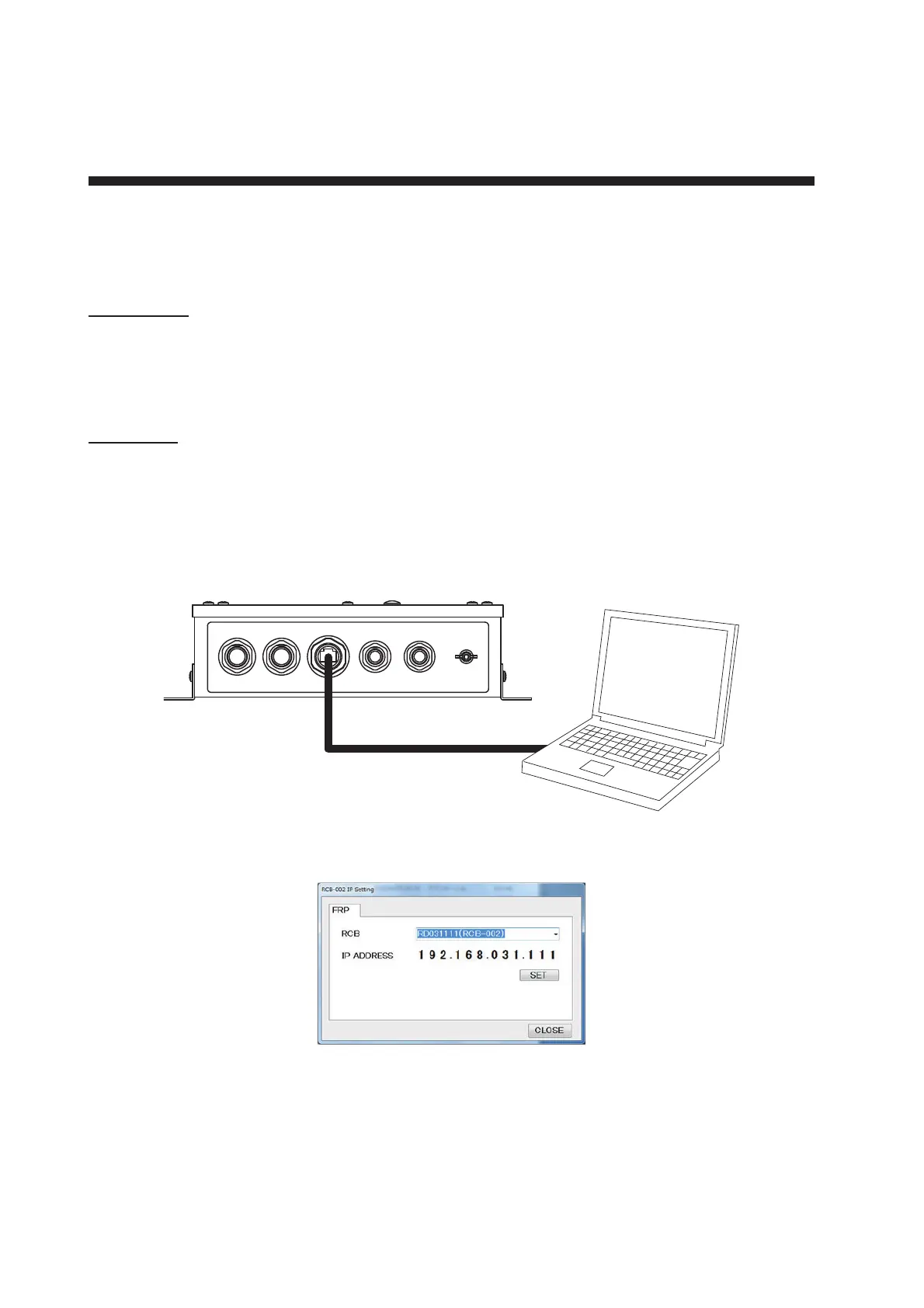
2. Connect the PC to the RCB-002, using a LAN cable.
3. Turn on the RCB-002 power.
4. Run the IP address setting tool (IPSetting.exe) on the PC.
5. Confirm that “RD031111 (RCB-002)” and “192.168.031.111” appear on the [RCB-002 IP Set-
ting] window.
Note: When the indication on the [RCB-002 IP Setting] window is not correct, confirm the fol-
lowing points.
• Confirm that the IP address and subnet mask setting for the PC is correct.
• Check the connection between the PC and RCB-002. Reconnect as necessary.



 To Next Page
 Loading...









