9. ROUTES
9-7
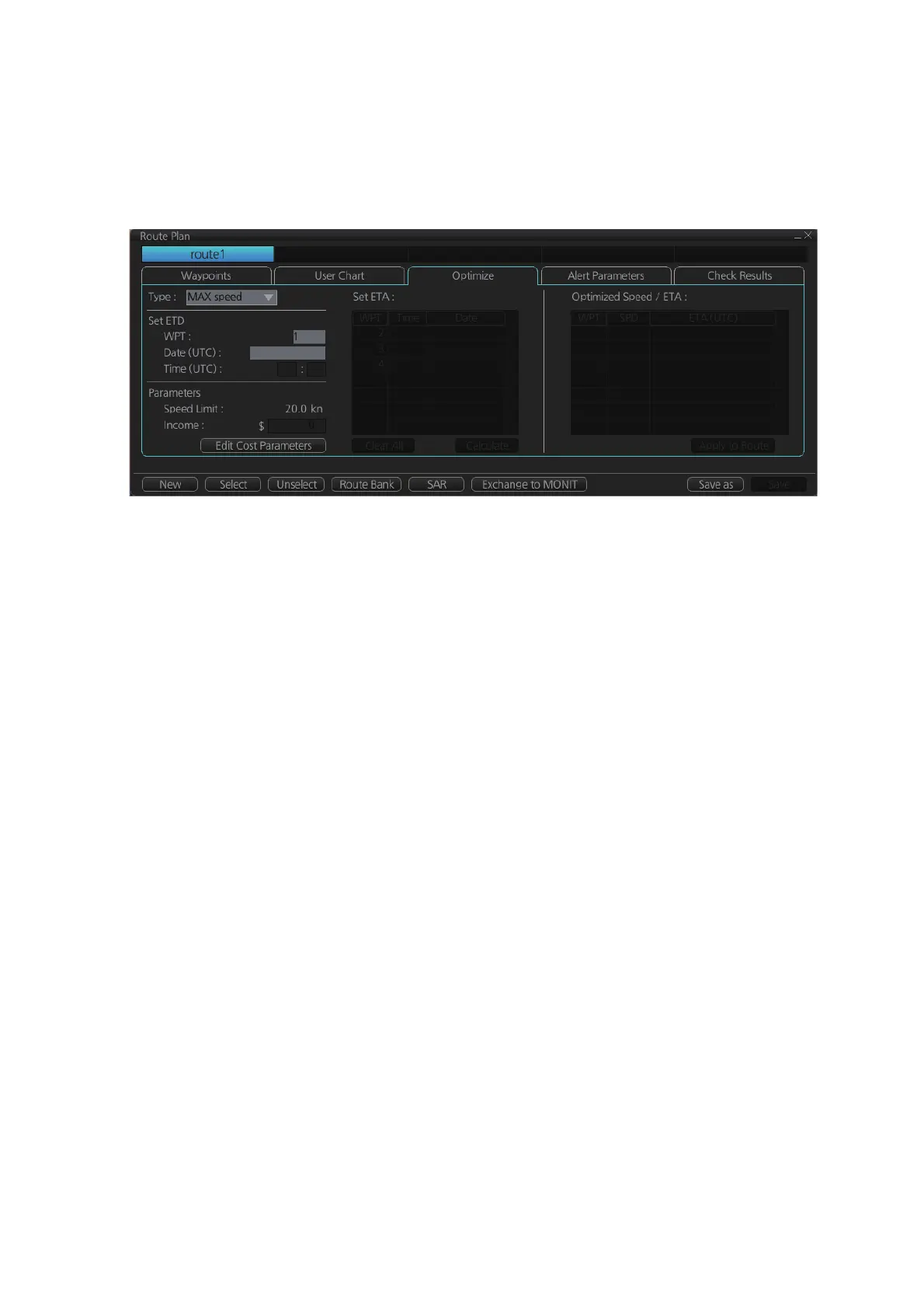
9.4.3 How to use the Optimize page
After all waypoints are inserted and you have made safe water calculation, you can
optimize your route, on the [Optimize] page. If not chosen, then optimization will be
done automatically with max. speed. If you want do optimization with a specific strat-
egy, see section 9.8 for how to optimize a route.
Type: Select optimization strategy: maximum speed, time table, maximum profit, or
minimum cost.
Set ETD: Set date, time and waypoint to start from.
Parameters: Set the parameters for optimization, speed limit and income (max profit).
Edit Cost Parameters button: Enter fuel consumption figures. See section 21.3.
Set ETA: For the type [Time table], set the date and time that you want to arrive at the
waypoint selected.
Optimized Speed/ETA: The optimized speed for the date and time entered at [Set
ETA] appears here, after clicking the [Calculate] button.
Clear All: Clear all ETD dates entered at [Set ETD].
Calculate button: Click to calculate optimization.
Apply to Route button: Apply the optimizations to the current route.
Check Status: Checked



 To Next Page
 Loading...









