The Futaba GPB-1 is a Gyro Program Box designed for setting up and managing the Futaba GYA553 airplane gyro. It allows users to update the gyro's software, configure various parameters, and monitor its operation.
Function Description:
The GPB-1 serves as an interface between a personal computer and the GYA553 gyro, enabling software updates and detailed configuration. It can also be used independently to adjust gyro settings directly.
Software Update Procedure:
To update the GPB-1's software to Ver4.1 or later, a PC with CIU-2 or CIU-3 driver software installed is required. The update process involves:
- Downloading the GPB-1 update file (main.bin, Updater(Highspeed).exe, Updater(Lowspeed).exe) from the Futaba website.
- Extracting the zip file on the computer.
- Connecting the GPB-1 to the PC using a CIU-2 or CIU-3 interface, a CGY connection cable or DSC cable, and a receiver battery.
- Starting the appropriate executable file (Updater(Highspeed).exe for CIU-3 or Updater(Lowspeed).exe for CIU-2).
- For CIU-3, hold down the [Enter] and [Esc/Page] keys on the GPB-1 while turning on the power. Release the keys when the backlight illuminates.
- For CIU-2, hold down the [A/+] and [V/-] keys on the GPB-1 while turning on the power. Release the keys when the backlight illuminates.
- Clicking "WRITE" and then "OK" on the PC software to initiate the update.
- The GPB-1 will display "PROGRAM UPDATE (HI) READY" and then "NOW WRITING."
- After approximately 50 seconds to 5 minutes, "PROGRAM UPDATE (HI) SUCCESS" will appear.
- Turn off the GPB-1 power.
- Verify the GPB-1 program version on the Information screen and check all settings and operations before use.
Caution during update: Do not turn off the power or remove the battery while updating, as this may damage the GPB-1. If an error occurs or the cable disconnects, restart the update process. If the GPB-1 fails to update or start, it may require servicing.
Usage Features:
Connection:
The GPB-1 connects to the GYA553 gyro via a receiver connection cable (included with GYA553) and a receiver battery. Ensure the GYA553 and GPB-1 connection cable are connected/disconnected with the power off.
- Use the [A/+] or [V/-] keys to navigate the cursor to setting items.
- Press the [Enter] key to enter setting mode.
- Use the [A/+] or [V/-] keys to change setting contents.
- Press the [Enter] key to exit setting mode.
- The [Esc/Page] key is used to change pages or return to the previous screen.
Opening Screen:
When the GPB-1 is powered on, the opening screen displays "Gyro Program Box GPB-1 Futaba Corporation."
- Pressing and holding [Enter] reads the setting data from the connected GYA553 into the GPB-1 and saves it.
- Pressing and holding [Esc/Page] allows writing the current setting data to the GYA553.
- Pressing and holding [A/+] leads to the parameter setting menu for S.BUS servos.
First-time use / Changing from heli gyro (CGY) data:
If using the GPB-1 with GYA553 for the first time, or if heli gyro (CGY) data was previously loaded, the GPB-1 will prompt to change the model.
- "MODEL IS CHANGED CGY760R GYA553 Are you sure?" will appear. Select "YES" to proceed.
- After confirmation, "EXECUTE: "Enter" (1sec)" will be displayed. Press and hold [Enter] to confirm.
- This step is skipped when using with GYA553 from the second time onward.
- If the gyro is not connected to GPB-1, press and hold the [Enter] key from the opening screen to move to the GYA553 Home Screen.
Home Screen:
The home screen displays basic information:
- Battery voltage: Shows the voltage of the receiver battery connected to the GYA553.
- Gyro operation mode / Gyro gain: Displays "AVCS" or "Normal" operation mode and gyro gain for aileron (roll), elevator (pitch), and rudder (yaw) axes.
- Example: "GYA553 C1 6.6V AIL NORM 100% ELE NORM 100% RUD NORM 100%"
From the home screen, pressing [Esc/Page] leads to the Basic Menu, which includes:
- CONFIG: For general configuration settings.
- SBUS BASIC: For S.BUS related settings.
This setting determines the mounting direction of the GYA553.
- Use [A/+] or [V/-] keys to change the direction (UP, DOWN, LEFT, RIGHT).
- Press [Enter] to confirm the selection.
- Caution: Incorrect direction setting can lead to crashes. Refer to the provided figures for correct orientation.
Sets the wing type and tail type for the GYA553.
- The transmitter's wing/tail type settings are not used and should be set to "NORMAL" on the transmitter.
- Turn off elevon/V-tail mixing on the transmitter.
- Do not use transmitter sub-trim; adjust using the gyro neutral offset.
- When using S.BUS servos, neutral offset can also be adjusted via S.BUS servo setting parameters.
- Select "NORMAL" for wing type or "ELEVON" for elevon wings.
- Select "NORMAL" for tail type or "V-TAIL" for V-tail aircraft.
Selects the servo type (Digital or Analog).
- Digital servo: DG: 285 Hz. Increases flight stability for high-speed control.
- Analog servo: AN: 70 Hz.
Selects the function of the SB/R2 port.
- S.BUS: Allows connection of S.BUS devices.
- RUD2: For connecting a second rudder servo (when using two rudder servos).
- CH3(THR): For throttle control (uses this port for throttle).
Sets the direction of the gyro's response.
- Crucial for flight safety; incorrect settings will cause crashes.
- For dual aileron, dual elevator, and dual rudder aircraft, verify the operating direction of each second aileron/elevator/rudder.
- Test procedure:
- Tilt the airplane left; ailerons should operate right.
- Turn the airplane right; rudder should operate left.
- Raise the airplane's nose; elevator should operate downward.
Sets the neutral position for each servo.
- Allows fine-tuning of servo neutral positions to the desired setting.
Sets the maximum travel limit for each servo.
- The maximum operation position is read into the gyro during initial setup.
- Aileron example: Move the stick to full right/left and adjust the value (%) until the servo reaches the maximum operating position.
Adjusts the posture holding force in AVCS mode.
- Decreasing the value weakens holding power, making the operation feel closer to normal mode.
- The current rate numbers (C1 to C5) are displayed and adjusted by operating the transmitter channel.
- Similar to flight conditions, up to 5 different data sets for attitude holding force can be configured and switched via a transmitter switch (using AFR function) or flight condition switch.
- Display and adjust: Operate the channel on the transmitter to display and adjust C1 to C5.
Resets all Config items to their initial values.
- Navigate to "RESET" using [A/+] or [V/-].
- Press [Enter] to enter setting mode.
- "EXECUTE: "Enter" (1sec)" will display.
- Press and hold [Enter] to reset.
Sets the channel for each function according to the transmitter. Unused functions should be set to INH (Inhibited).
- WARNING: Always verify that S.BUS function assignments match the transmitter's FUNCTION menu assignments. Changes in transmitter assignments require corresponding changes in S.BUS function assignments. GYA553 and GPB-1 must be connected to change channels.
- HD.P (Holding Power): Selects the channel for holding power.
- AutoRecovery.SW: Sets the ON-OFF channel for auto recovery.
- Reset: Resets all S.BUS functions to initial values.
- Navigate to "RESET" using [A/+] or [V/-].
- Press [Enter] to enter setting mode.
- "EXECUTE: "Enter" (1sec)" will display.
- Press and hold [Enter] to reset.
Important Technical Specifications (implied from the manual):
- Software Version: GPB-1 Ver.4.1 (and later)
- Compatible Gyro: Futaba GYA553
- PC Interface: CIU-2 or CIU-3
- Servo Types: Digital (DG: 285 Hz) and Analog (AN: 70 Hz)
- S.BUS/S.BUS2 Support: Yes, for servo parameter setting and device connection.
- Power Source: Receiver battery for GPB-1 and GYA553 operation during setup/update.
Maintenance Features:
- Software Updates: Regular updates are available to enhance functionality and compatibility.
- Troubleshooting: The manual provides guidance for common issues during updates, such as error messages or disconnections.
- Servicing: If issues persist or the device fails to start, servicing is recommended.

 Need help?
 General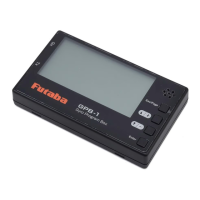

 To Next Page