
 Need help?
Do you have a question about the G-Homa 15UKD/3A and is the answer not in the manual?
Explains the black and white parts of the dial representing AM/PM hours.
Details the arrow's function to indicate the current time of day.
Describes how to use the slide switch for ON or OFF positions.
Explains that each pin represents 30 minutes; down is ON, up is OFF.
Specifies the socket is intended only for grounded devices.
Instructions on setting up to 24 daily On/Off commands using push/pull segments.
Guide to setting the actual time by turning the dial and positioning the switch.
Steps for plugging the timer into a wall socket and an appliance into the timer.
How to interrupt pre-set commands using the manual override switch.
Details power supply, capacity, and temperature range for the timer.
Guidelines for indoor use, capacity limits, cleaning, and appliance compatibility.
Specifies the accuracy of the daily plug-in mechanical timer.
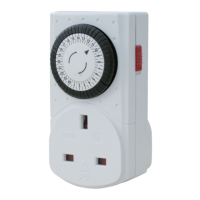
The G-Homa 24 Hour Mechanical Timer is a daily plug-in device designed to automate the on/off periods of connected appliances. This mechanical timer offers a straightforward way to manage power consumption by setting specific operating times for various electrical devices, contributing to energy saving. It is identified by product numbers such as 15UKD/3A, 15GD/3A, 17GD/3A, and 18GD/3A.
The primary function of the G-Homa mechanical timer is to control the power supply to an appliance based on a pre-set schedule. It operates on a 24-hour cycle, allowing users to program up to 24 on/off commands within a day. This means that an appliance can be switched on and off at half-hour intervals throughout the day and night. The timer features a clock dial, an arrow to indicate the current time, a slide switch for manual override, and push pins for setting the on/off periods.
The clock dial is divided into black and white parts, representing different time segments. The black part typically corresponds to 12 PM (noon) to 12 AM (midnight) hours, while the white part covers 12 AM (midnight) to 12 PM (noon) hours. This visual distinction helps users to easily identify and set schedules for both day and night. The arrow on the timer serves as a pointer, indicating the current time of day as the dial rotates.
The core of the timer's programming lies in its push pins. Each pin on the clock dial represents a 30-minute interval. To program an "on" period, the corresponding pins must be pushed down. Conversely, to program an "off" period, the pins should be pulled up. This tactile method of programming makes it intuitive to set the desired operational schedule for any connected appliance. For instance, if a user wants an appliance to be on from 8:00 AM to 10:00 AM, they would push down the pins corresponding to those hours on the dial.
In addition to scheduled operation, the G-Homa timer includes a manual override feature. A slide switch on the side of the unit allows users to temporarily bypass the programmed settings. When the switch is in the "ON" position, the connected appliance will remain on continuously, regardless of the programmed schedule. When the switch is in the "o" position, the timer will operate according to the pre-set on/off commands. This flexibility is useful for situations where an appliance needs to be used outside of its regular schedule without having to reprogram the timer.
The timer is designed as a plug-in device, meaning it plugs directly into a wall socket, and the appliance then plugs into the timer's socket. This configuration ensures that the timer acts as an intermediary, controlling the power flow to the appliance. The socket on the timer is specifically intended for use with grounded devices, emphasizing safety in its application.
Setting up the G-Homa 24 Hour Mechanical Timer involves a few simple steps. First, the user needs to define the on/off periods. This is done by manipulating the push pins around the clock dial. For any period when the appliance should be "off," the corresponding segments (pins) should be pulled up using a finger, pen, or screwdriver. For periods when the appliance should be "on," the segments must be pushed down. Each segment represents 30 minutes, allowing for precise control over the schedule.
Once the on/off periods are set, the next step is to set the current time on the timer. This involves turning the clock dial clockwise until the triangular pointer aligns with the actual time of day. It is crucial to ensure that the slide switch on the side of the unit is set to the "o" position (timer on mode) for the programmed schedule to take effect. If the switch is left in the "ON" position, the timer will not follow the schedule and the appliance will remain on continuously.
After programming the on/off periods and setting the current time, the timer is ready for connection. The timer should be plugged into a wall socket, and then the appliance's plug should be inserted into the timer's socket. It is important to ensure that both the wall socket and the appliance are switched on. Once connected and activated, the timer will begin to operate, switching the appliance on and off automatically according to the pre-set commands.
The manual override feature provides convenience for situations requiring immediate or continuous operation of an appliance. By sliding the switch to the "ON" position, the user can ensure the appliance stays on permanently, overriding any programmed "off" periods. This is particularly useful for temporary needs, such as needing a lamp on for an extended period outside its usual schedule. When the manual override is no longer needed, sliding the switch back to the "o" position will revert the timer to its programmed schedule.
The design of the timer, with its clear clock dial and distinct push pins, aims to make programming as user-friendly as possible. The visual representation of on/off periods on the dial allows for quick verification of the set schedule. The robust plug-in design ensures a secure connection between the wall socket, the timer, and the appliance.
The G-Homa 24 Hour Mechanical Timer is designed for indoor use only. This is an important consideration for its longevity and safe operation, as exposure to outdoor elements could damage the internal mechanisms.
When it comes to cleaning, the timer should be handled with care. If cleaning is necessary, the timer must first be removed from the mains power supply. This is a critical safety precaution to prevent electrical shock. Once unplugged, the timer can be wiped with a dry cloth. It is explicitly stated that the timer should not be immersed in water or any other liquid. This prevents damage to the electrical components and ensures the device remains safe to use.
Users are also advised to ensure that the plug of any appliance connected to the timer is fully inserted into the timer's socket. A loose connection could lead to inefficient operation or potential safety hazards.
A significant precaution highlighted in the manual concerns the types of appliances that should not be connected to the timer. Specifically, fan heaters and heaters with exposed elements are not recommended for use with timers. Such appliances should not be left unattended, and connecting them to a timer is discouraged due to potential safety risks. This guidance underscores the importance of using the timer responsibly and with appropriate appliances.
The overall maintenance philosophy for the G-Homa timer is one of simplicity and safety. Regular checks for secure connections and adherence to cleaning guidelines will help ensure the device functions correctly and safely over time. The mechanical nature of the timer means there are no complex software updates or intricate calibration procedures required, making it a low-maintenance device.
 General
| Type | Digital Timer |
|---|---|
| Operating Voltage | 230V AC |
| Maximum Load | 3680W |
| Maximum Current | 16A |
| Minimum Switching Time | 1 minute |
| Frequency | 50Hz |
| Timer Channels | 1 |
| Timer Resolution | 1 minute |
| Weight | 150g |
| Operating Temperature | 0°C to +40°C |

 To Next Page