Operation instruction
When the machine is powered on for the first time, the buzzer will play power-on music and then
the machine will get into standby status.
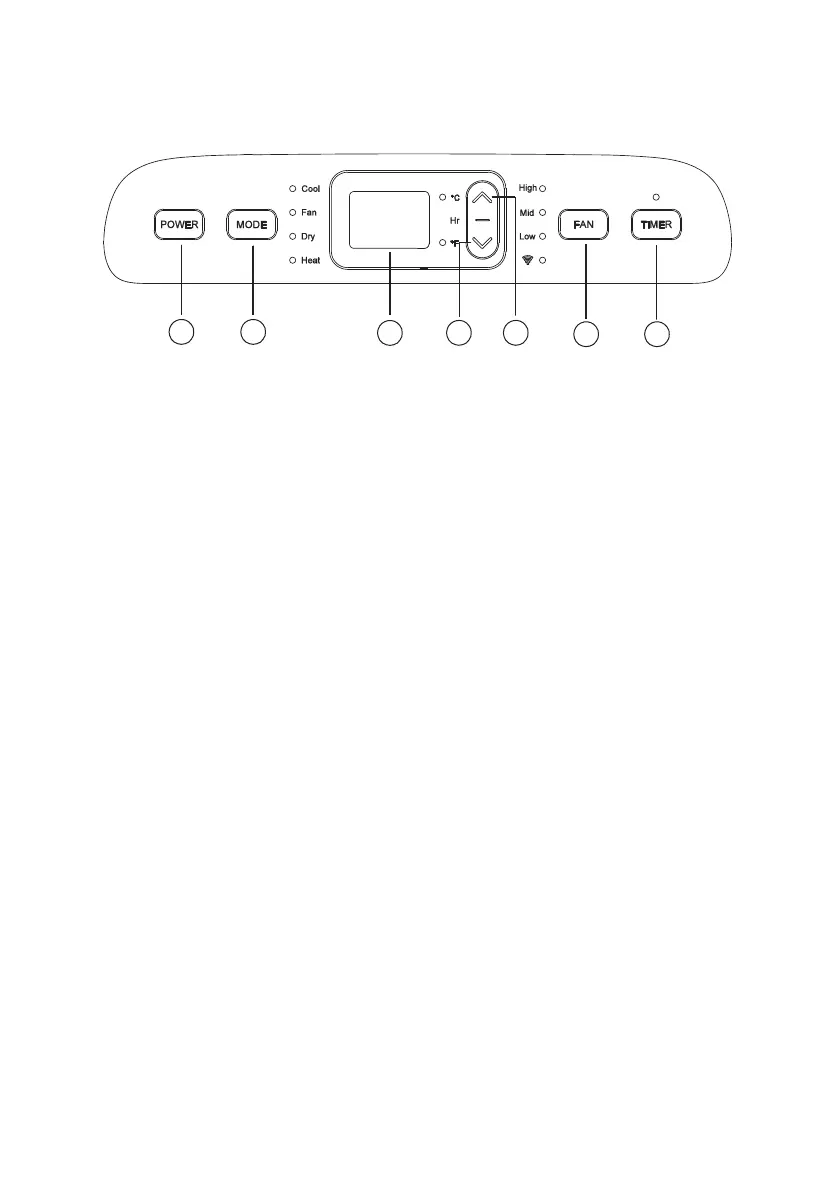
Power key: press the key to turn on or turn off the machine.
Mode selection key: in the case of power on, press the key to switch between cooling, air supply,
dehumidification and heating mode.
Up and Down key: press the two keys to change the set temperature or timing setting value,
operate as follows:
While setting temperature, press up key or down key to select the required temperature (not
available in air supply or dehumidification mode).
Simultaneously press both keys to switch between Celsius °C and Fahrenheit °F.
Wind Speed Selection key
In cooling and air supply mode, press the key to select high, medium or low wind speed operation.
In heating mode, press the key to select high, medium or low wind speed operation.
In dehumidification mode, pressing the key is invalid, and the fan will forcibly choose low wind
speed operation
Timing key:
If the machine is powered on, press the key to turn or on turn off the timer.
Press the key, when the timing symbol flashes, press up and down key to select the required
timing value.
Timing values can be set within 1-24 hours and the timing value is adjusted upwards or
downwards by one hour.
1. Timing key
2. Wind speed selection key
3. Up key
4. Down key
5. Display window
6. Mode selection key
7. Power key
12
34
5
67
Instruction for operating


 To Next Page