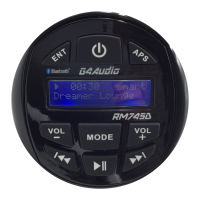
3, APS BUTTON
• When in DAB or FM mode a short press will autotune
• When in FM mode a long press will start the Auto Pre-Set Function (see page 6)
• When in USB mode a short press will enter track select mode (the display will
flash)
Scroll through tracks with VOLUME buttons and confirm with a short press of the
APS button
4, VOLUME - BUTTON
• Decrease Volume4
5, MOOE BUTTON
• A short press switches between DAB/FM, Bluetooth, USB & Aux Note - USB
will not show up if no drive is inserted
• A long press will enter the audio settings menu (see page 8)
6, VOLUME + BUTTON
• Increase Volume
7, PREVIOUS BUTTON
• Previous Track
• Previous Station
• Back
8, PLAY/PAUSE BUTTON
• When in USB or Bluetooth mode a short press will play/pause the current
track
9, NEXT BUTTON
• Next Track
• Next Station
• Forward


 To Next Page