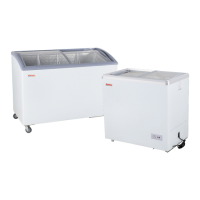
This document is a user manual for Galaxy Commercial Display Freezers, covering both flat lid and curved lid models. It provides essential information for the set-up, operation, and maintenance of these refrigeration units.
Function Description:
The Galaxy Commercial Display Freezers are designed for the commercial storage and display of frozen products. These units maintain a consistently low temperature to ensure the preservation and safety of food items. The display aspect allows for easy viewing of products, making them suitable for retail environments. The manual details how to adjust the temperature, defrost the unit, and troubleshoot common issues, all aimed at ensuring optimal performance and longevity of the freezer.
Important Technical Specifications:
The manual lists specific models covered:
- Flat Lid Freezers: 177ICFF7HC
- Curved Lid Freezers: 177ICFC9HC, 177ICFC12HC, 177ICFC13HC
While detailed technical specifications like dimensions, power consumption, or refrigerant type are not explicitly listed on the provided pages, the document emphasizes the use of a "flammable refrigerant." This indicates that the units likely use a hydrocarbon refrigerant (e.g., R290 or R600a), which is common in modern commercial refrigeration for its lower environmental impact. The temperature control system allows for adjustment to maintain frozen product temperatures, with a standard setting of "4" on numbered controllers or a dot between "Freezing" and "Max" on non-numbered controllers. The manual also mentions an initial temperature decrease to -13° Fahrenheit for optimal food placement.
Usage Features:
- Temperature Adjustment: Users can adjust the internal temperature using a control knob. For numbered controllers, setting "4" is standard for frozen products, with higher numbers indicating colder temperatures. For non-numbered controllers, the dot between "Freezing" and "Max" is the standard setting.
- Initial Setup: Before placing food, the temperature control should be set to the lowest point (highest number) and allowed to run until the internal temperature reaches -13°F. Food should then be added, and after 12 hours, the temperature control can be adjusted to the normal setting.
- Food Placement: Only cold or frozen food should be placed in the freezer. It is recommended to divide meats and large items into smaller parts and leave space between items for proper cold air circulation. Non-packaged foods should be stored in plastic bags.
- Power Interruption: If power is cut off, users must wait at least 5 minutes before turning the unit back on to prevent compressor damage.
- Safety Precautions: The manual explicitly warns against storing flammable, explosive, or corrosive products in the freezer and advises keeping the freezer away from such materials. Children should not operate or play around the equipment.
- Transportation: The unit should not be transported on an incline greater than 45 degrees to prevent compressor or system damage. The condenser, lid, or hinges should not be used as loading or unloading points.
- Installation Environment: The freezer must be placed on a stable surface in a well-ventilated, dry area, away from direct sunlight, water, sinks, and heat sources. Specific clearance requirements are given: at least 4 inches for flat lid freezers (ICFF) and at least 8 inches for curved lid freezers (ICFC) from surrounding walls for proper air circulation.
- Voltage Stability: If the local voltage is unstable, the use of a suitable automatic voltage regulator is recommended.
Maintenance Features:
- Defrost System: Defrosting is required when the ice thickness on the cabinet wall reaches 1/4 inch. The process involves turning the temperature control knob to the lowest setting (or lowest number) for 5-6 hours, powering off the freezer, removing all food, and then removing ice buildup. Users are explicitly warned not to use sharp tools for ice removal. After defrosting, the interior walls should be cleaned with a dry cloth before powering the unit back on.
- Cleaning: Before cleaning, the freezer must be powered off. A soft cloth with moderate detergent and warm water should be used to clean the freezer. Oil or fruit juice stains on the gasket should be cleaned with warm water to maintain elasticity, and talcum powder can be applied to prolong its life.
- Long-Term Storage: If the freezer will not be used for an extended period, it should be powered off, cleaned inside, and the door left open for 2-3 days to allow it to dry completely.
- Troubleshooting: The manual includes a "Trouble Shooting" section with common issues and their solutions:
- Freezer Keeps Unfreezing: Solutions include adjusting the temperature, ensuring the plug is properly connected, and replacing a broken fuse.
- Compressor Does Not Shut Off: Solutions involve adjusting the temperature, removing excess food, defrosting the freezer, reducing door opening frequency, placing the freezer away from walls (at least 4 inches), and moving it away from heat sources.
- Loud Noises: Solutions include relocating the freezer to a level surface and ensuring refrigerating tubes are not touching each other.
- Professional Service: The manual strongly recommends that any servicing be performed by an authorized service technician, especially given the use of flammable refrigerant. In case of damage to electric wires or the plug, users are advised to contact after-sales service and not attempt repairs themselves.
- Warranty Information: The product comes with a 1-year limited replacement warranty valid only in the United States, covering defects in material and workmanship. The warranty does not cover failures due to improper installation, maintenance (e.g., not cleaning the condenser coil), use outside the US, negligence, improper handling, or overloading. Normal wear parts like light bulbs and gaskets are also excluded. For warranty service, customers are directed to contact their purchase location (e.g., WebstaurantStore.com or The Restaurant Store) with their order number. Failure to contact the designated location prior to obtaining service may void the warranty.


 To Next Page
 General