The GAMDIAS™ ARES M2 + ZEUS E2 is a gaming combo set consisting of a gaming keyboard and an optical gaming mouse, designed for an enhanced gaming experience.
GAMDIAS™ ARES M2 Gaming Keyboard
Function Description:
The GAMDIAS™ ARES M2 gaming keyboard is designed for comfortable use and features a spill-resistant structure, making it durable for long gaming sessions. It offers a full-size layout with dedicated multimedia shortcut keys for quick access to common functions.
Important Technical Specifications:
- Compatibility: Windows® XP / Vista / 7 / 8 / 10
- Connectivity: USB (PC with USB ports required)
- Layout: Full-size keyboard with a numeric keypad.
- Multimedia Keys: Eight dedicated multimedia shortcut keys are integrated for convenient control. These include:
- My Computer
- Home
- Email
- Search
- Play/Pause
- Mute
- Increase Volume
- Decrease Volume
- Design: Comfortable and spill-resistant structure.
Usage Features:
- Plug-and-Play Installation: Simply insert the USB plug into an available USB port on the computer. The "New Hardware Found" notification will appear, guiding the user through the installation process.
- Multimedia Control: The dedicated multimedia keys allow for quick and easy control of media playback, volume, and system functions without interrupting gameplay or requiring software navigation.
- Gaming-Oriented Design: The comfortable design is tailored for extended gaming sessions, reducing fatigue.
- Durability: The spill-resistant structure provides protection against accidental spills, enhancing the keyboard's longevity.
Maintenance Features:
- Spill Resistance: The spill-resistant design helps protect the internal components from liquid damage, simplifying cleanup of minor spills.
GAMDIAS™ ZEUS E2 Optical Gaming Mouse
Function Description:
The GAMDIAS™ ZEUS E2 optical gaming mouse is designed for precision and responsiveness, utilizing a premium micro-processor and a high-DPI optical sensor to deliver accurate tracking for gaming.
Important Technical Specifications:
- Sensor Type: Optical sensor
- DPI Settings: Adjustable DPI cycle with default settings of 1,200 / 1,600 / 2,000 / 3,200 DPI. The default DPI is 1,200.
- Buttons:
- Left Key
- Middle Key (Scroll Wheel)
- Forward Button
- Backward Button
- Right Key
- DPI Cycle Button (for adjusting DPI settings)
- Micro-processor: Employs a premium micro-processor for enhanced performance.
- Connectivity: USB (PC with USB ports required)
Usage Features:
- Precision Tracking: The 3,200 DPI precision-perfect optical sensor ensures accurate and responsive tracking, crucial for gaming.
- Adjustable DPI: Users can cycle through different DPI settings (1,200, 1,600, 2,000, 3,200) to match their preference and game requirements, allowing for on-the-fly sensitivity adjustments.
- Ergonomic Design: The mouse is designed for comfortable grip and control during gaming.
- Programmable Buttons: While not explicitly stated as programmable, the presence of forward and backward buttons suggests utility beyond basic click functions, often used for navigation or in-game macros.
- Plug-and-Play Installation: Similar to the keyboard, the mouse can be installed by plugging its USB connector into an available USB port. The "New Hardware Found" notification will guide the user through the installation.
Maintenance Features:
- Optical Sensor: Optical sensors are generally low-maintenance, requiring occasional cleaning of the sensor window to ensure optimal tracking performance.
Package Contents:
- GAMDIAS™ ARES M2 Gaming Keyboard
- GAMDIAS™ ZEUS E2 Gaming Mouse
System Requirements:
- Windows® XP / Vista / 7 / 8 / 10
- PC with USB ports
Hardware Installation:
- Insert the USB plug of the GAMDIAS™ ARES M2 keyboard into an available USB port on the computer.
- The "New Hardware Found" notification will be displayed. Follow the instructions on the screen to complete the hardware installation.
- Insert the USB plug of the GAMDIAS™ ZEUS E2 mouse into an available USB port on the computer.
- The "New Hardware Found" notification will be displayed. Follow the instructions on the screen to complete the hardware installation.
Product Registration:
Users are encouraged to register their GAMDIAS™ ARES M2 Gaming Headset (likely a typo, referring to the combo set) by visiting www.GAMDIAS.com for online product registration.

 Need help?
 General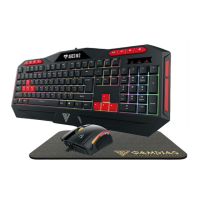

 To Next Page