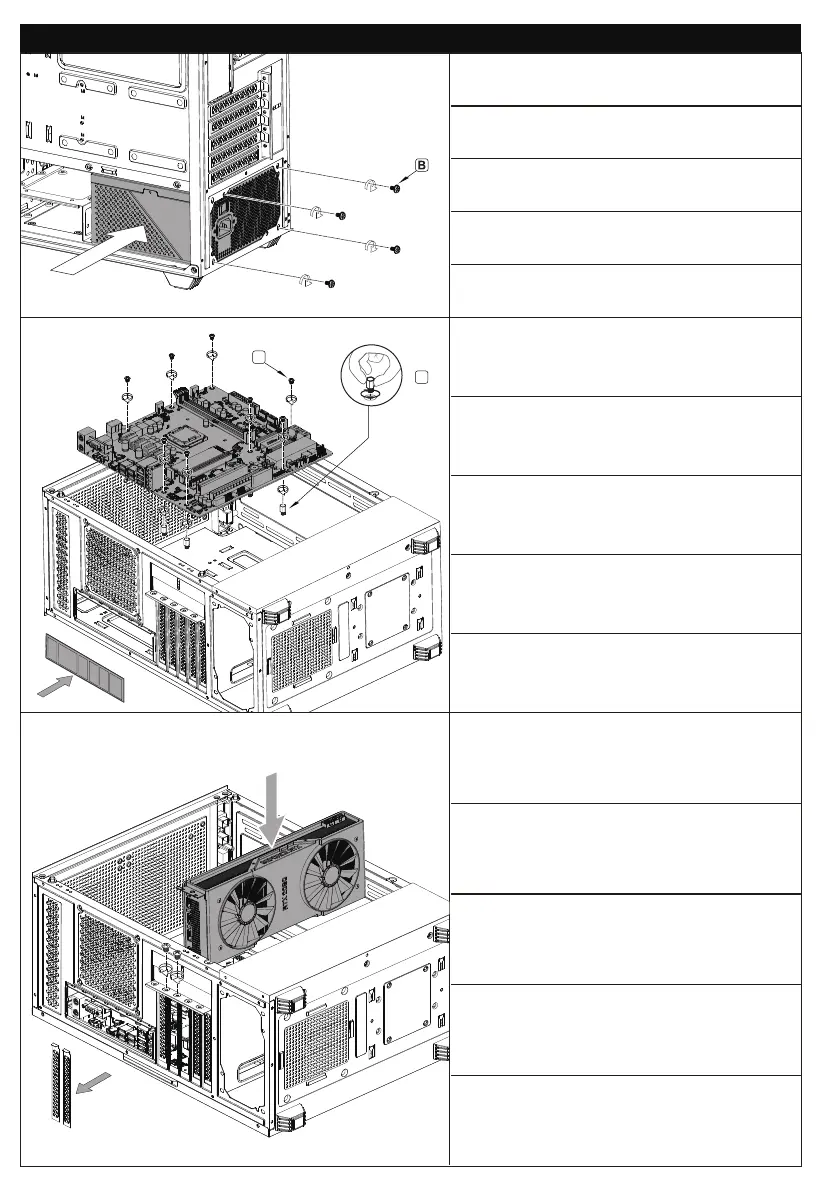
Insert PSU from left side, secure with screws.
Setzen Sie PSU von der linken Seite ein und sicher
mit Schrauben.
Insira a PSU do lado esquerdo, prenda com parafusos.
Вставьте PSU с левой стороны, закрепите винтами.
将电源从右侧板置入,对齐孔位,锁上电源螺丝。
Installation Guide - Installationsanleitung - Guia de instalação - Инструкция по установке - 安装指南
Insert the MB IO Shield, and then place the
motherboard on the corresponding position and secure
with screws.
Setzen Sie den MB IO -Schild ein und legen Sie das
Motherboard auf die entsprechende Position und
sichern Sie sie mit Schrauben.
Insira o escudo MB IO e depois coloque a placa -mãe
na posição correspondente e prenda com parafusos.
Вставьте щит MB IO, а затем поместите
материнскую плату на соответствующее положение
и закрепите винтами.
置入主板IO挡板,锁上铜柱螺丝,然后将主板放在对应
位置,用主板螺丝固定。
D
A
Remove the PCI-E bracket;
Install the GPU card.
Entfernen Sie die PCI-E-Klammer;
Installieren Sie die GPU -Karte.
Remova o suporte PCI-E;
Instale o cartão GPU.
Удалить кронштейн PCI-E;
Установите карту GPU.
拆下PCI-E界面卡条;
安装GPU显卡。


 To Next Page
 Loading...