PACKAGE CONTENTS
GameSir-F9 *1
Magnetic Sheet *1
Phone Clip *1
Transparent Protective Film *1
Wet & Dry Wipe Set *1
Type-C Cable (1.5 m) *1
User Manual *1
Certification *1
Type-C Port
REQUIREMENTS
① Use the cooler only:
Compatible Devices: MagSafe-compatible iOS devices
Required Power Input: 5V/2A
② Use the cooler with the attached magnetic sheet:
Compatible Devices: Phones, tablets, Switch and other mobile devices
without magnetic area
Required Power Input: 5V/2A
③ Use the cooler with the attached clip
Compatible Devices:Mobile phones with a width of 65-90 mm
Required Power Input: 5V/2A
The following three requirements are applied for the three usage
scenarios of the cooler accordingly:
INSTALLATION AND USE
1. Tear off the protective film on the surface of the cooler.
2. The following three installation methods are adopted for the three
usage scenarios of the cooler:
① Use the cooler only on MagSafe-compatible iOS devices: place the
cooler’s magnetic surface on the back of the iOS device.
② Use the cooler with the attached magnetic sheet on phones, tablets,
Switch and other devices without magnetic area: place the magnetic
sheet on the device’s back, then stick the cooler on the magnetic sheet.
How to Install the Magnetic Sheet
A. Use the attached wet and dry wipe set to clean the area where
the magnetic sheet is to be placed.
B. Tear the film off the transparent protective film, place the
protective film on the back of mobile phone and remove bubbles
to ensure a perfect fit of the protective film on the back of mobile
phone.
C. Tear off the release paper on magnetic sheet, attach it to the
protective film accurately; press for 30 seconds and use after a
30-minute standing.
How to Remove the Magnetic Sheet
Open a corner of the protective film’s edge, then uncover it completely
to remove the magnetic sheet from the phone.
Notes!
Pay attention to avoiding the position of NFC while placing the
magnetic sheet on the device with NFC function, otherwise, the
NFC function will be affected.
Devices that support wireless charging cannot be charged wirelessly
when using the magnetic sheet.
③ Use the cooler with the attached phone clip on phones with a width
of 65-90 mm: wrap F9 with the phone clip, pull out the clip and place
the mobile phone in.
3. Use the Type-C cable to connect the Type-C port of the cooler and
a USB power adapter (not included) after installing the cooler. Press
the cooling mode switch once to reach Normal Cooling Mode with a
solid green indicator; press the cooling mode switch twice to reach
Hardcore Cooling Mode with a solid blue indicator.
DEVICE LAYOUT
ACCESSORIES LAYOUT
Cooling Mode Switch
(Normal Cooling Mode /
Hardcore Cooling Mode)
Temperature Display
Magnetic
Sheet
Transparent
Protective Film
Type-C Cable Wet & Dry
Wipe Set
Phone Clip
製品リスト
GameSir-F9 *1
磁気吸着シート*1
固定しょいこ*1
透明保護フィルム*1
ドライ・ウェット・クリーニング布セット*1
Type-C電源コード(1.5 m)*1
取扱説明書*1
合格証*1
要求
①散熱器のみの場合:
対応機器:MagSafe対応のiOSデバイス
電源要件:5V/2A
②散熱器と付属の磁気吸着シートを併用する場合
対応機器:磁気吸着機能を搭載していない携帯電話、タブレット、Switchなどに
適用
電源要件:5V/2A
③散熱器と付属の固定しょいこを併用する場合
対応機器:幅65~90mmの携帯電話に適用
電源要件:5V/2A
散熱器3つの使用シナリオは、次の3つの要件に対応しています。
PLEASE READ THIS PRECAUTIONS
CAREFULLY.
DO NOT insert fingers, rods or any other foreign objects to the fan’s exhaust opening
to prevent any body damage or property damage.
CONTAINS SMALL PARTS. Keep out of reach of children under the age of 3. Seek
immediate medical attention if swallowed or inhaled.
DO NOT use the product near fire.
DO NOT expose to direct sunlight or high temperatures.
DO NOT leave the product in a humid or dusty environment.
DO NOT impact the product or cause it to fall due to strong impact.
DO NOT touch USB port directly or it might cause malfunctions.
DO NOT strongly bend or pull cable parts.
Use a soft, dry cloth while cleaning.
DO NOT use chemicals such as gasoline or thinner.
DO NOT disassemble, repair or modify.
DO NOT use for purposes other than its original purpose. We are NOT responsible for
accidents or damage when used for non-original purposes.
DO NOT look directly at the optical light. It might damage your eyes.
If you have any quality concerns or suggestions, please contact GameSir or
your local distributor.
Nintendo Switch™ is a registered trademark of Nintendo Inc. All rights reserved. All
other trademarks are property of their respective owners. Photos and illustrations not
binding. Contents, designs and specifications are subject to change without notice and
may vary from one country to another. This productis not distributed under official license
form or approved, sponsored or endorsed by Nintendo Inc. This product is not
manufactured for Nintendo Inc.
This device complies with part 15 of the FCC Rules. Operation is subject to the following
two conditions: (1) This device may not cause harmful interference, and (2) this device
must accept any interference received, including interference that may cause undesired
operation.
Note: This equipment has been tested and found to comply with the limits for a Class B
digital device, pursuant to part 15 o the FCC Rules. These limits are designed to provide
reasonable protection against harmful interference in a residential installation. This
equipment generates, uses and can radiate radio frequency energy and, if not installed
and used in accordance with the instructions, may cause harmful interference to radio
communications. However, there is no guarantee that interference will not occur in a
particular installation. If this equipment does cause harmful interferenc to radio or
television reception, which can be determined by turning the equipment off and on, the
user is encouraged to try to correct the interference by one or more of the following
measures:
-Reorient or relocate the receiving antenna.
-Increase the separation between the equipment and receiver.
-Connect the equipment into an outlet on a circuit different from that to which the
receiver is connected.
-Consult the dealer or an experienced radio/TV technician for help.
GAMESIR F9
PHONE COOLER
ENGLISH...........................1
日本語.............................................6
简体中文.......................................10
https://www.gamesir.hk/pages/manuals-gamesir-f9
(E-MANUAL IN MORE LANGUAGES)
USER MANUAL
https://www.gamesir.hk/pages/ask-for-help
(CUSTOMER SERVICE)
www.gamesir.hk
GAMING IS WINNING.™
1 2 3 4 5 6

 Need help?
 General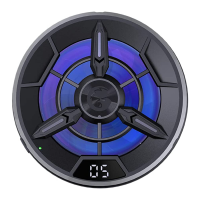

 To Next Page